-2-
Repair and maintenance
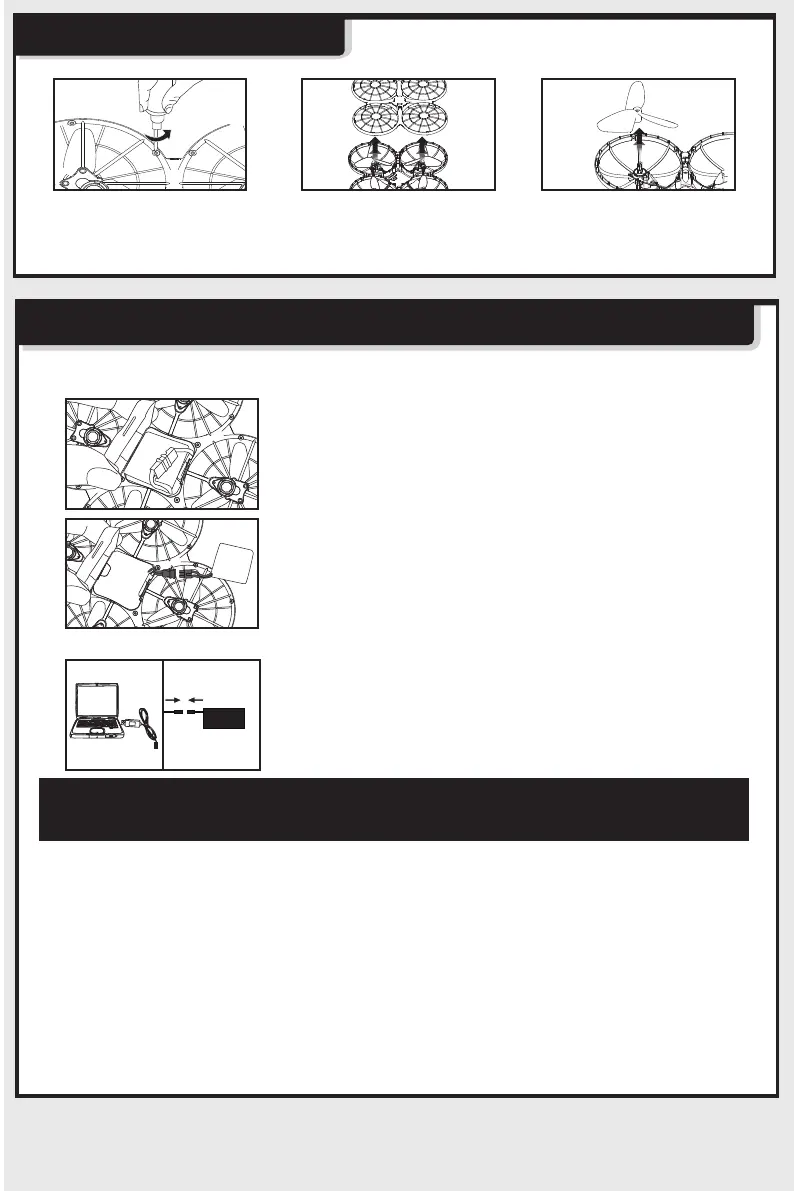
Charge battery method:
Replacement battery steps;
1.Make sure drone is in a closed state,
then open battery cover
2.Disconnect the battery plug and remove
the battery
Changing and Charging the Drone’s Batteries Protective Guards
Charging time is about 90 minutes. Drone hover
time is about 6 minutes.
Important: battery charging information.
- Do not keep the battery in high temperature areas, such as fire or heat
sources. Otherwise, it may damage the battery or even trigger an explosion.
- Do not put the battery into water. Store the battery in a cool and dry environment.
- Avoid dismantling the batteries.
- During the charging of battery, avoid leaving the charging place.
- Rechargeable batteries should be removed from the toy before being charged.
- Rechargeable batteries should only be charged under the supervision of adults.
- Exhausted batteries should be removed from the aircraft.
- Caution:Risk of explosion if battery is replaced with incorrect ones,Please
dispose the batteries according to the instructions.
3.Connect the USB port to your computer's
USB and connect the battery power cord to
the USB. (The indicator light is on when
charging, full the power indicator is off. )
Step 1: Remove all
screws
Step 3: Remove screws
the Blade can be
removed
Step 2: Disassemble top
body



 To Next Page