-3-
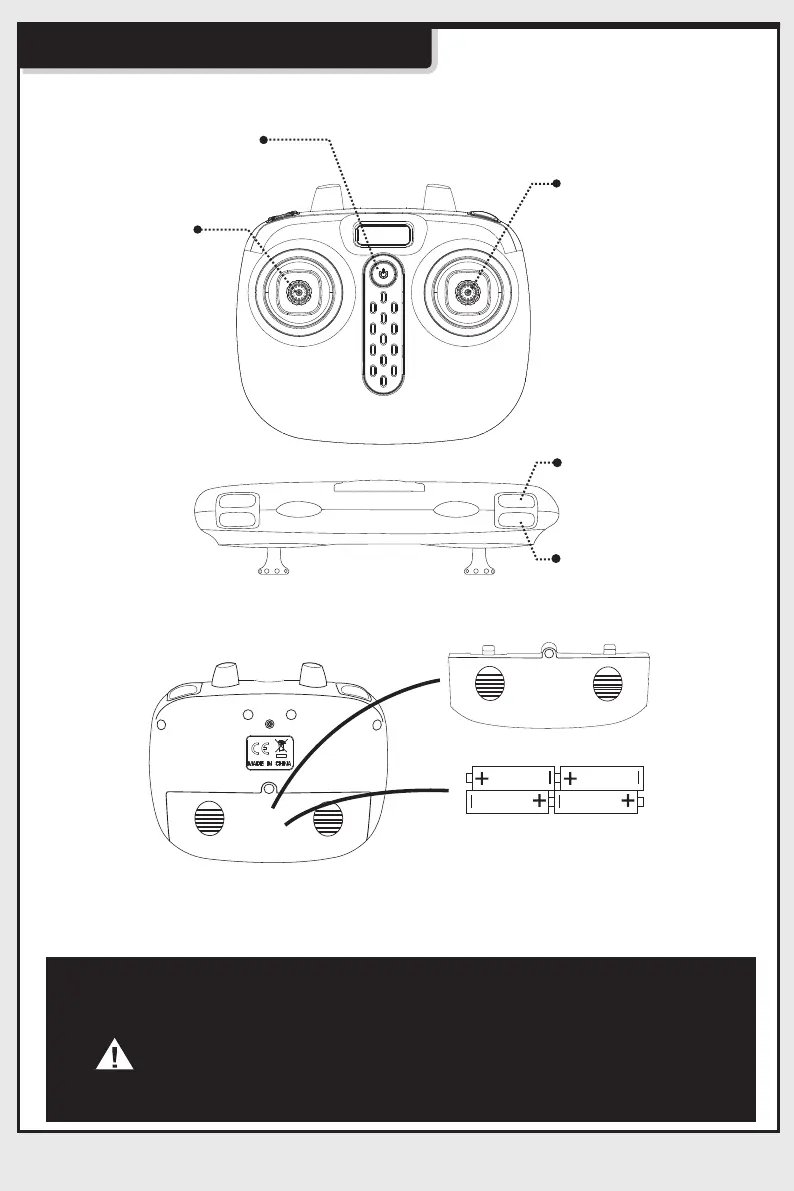
Understanding the Transmitter
Transmitter functions:
Installing transmitter batteries:
ON/OFF Button
3D Stunt
Auto take-off and
landing
Left stick. Press
the stick to enter
trim mode, let the
stick to exit trim
mode. To reset
trims, press the
stick and turn on
the transmitter.
Right stick. Long
press will cause
the drone to
activate headless
mode. Short
press will cause
the drone to
change speed
mode.
Transmitter battery installation: open the battery cover at the back fo the
transmitter. Install 4pcs AA batteries according to the polarity indications ( Note:
batteries are not included).
Battery cover
4 x AA Batteries
1. During the battery installation, it must be ensured that the
polarities of the batteries are matched with that of the battery
box. No battery shall be installed with the opposite polarity.
2. Please do not use new and old batteries together.
3. Please do not use different types of batteries together.
4. Do not use rechargeable batteries.



 To Next Page