-6-
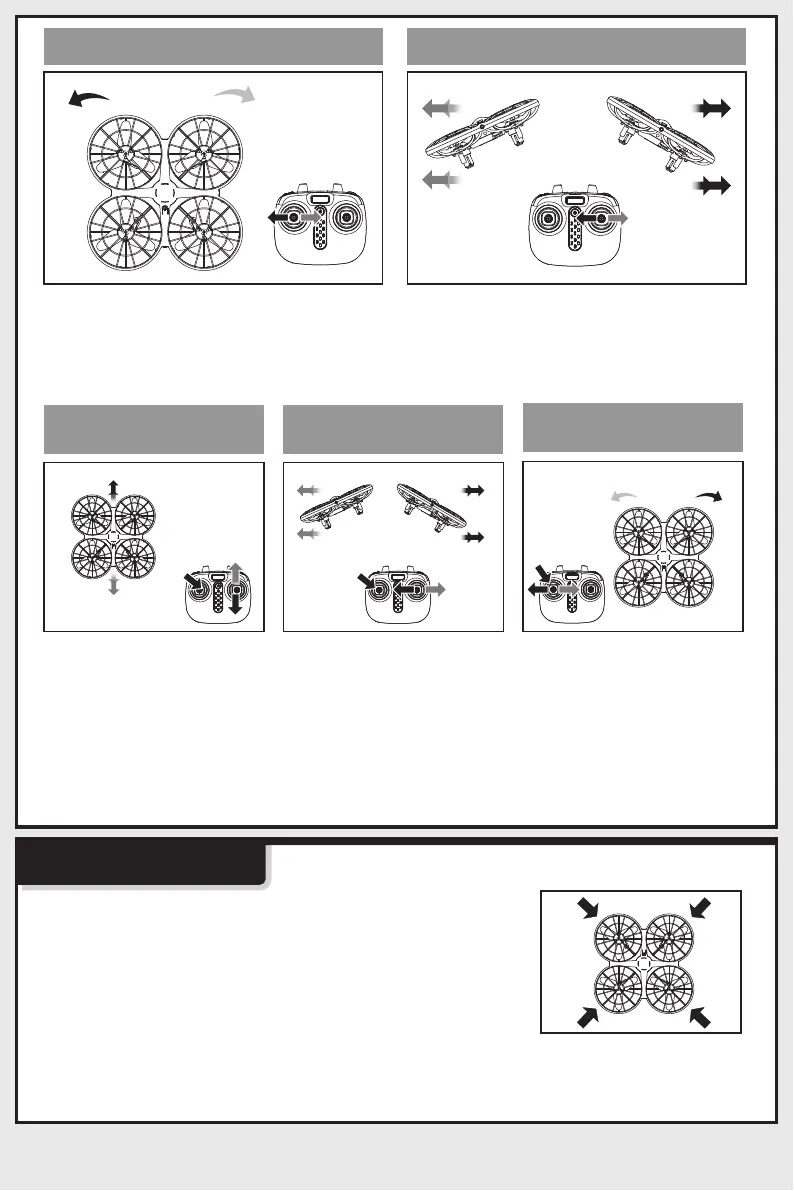
Forward/Backward
Trim Control
Trimming
Left/Right
Trim Control
Left/Right Rotation
Trim Control
Left/Right Rotation Left/right
1. Low-Voltage Protection:
Product Features
2. OverflowProtection:
When the left stick (throttle) is moved
left / right the drone will rotate to the
left / right.
When the drone battery voltage is low, the drone
indicator lights will start flashing. After this warning,
return your drone to the desired place and land it.
When the drone is in the air and the propellers
collide with objects or become jammed, the drone
overflow protection will be activated.and land it.
When the right stick is moved left /
right the drone will fly to the left /
right.
If the drone drifts quickly
forward or backward
while hovering, please
adjust forward/backward
trim. Press the left stick
and hold it, then move the
right stick forward / back-
ward until the drone starts
hovering as normal.
If the drone drifts quickly
to the left/right while
hovering, please adjust
left/right trim. Press the
left stick and hold it, after
move the right stick to the
left/right until the drone
starts hovering as
normal.
If the drone automatically
rotates and flies towards
the left/right side while
hovering, press in the left
joystick and at the same
time move it to the right/left
slightly to fine tune the
direction. Don’t release the
left joystick until the drone
is flying in a stable state.



 To Next Page