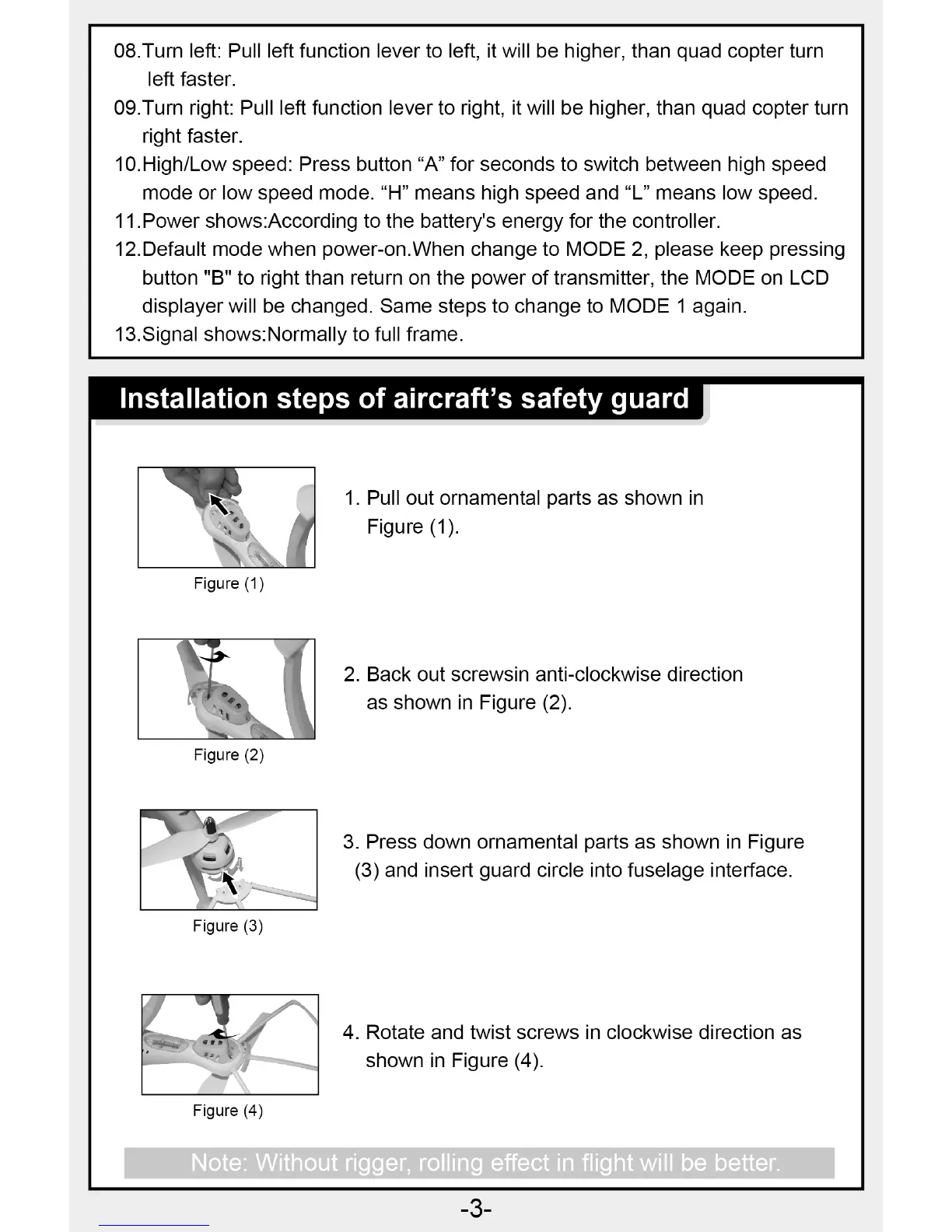
Figure (1)
LA I
Figure (2)
Figure (3)
Figure (4)
08.Turn left: Pull left function lever to left, it will be higher, than quad copter turn
left faster.
09.Turn right: Pull left function lever to right, it will be higher, than quad copter turn
right faster.
10.High/Low speed: Press button "A" for seconds to switch between high speed
mode or low speed mode. "H" means high speed and "L" means low speed.
11.Power shows:According to the battery's energy for the controller.
12.Default mode when power-on.When change to MODE 2, please keep pressing
button "B" to right than return on the power of transmitter, the MODE on LCD
displayer will be changed. Same steps to change to MODE 1 again.
13.Signal shows:Normally to full frame.
Installation steps of aircraft's safety guard
1.
Pull out ornamental parts as shown in
Figure (1).
2.
Back out screwsin anti-clockwise direction
as shown in Figure (2).
3.
Press down ornamental parts as shown in Figure
(3) and insert guard circle into fuselage interface.
4.
Rotate and twist screws in clockwise direction as
shown in Figure (4).
Note: Without rigger, rolling effect in flight will be better.
-3-


 To Next Page