Controller modes & instructions
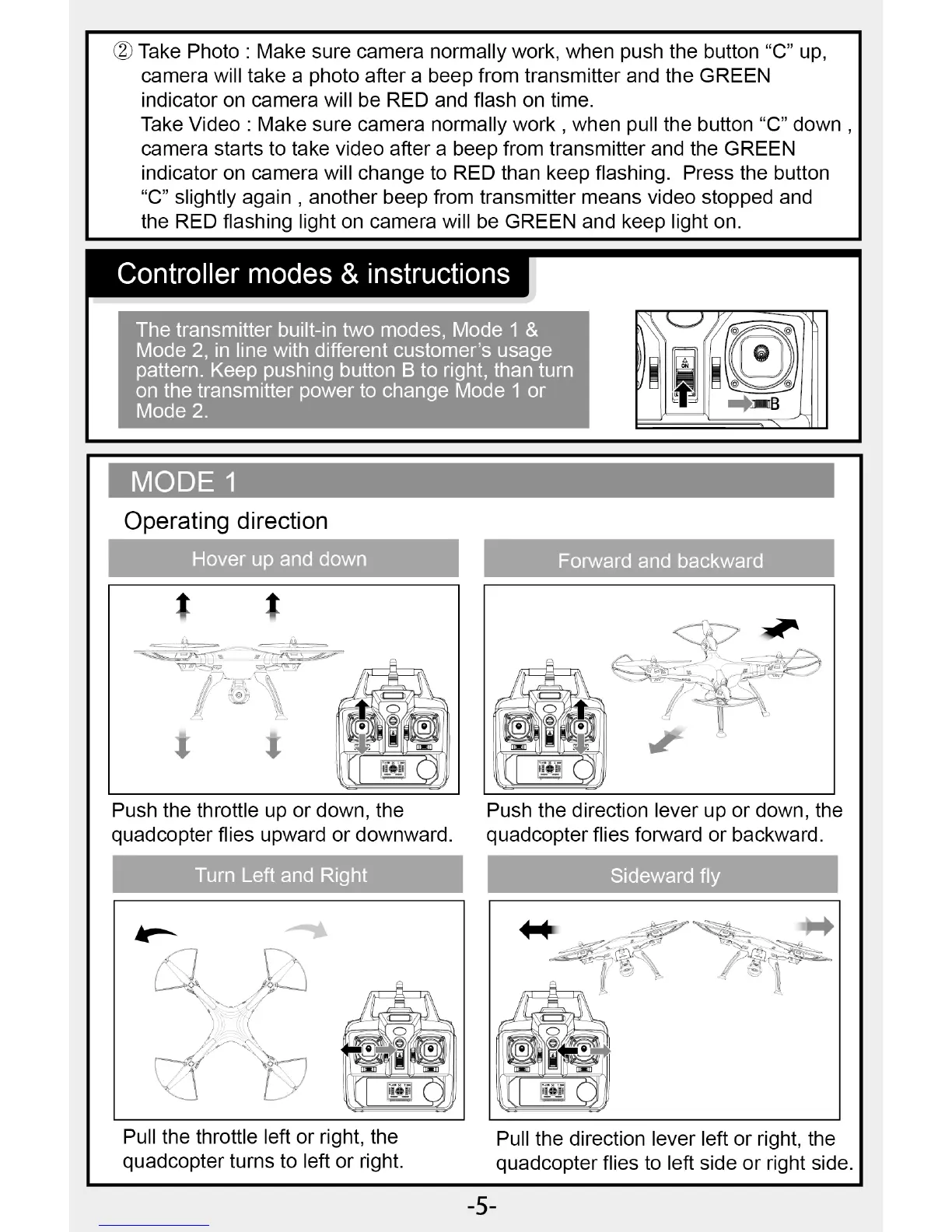
The transmitter built-in two modes, Mode 1 &
Mode 2, in line with different customer's usage
pattern. Keep pushing button B to right, than turn
on the transmitter power to change Mode 1 or
Mode 2.
Forward and backward
MODE
Operating direction
Hover up and down
Pull the throttle left or right, the
quadcopter turns to left or right.
Pull the direction lever left or right, the
quadcopter flies to left side or right side.
Push the throttle up or down, the
Push the direction lever up or down, the
quadcopter flies upward or downward.
quadcopter flies forward or backward.
Turn Left and Right
Sideward fly
10 Take Photo : Make sure camera normally work, when push the button "C" up,
camera will take a photo after a beep from transmitter and the GREEN
indicator on camera will be RED and flash on time.
Take Video : Make sure camera normally work , when pull the button "C" down
camera starts to take video after a beep from transmitter and the GREEN
indicator on camera will change to RED than keep flashing. Press the button
"C" slightly again , another beep from transmitter means video stopped and
the RED flashing light on camera will be GREEN and keep light on.
-5-


 To Next Page