1-6-8 H9400IB
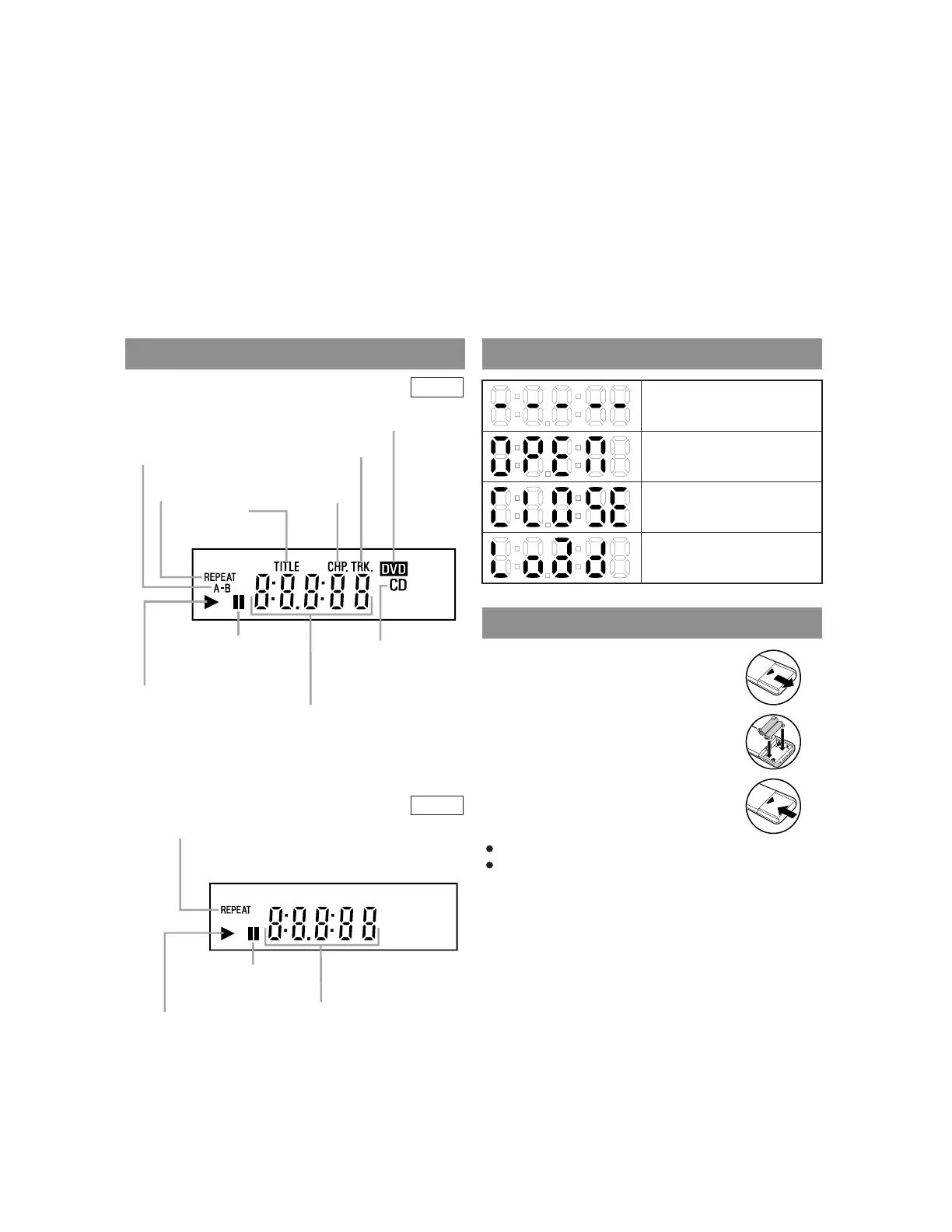
DISPLAY DISPLAYS DURING OPERATION
LOADING THE BATTERIES
Stays on when the inserted
disc is being played back.
Lights up when a
CD is inserted on
the tray.
Lights up when a DVD
is inserted into the tray.
Lights up when the
inserted disc comes
to a pause.
Stays on when the
A-B repeat function
is on.
Stays on when the
repeat function is on.
Stays on when repeat
track function is on.
Displays how long a current title
or track has been played back. When
a chapter or track has switched, the
number of the a title, chapter or
track is displayed.
Stays on when
repeat title
function is on.
Stays on when
repeat chapter
function is on.
Stays on when the inserted
cassette is being played back.
Lights up when the playback
is in a still or in a slow mode.
tays on during playback
hen the repeat function
s on.
Works as a tape counter.
Also displays a channel number,
tape speed, and remaining time for OTR
No disc inserted or playing
DVD menu
Tray open
Tray closed
Loading the Disc
1. Open the battery compartment
cover.
2. Insert two AA batteries (supplied),
with each one oriented correctly.
3. Close the cover.
Notes
Do not mix alkaline and manganese batteries.
Do not mix old and new batteries.
2. DVD AUDIO OUT Jacks
Connect the supplied audio cables here and to the
Audio In jacks of a television or other audio equip-
ment (DVD only).
3. S-VIDEO OUT Jack
Connect an optional S-Video cable here and to the S-
Video In jack of a television.
4. VIDEO IN Jack
Connect a cable coming from the video out jack of a
camcorder, another VCR, or an audio-visual source
(laser disc player, video disc player, etc.) here.
65. DVD/VCR VIDEO OUT Jack
Connect the yellow video cable (supplied) here an
to the TV’sVideo In jack.
66. ANT-OUT (Antenna Out) Jack
Use the supplied RF coaxial cable to connect thi
jack to the ANTENNA IN Jack on your TV.
Caution: Do not touch the inner pins of the jacks
on the rear panel. Electrostatic discharge may
cause permanent damage to the player.
DVD
VCR


 To Next Page