New Features
18
7 Installation
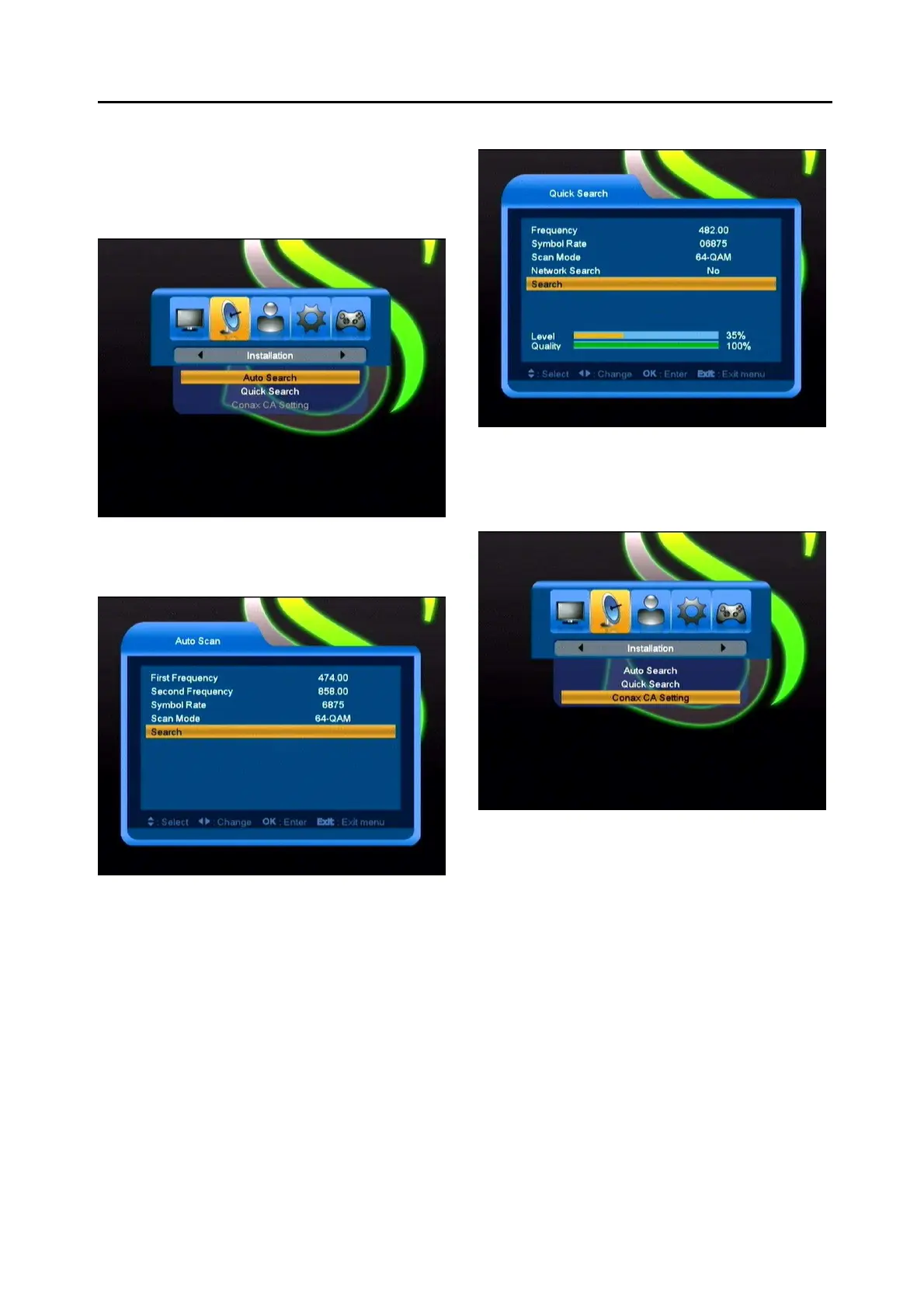
When you enter to “Installation” menu, there will
display the screen like below:
7.1 Auto Search
Press OK button to enter the Auto scan menu,
there will display the screen like below:
1, Press [Up/Down] key to move highlight.
2, Press Numeric key of the RCU to input the
First Frequency, Second Frequency and Symbol
Rate.
3, Press [Left/Right] key to select Scan Mode.
4, Move highlight to [Search] button and press
[OK] key to begin to auto scan.
7.2 Quick Search
In this menu, you can Search channels manually
by input some parameters.
7.3 Conax CA Setting
We provide one CA slot for user to use.
Receiver has build in smart card module with
CONAX system. By using cards in this system
provided by operators, it is possible to watch
many scrambled channels coded in this system.
This menu shows detailed information about
cord inserted into cord reader module. It allows
inserted according to help messages visible on
the bottom of the screen.



 To Next Page