New Features
25
9 Tools
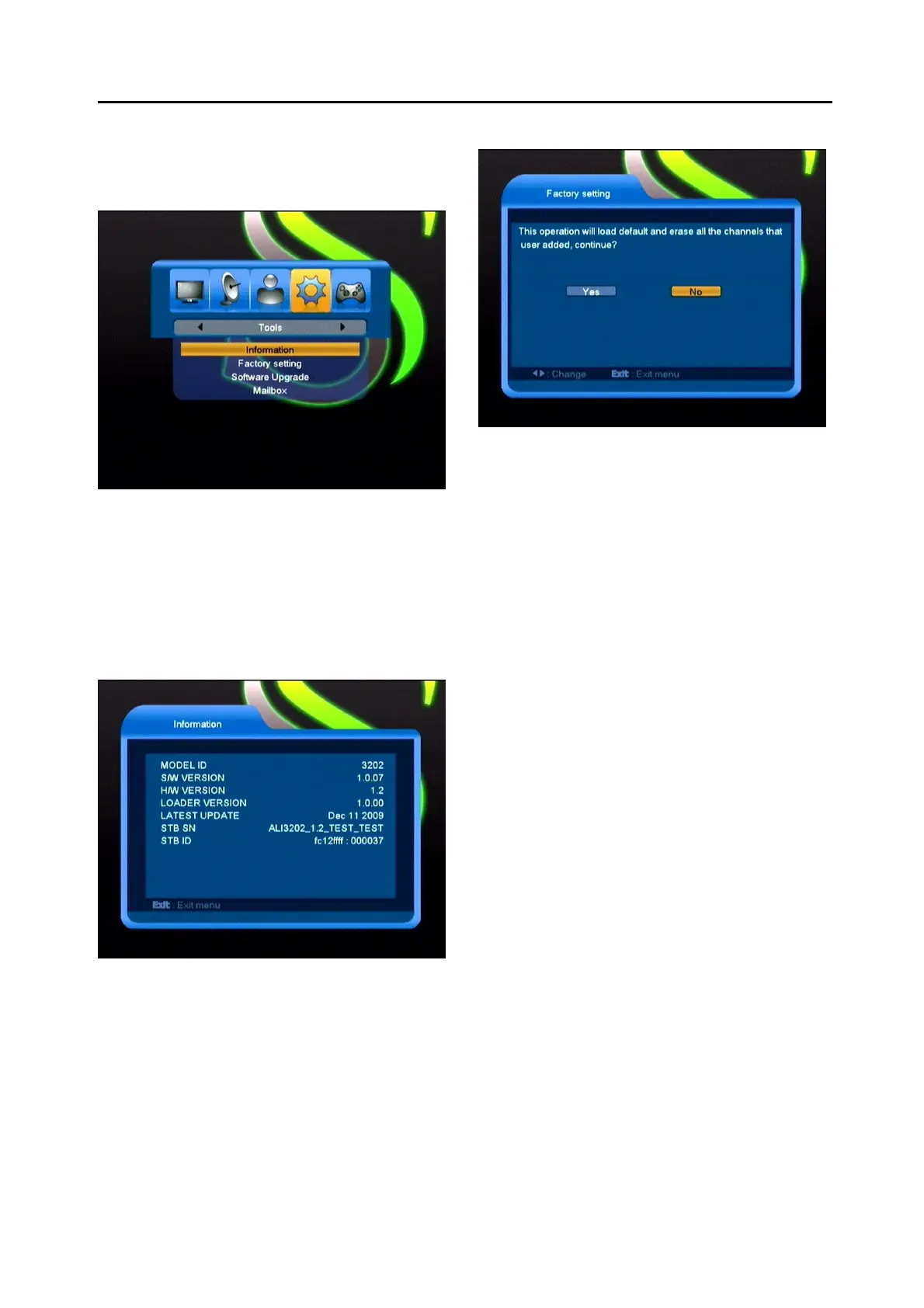
When you enter to “Tools” menu, you will see a
screen like below:
In “Tools” menu:
1
Press [Channel Up/Channel Down] key to
select menu items among Information,
Factory Setting, Software Upgrade,Mailbox.
2
Press [OK] key to enter the selected item.
9.1 Information
1
When you enter to “Information” menu, you
will see a screen like above. The screen
displays software, loader and hardware
information.
2
Press [Exit] key to draw back to “Tools”
menu.
9.2 Factory Setting
When you press [OK] key In the “Factory
Setting” item:
1
There will pop a dialogue for you to enter
the password, and the default password is
“0000”.
2
After you input the correct password,
there will show a warning message to
inquiry you “The operation will load default
and erase all the channels that user
added, continue?”.
3
If you select “OK” option, the all revised
parameters of the receiver will reset to
default value. Please carefully to using
this function.
4
In step 1 and step 2, press[Exit]key can
draw back from this item and without
saving.



 To Next Page