The Synology DiskStation DS115j is a network-attached storage (NAS) device designed for personal and small office use, offering a range of functionalities for data storage, sharing, and management. It serves as a centralized hub for digital content, allowing users to access their files from various devices and locations. The device is characterized by its compact design and user-friendly interface, making it accessible even for those with limited technical expertise.
Function Description
At its core, the DS115j functions as a single-bay NAS, meaning it can accommodate one hard drive for data storage. This allows users to create a personal cloud, store backups of their computers, share files with others, and stream multimedia content. The device is powered by Synology's DiskStation Manager (DSM) operating system, a browser-based platform that provides a rich set of applications and services.
Key functions include:
- Centralized Data Storage: The primary purpose of the DS115j is to provide a central location for storing all types of digital data, including documents, photos, videos, and music. This eliminates the need for multiple external hard drives and ensures data is organized and easily accessible.
- File Sharing: Users can easily share files and folders with other users on the local network or over the internet. DSM offers various sharing options, including user accounts with customizable permissions, shared links, and integration with popular cloud services.
- Data Backup: The DS115j can serve as a reliable backup target for computers (Windows, Mac, and Linux) and other devices. It supports various backup solutions, including scheduled backups, versioning, and synchronization with public cloud storage. This helps protect valuable data from accidental deletion, hardware failure, or other unforeseen events.
- Multimedia Streaming: The device is capable of streaming multimedia content (photos, music, and videos) to a wide range of devices, such as smart TVs, game consoles, mobile phones, and computers. DSM includes applications for organizing and managing multimedia libraries, making it easy to browse and play content.
- Personal Cloud: By setting up a personal cloud, users can access their files on the DS115j from anywhere with an internet connection. This provides the convenience of public cloud services with the added benefit of full control over data privacy and security.
- Application Platform: DSM extends the functionality of the DS115j beyond basic storage through its Package Center, which offers a variety of installable applications. These can include surveillance station software, download managers, web servers, and more, allowing users to customize the NAS to their specific needs.
- Remote Access: The DS115j supports various methods for remote access, enabling users to connect to their NAS and manage files even when they are away from home or office. This includes Synology's QuickConnect service, which simplifies remote access configuration.
Usage Features
The DS115j is designed for ease of use, from initial setup to daily operation.
- Simple Hardware Installation: The installation process for the hard drive is straightforward. Users push the upper case of the device, slide the drive into the bay, and secure it with screws. For 2.5" drives, a separate disk holder is used. The physical setup is designed to be quick and require minimal tools, typically just a screwdriver.
- Intuitive Software Setup (Web Assistant): The device utilizes a "Web Assistant" for initial software installation. By connecting the DiskStation to a network and accessing a specific web address (find.synology.com or diskstation:5000) from a web browser, users can initiate the installation of DiskStation Manager (DSM). The Web Assistant automatically detects the NAS and guides the user through the process, including downloading the latest DSM version from the internet. This eliminates the need for complex manual configurations.
- Front Panel Indicators: The front panel features several LED indicators (Status, LAN, Disk, Power) that provide visual feedback on the device's operational status. These indicators help users quickly assess the system's health, network connectivity, and drive activity. For example, a blinking orange status light might indicate a degraded volume, while a static green LAN light confirms a network connection.
- Power Management: The power button on the front panel allows for easy power-on and controlled shutdown. A press and hold action initiates a beep sound and blinking power LED for shutdown, ensuring data integrity.
- Reset Functionality: A dedicated RESET button on the back panel offers two levels of reset. A short press and hold restores default IP address, DNS server, and administrator passwords, useful for troubleshooting network access. A longer press and hold, followed by another press and hold, returns the DiskStation to an "Not Installed" status, allowing for a complete DSM reinstallation. This provides robust recovery options for users.
- Connectivity Ports: The DS115j includes essential connectivity options. An RJ-45 LAN port allows connection to a network switch, router, or hub, enabling network access. Two USB 2.0 ports are available for connecting external hard drives, USB printers, or other USB devices, expanding the device's capabilities.
- Kensington Security Slot: For physical security, a Kensington Security Slot is integrated, allowing users to attach a compatible lock to deter theft.
- Quiet Operation: The device incorporates a fan for cooling, designed to dispose of excess heat and maintain optimal operating temperatures. The system is designed to emit a beeping sound if the fan malfunctions, alerting the user to potential issues.
- AC Power Adapter: The device uses an external AC power adapter, which is connected to the power port on the back. The plug adapter is designed to be interchangeable, accommodating different regional power outlets.
Maintenance Features
Maintaining the DS115j involves both physical care and software management to ensure optimal performance and data integrity.
- Environmental Guidelines: The manual provides clear safety instructions emphasizing the importance of placing the device in an environment free from direct sunlight, chemicals, and abrupt changes in temperature or humidity. This helps prolong the lifespan of the device and its internal components.
- Cleaning Instructions: Users are advised to unplug the power cord before cleaning and to use damp paper towels. Chemical or aerosol cleaners are explicitly discouraged, preventing damage to the device's surfaces and internal electronics.
- Power Cord Management: Instructions highlight the importance of plugging the power cord into the correct and stable supply voltage. To completely remove electrical current, all power cords must be disconnected from the power source, ensuring safety during maintenance or relocation.
- Battery Replacement (Explosion Risk Warning): The manual includes a warning regarding the risk of explosion if the internal battery is replaced with an incorrect type. It emphasizes the importance of disposing of used batteries appropriately, indicating that the device contains a battery that may require eventual replacement by qualified personnel.
- DSM Updates: Synology regularly releases updates for DSM, which include new features, security patches, and performance improvements. Users can easily update DSM through the web interface, ensuring their NAS remains secure and up-to-date.
- Disk Health Monitoring: DSM provides tools to monitor the health of the installed hard drive, including S.M.A.R.T. (Self-Monitoring, Analysis, and Reporting Technology) tests. This allows users to detect potential drive failures early and take preventive measures, such as backing up data or replacing the drive.
- System Logs: The device maintains system logs that record various events and activities, which can be invaluable for troubleshooting issues or monitoring system performance.
- Backup and Restore Options: Beyond backing up external devices to the NAS, DSM also offers comprehensive backup and restore solutions for the NAS itself, including configuration backups and data replication to other Synology NAS devices or cloud services. This ensures the NAS's data and settings can be recovered in case of a catastrophic failure.
- User and Group Management: The ability to create and manage user accounts and groups with specific permissions helps maintain data security and control access to shared resources. This is a crucial maintenance feature for multi-user environments.
- Network Configuration: DSM provides extensive network configuration options, allowing users to fine-tune network settings, including IP addresses, DNS servers, and firewall rules, to optimize performance and security.
- Fan Monitoring: While the fan operates automatically, DSM may offer options to monitor fan speed and temperature, providing additional insights into the device's thermal performance. The audible alert for fan malfunction is a direct maintenance notification.

 Need help?
 General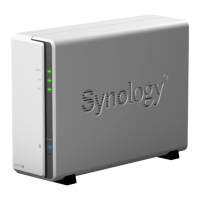

 To Next Page