6
2
Chapter
Tools and Parts for Drive Installation
• Ascrewdriver
• One3.5”or2.5”SATAdrive(pleasevisit
www.synology.com
forcompatibledrivemodels.)
Warning:
Ifyouinstalladrivethatcontainsdata,thesystemwillformatthedriveanderaseallexistingdata.Please
backupanyimportantdatabeforeinstallation.
Install Drives
1
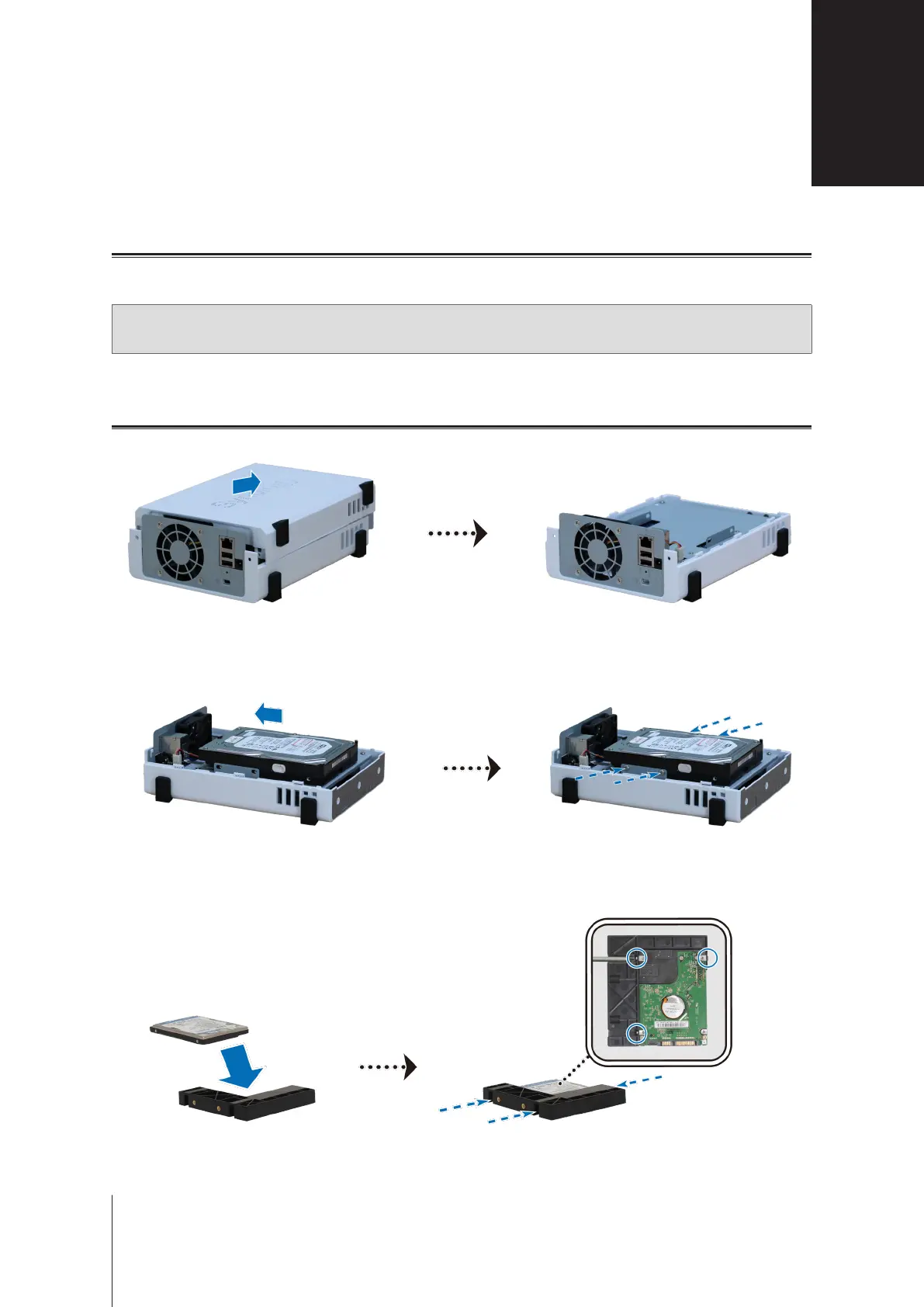
Pushtheuppercaseinthedirectionasshownbelow.Lifttheuppercaseandsetitaside.
2
Installdrives:
•
For 3.5” drives:
Slidethedriveintotheharddrivebay,andpushitallthewayuntilit’srmlyconnectedto
theSATAconnector.Securethedrivewiththescrewsprovided.
•
For 2.5” drives:
a
Placethedriveinthe2.5"DiskHolder(TypeC,soldseparately),andthentightenthe2.5"screwsto
securethedrive.
Hardware Setup


 To Next Page