4
Chapter1:BeforeYouStart
Synology DiskStation at a Glance
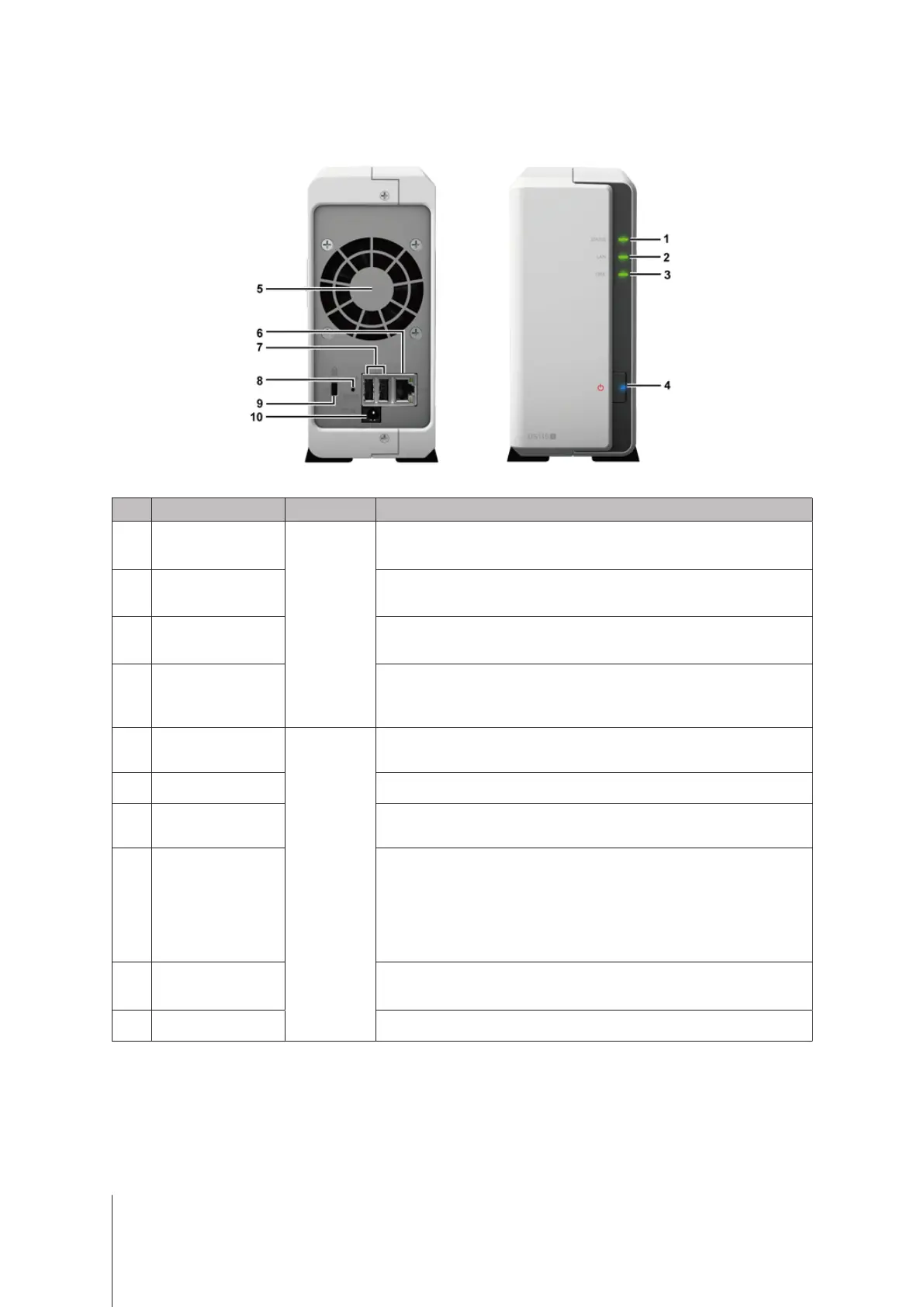
No. Article Name Location Description
1
StatusIndicator
FrontPanel
Displaysthestatusofthesystem.Formoreinformation,see"AppendixB:
LEDIndicatorTable".
2
LANIndicator
Displaysthestatusofthenetworkconnection.Formoreinformation,see
"AppendixB:LEDIndicatorTable".
3
DiskIndicator
Displaysthestatusoftheinstalleddrive.Formoreinformation,see"Appendix
B:LEDIndicatorTable".
4
PowerButton
1. PresstopowerontheDiskStation.
2. TopowerofftheDiskStation,pressandholduntilyouhearabeepsound
andthePowerLEDstartsblinking.
5
Fan
BackPanel
Disposesofexcessheatandcoolsthesystem.Ifthefanmalfunctions,the
DiskStationwillemitabeepingsound.
6
LANPort Connectanetworkcablehere.
7
USB2.0Port
Connectexternalharddrives,USBprinters,orotherUSBdevicestothe
DiskStationhere.
8
RESETButton
1. Pressandholduntilyouhearabeepsoundtorestorethedefault
IPaddress,DNSserver,andpasswordsforusersbelongingtothe
administrators
group.
2. Pressandholduntilyouhearabeepsound,thenpressandholdagain
untilyouhearthreebeepsoundstoreturntheDiskStationto“NotInstalled”
statussothatDiskStationManager(DSM)canbereinstalled.
9
Kensington
SecuritySlot
AttachaKensingtonsecuritylockhere.
10
PowerPort ConnecttheACpoweradapterhere.


 To Next Page