
 Need help?
Do you have a question about the Synology RT2600ac and is the answer not in the manual?
Lists all the components included in the Synology Router package.
Provides a detailed visual guide to the Synology Router's ports and components.
Outlines essential safety instructions to prevent damage and ensure safe operation.
Step-by-step instructions for correctly installing the router antennas for optimal performance.
Recommendations for positioning the router to achieve the best wireless coverage and performance.
Guide on connecting the router to your ISP modem and the power outlet for initial setup.
Instructions for accessing and initiating the Synology Router Manager (SRM) setup wizard.
Steps to set up a secure administrator account for managing your Synology Router.
Guide to setting up your wireless network name (SSID) and password.
Instructions on selecting and configuring the router's primary operation mode.
Steps to configure the router for different internet connection types like PPPoE or DHCP.
Information on completing the router setup process and launching the management interface.
 General
| Certification | RoHS, CE, FCC, NCC, RCM |
|---|---|
| Processor cores | 2 |
| Built-in processor | Yes |
| Processor frequency | 1700 MHz |
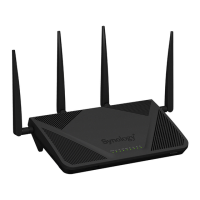
| Antennas quantity | 4 |
| Antenna gain level (max) | 4.5 dBi |
| USB 2.0 ports quantity | USB 2.0 ports have a data transmission speed of 480 Mbps, and are backwards compatible with USB 1.1 ports. You can connect all kinds of peripheral devices to them. |
| Compatible memory cards | SD, SDHC, SDXC |
| Ethernet LAN (RJ-45) ports | 5 |
| USB 3.2 Gen 1 (3.1 Gen 1) Type-A ports quantity | 1 |
| Product type | Tabletop router |
| Product color | Black |
| AC input voltage | 100 - 240 V |
| Power source type | AC |
| AC input frequency | 50 - 60 Hz |
| Operating altitude | 0 - 5000 m |
| Storage temperature (T-T) | -20 - 60 °C |
| Operating temperature (T-T) | 5 - 40 °C |
| Operating relative humidity (H-H) | 5 - 95 % |
| VPN support | PPTP, OpenVPNTM, L2TP IPSec |
| Networking standards | IEEE 802.11a, IEEE 802.11ac, IEEE 802.11n |
| Ethernet LAN interface type | Gigabit Ethernet |
| Wi-Fi band | Dual-band (2.4 GHz / 5 GHz) |
| Top Wi-Fi standard | Wi-Fi 4 (802.11n) |
| WLAN data transfer rate (max) | 1733 Mbit/s |
| WLAN data transfer rate (first band) | 800 Mbit/s |
| SIM card slot | No |
| Firewall security | IPv4, IPv6 |
| Security algorithms | WEP, WPA, WPA2, WPS |
| Supported network protocols | IPv4, IPv6, FTP, FTP SSL / TLS, SFTP |
| Mac operating systems supported | Mac OS X 10.10 Yosemite, Mac OS X 10.11 El Capitan, Mac OS X 10.12 Sierra |
| Windows operating systems supported | Windows 10 Education, Windows 10 Education x64, Windows 10 Enterprise, Windows 10 Enterprise x64, Windows 10 Home, Windows 10 Home x64, Windows 10 Pro, Windows 10 Pro x64, Windows 7 Enterprise, Windows 7 Enterprise x64, Windows 7 Home Basic, Windows 7 Home Basic x64, Windows 7 Home Premium, Windows 7 Home Premium x64, Windows 7 Professional, Windows 7 Professional x64, Windows 7 Starter, Windows 7 Starter x64, Windows 7 Ultimate, Windows 7 Ultimate x64, Windows 8, Windows 8 Enterprise, Windows 8 Enterprise x64, Windows 8 Pro, Windows 8 Pro x64, Windows 8 x64, Windows 8.1, Windows 8.1 Enterprise, Windows 8.1 Enterprise x64, Windows 8.1 Pro, Windows 8.1 Pro x64, Windows 8.1 x64 |
| Cables included | LAN (RJ-45) |
| Harmonized System (HS) code | 85176990 |
 Weight and Dimensions
| Depth | 169 mm |
|---|---|
| Width | 280 mm |
| Height | 77 mm |
| Weight | 700 g |

 To Next Page

