4 - 3
4 System Program
NA-series Programmable Terminal Hardware User’s Manual (V117)
4-2 System Recovery
4
4-2 System Recovery
You can implement system recovery if the NA Unit will not start normally or if you want to initialize the
contents of the NA Unit to the default state.
When you implement system recovery, all of the user data is deleted from the NA Unit and the system
program is overwritten with the newest version.
Use the following procedure for system recovery.
1 Prepare a formatted SD Memory Card or USB Memory Device.
2 Execute the following file in the Sysmac Studio installation media.
Sysmac_Studio_installation_media\Utility\
NA_RecoverUpdate\NA_RecoverUpdate___.exe
3 Specify the root folder on the media you prepared in step 1 as the extraction location.
• Files saved to media may be deleted.
• If you need to use the media for another purpose, use a third-party formatting tool to reformat
the media.
4 Turn OFF the power supply to the NA Unit.
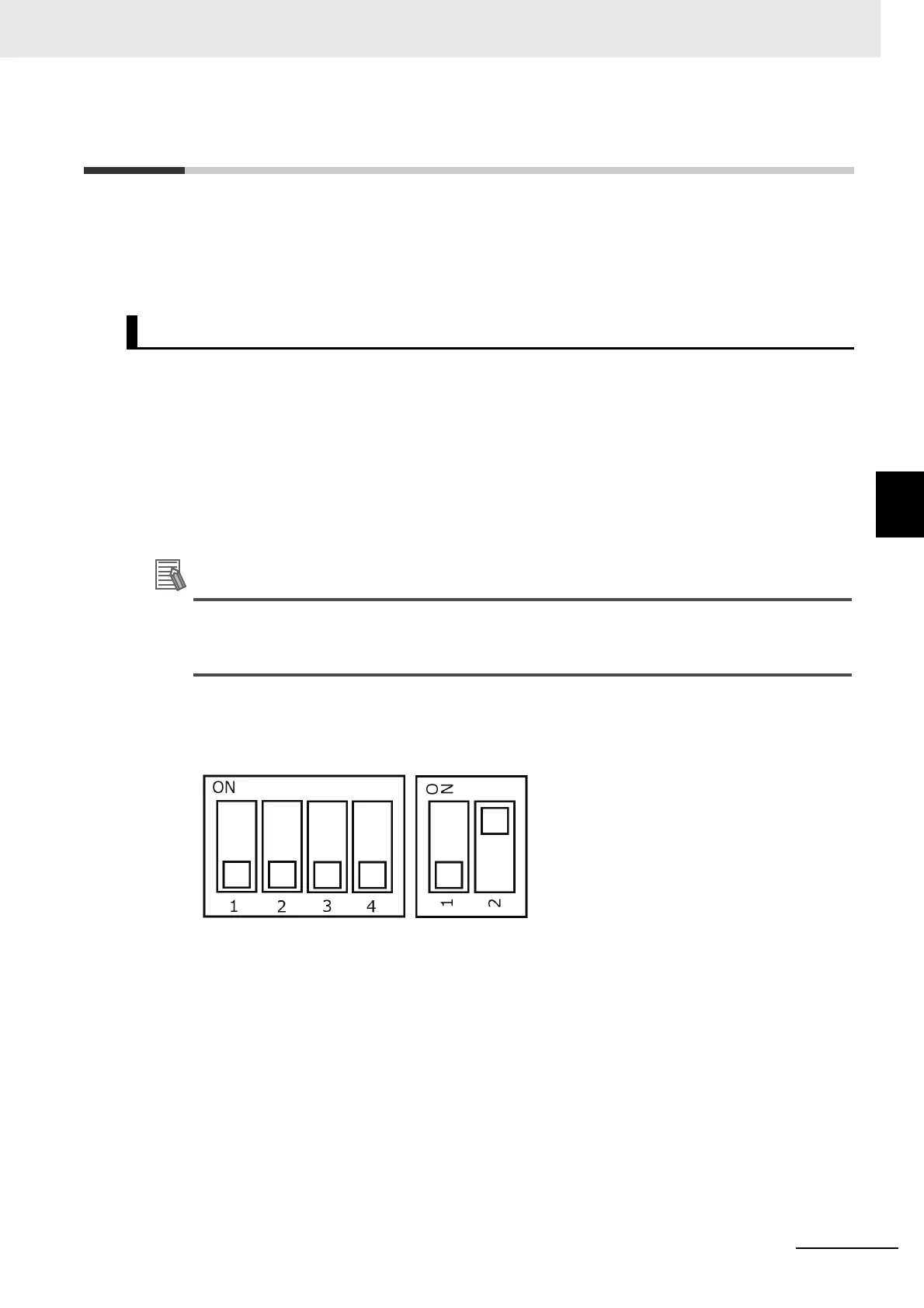
5 Open the battery cover on the back of the NA Unit and set the DIP switch to the settings shown
below. When you finish setting the DIP switch, close the battery cover.
6 Insert the media that you prepared in step 2 into the NA Unit and turn ON the power supply to
the NA Unit.
System Recovery Procedure



 To Next Page