4 - 13
4 System Program
NA-series Programmable Terminal Hardware User’s Manual (V117)
4-4 System Menu Details
4
4-4-4 User Accounts (Project System Menu)
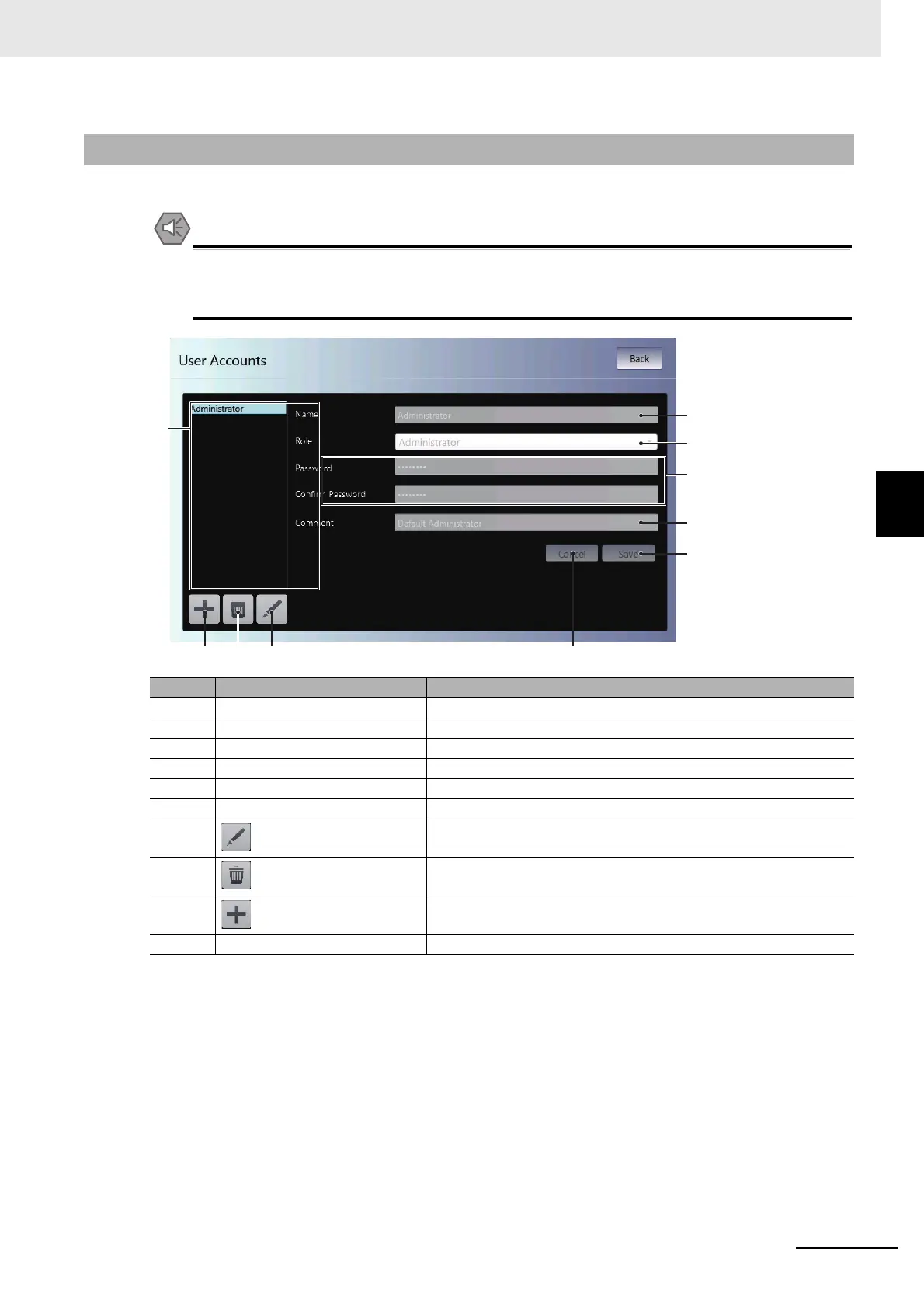
You can use the user account settings to set the following items.
• When you change a password, do not reset the NA Unit or turn OFF the power supply before
writing the new password is completed. A failure to store the password may cause the project
to fail to function.
4-4-4 User Accounts (Project System Menu)
No. Item Description
(a) Name Sets the name.
(b) Role Sets the rights.
(c) Password Sets the password.
(d) Comment Sets a comment.
(e) Save Saves any changes.
(f) Cancel Discards any changes.
(g) Edits the selected user account.
(h) Deletes the selected user account.
(i) Adds a user account.
(j) User account table A list of the user accounts that are currently registered is displayed.
(j)
(c)
(a)
(b)
(d)
(e)
(f)(g)(h)(i)



 To Next Page