MAINTENANCE AND SUPPLIES REPLACEMENT
Sysmex KX-21 Operator’s Manual -- Revised October 1998 4-29
(6) When reagent in the transducer chamber is drained, the message instructing turning-off
of the power is displayed, which indicates that it is ready for cleaning with the brush.
*Drain TD Chamber.*
3:Cancel
Fluid in T.D.Chamber was drained.
Turn power OFF and dab the aperture
with transducer brush.
See the Operator's Manual.
Figure 4-7-8: Drain TD Chamber Screen
NOTE: • When you press [3] key, cleaning with brush is canceled and the
Analysis screen returns.
2. Clean Transducer Aperture
(1) Turn off the power and wait approximately 30 seconds.
(2) Open the front cover of the main unit.
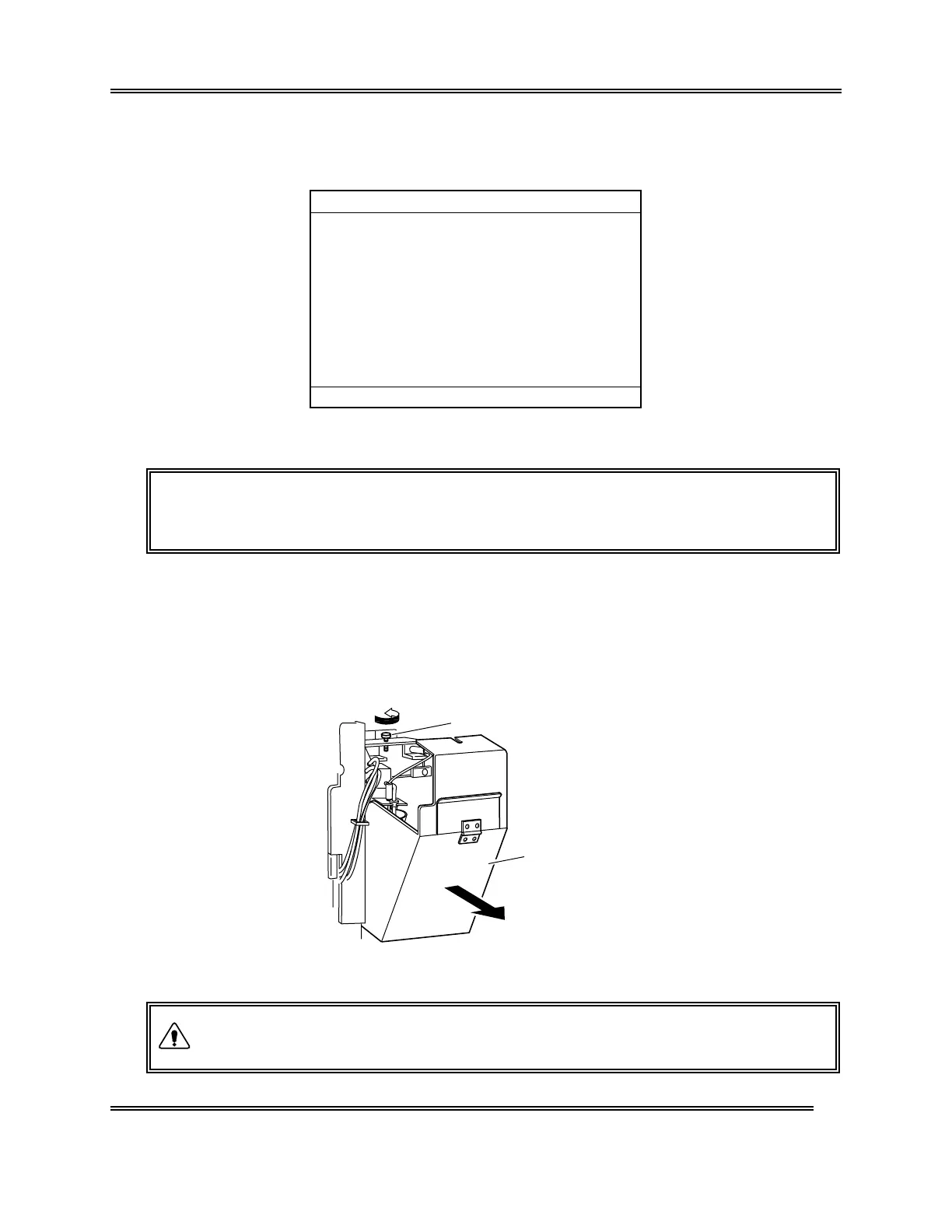
(3) Loosen the screw and open the transducer cover.
Transducer Cover
Loosen
Screw
Figure 4-7-9: Opening the Transducer Cover
• When the power is on, never open the transducer cover. This is to
prevent possible electric shocks.
WARNING



 To Next Page