INSTRUMENT SETUP
Sysmex KX-21 Operator’s Manual -- Revised October 1998 10-25
9. PERIPHERAL SETTINGS
When you want to temporarily cancel external output due to error occurrence, use this
program to set "Use" or "Not use" of the built-in printer or optional host computer output.
NOTE: • "Host Output" is displa
ed onl
when the optional serial interface is
incorporated.
• For peripheral settin
s, refer to "5: "Host Settin
s" and "6: Printer
Settin
s" which carr
description of similar settin
s.
How to Set Peripheral Connection
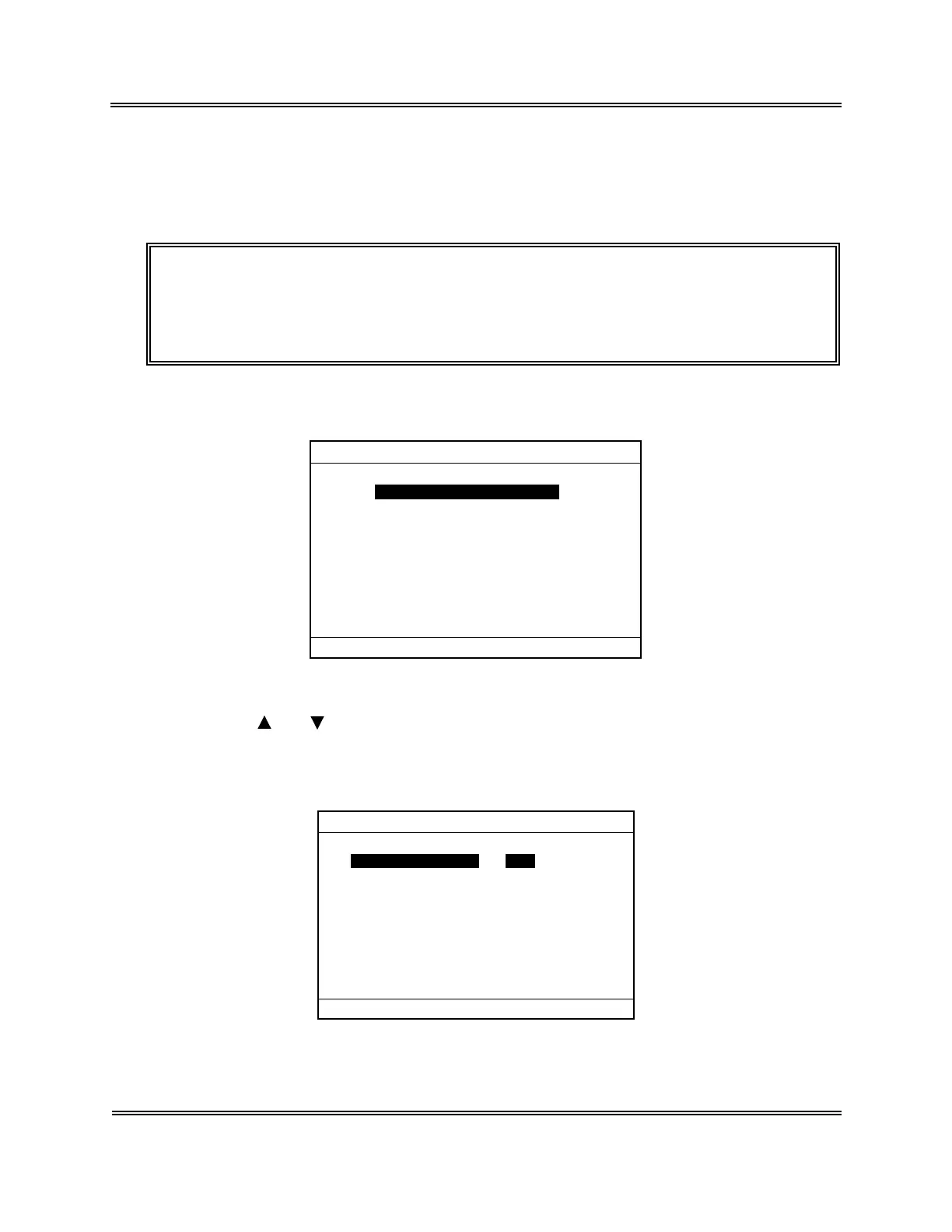
(1) Press [SELECT] key on the Analysis screen. The Select Menu screen appears.
*
SELECT
*
1:Stored Data
2:Quality Control
3:Calibration
4:Replace Lyse
5:Auto Rinse
6:Settings
7:Maintenance
8:Periph. Settings
00:PU Sleep
Figure 10-9-1: Select Menu Screen
(2) Using [ ] or [ ] key, move the cursor to select "8: Periph. Settings."
(3) Press [ENTER] key. This displays connection status of external devices on the
Peripheral Settings screen.
*
Periph.Settings
*
Built-in Printer Use
Host Output Not Use
Press [SELECT] to exit.
Figure 10-9-2: Peripheral Settings Screen
Sysmex KX-21 Operator’s Manual -- Revised January 2000


 To Next Page