MFT-PRO
Quick reference guide
EN – 11
4.5. SEQ FUNCTION – DETECTION OF PHASE ROTATION WITH 1 TEST LEAD
CAUTION
The instrument can be used for measurements on installations with overvoltage category CAT III 240V
to earth and CAT III 415V between inputs. Category CAT III is suitable for measurements carried out on
installations inside buildings with low voltage (examples are distribution boards, wirings, switches, fixed
installation sockets, electric motors, industrial equipment)
We recommend holding the alligator clip and the leads respecting the safety area created by the hand
protection (see § 2.4)
Do not measure impedance with rated voltages in the system exceeding a range of 110
240V10%
(Phase-Neutral, Phase-Earth) and 110
415V10% (Phase-Phase)
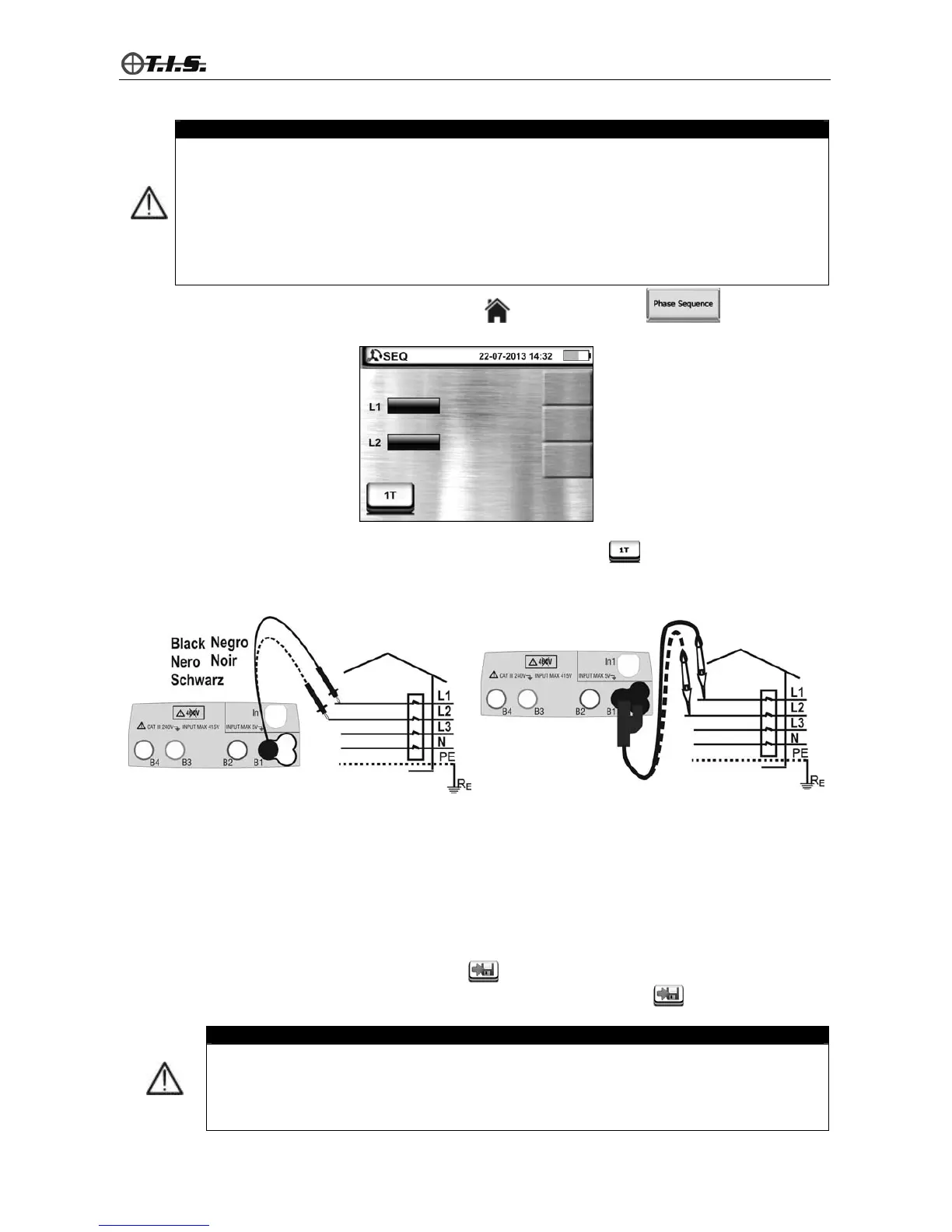
Access the general menu by pressing the HOME key and select function . The instrument
shows the following screen:
4.5.1. Measuring phase rotation with only 1 test lead
1. Select 1T mode by pressing key F1 or touching the relevant icon (e.g.: )
2. Connect the instrument to phase L1 of the system to be tested by using the Black lead or, as an
alternative, the remote lead PR400 as shown in the following figures:
Phase rotation with 1 test lead Phase rotation with 1 test lead with PR400
3. Press the GO/STOP key of the instrument (measurement with two leads) or the START key on the
remote lead (measurement with one lead). As soon as the instrument detects a reference voltage higher
than 100V, measurement is started.
4. Move the Black or the remote lead PR400 onto phase L2.
5. As soon as the instrument detects a reference voltage higher than 100V, the test goes on and, in case of
positive result, the instrument gives out a double sound and the messages “123” and “OK” appear on the
display. The messages “132” and “NON OK” in addition to a long sound are provided by the instrument in case
of negative result.
6. Press the SAVE key or touch the relevant icon
to save the result of measurement shown on the
display. Confirm saving by pressing the SAVE key again, or the relevant icon.
CAUTION
The message “Time out” is provided by the instrument in case more than 7 seconds have
elapsed between the passage from phase L1 to phase L2 and repeating measurement is
necessary.
A message “Vin>Vmax” is shown by the instrument in case voltage Phase-Neutral or to
Earth >300V is detected and measurement is automatically interrupted.


 To Next Page