MFT-PRO
Quick reference guide
EN – 6
3. SWITCHING ON THE INSTRUMENT, INITIAL SETTING
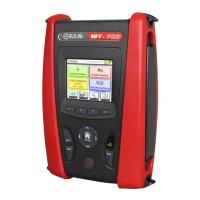
Press the ON/OFF key to switch on the instrument. The following initial screen appears on the screen for a
few seconds:
It contains (further to the name of the Manufacturer and to the instrument model):
The serial number (SN:) of the instrument
The Firmware version of the two instrument's internal microprocessors (LCD and CPU)
The date of the last calibration (Calibration date)
Then the instrument shows the general MENU screen:
MFT-PRO General menu
To select the desired function, just touch the relevant icon on the screen.
Select icon
to enter the general setting screen of the instrument. In this area, it is possible to change:
The characteristics of the electric system in which the tests are going to be performed
TT, TN or IT system
Contact voltage limit (25V, 50V)
Rated voltage of the system for calculating the assumed short-circuit current
System language
Enabling/disabling of key tone and of auto power off
Date and time setting
Operator name setting
For further information, please refer to the instrument's complete user manual.


 To Next Page