MFT-PRO
Quick reference guide
EN – 4
2. DESCRIPTION OF THE INSTRUMENT
2.1. OVERVIEW
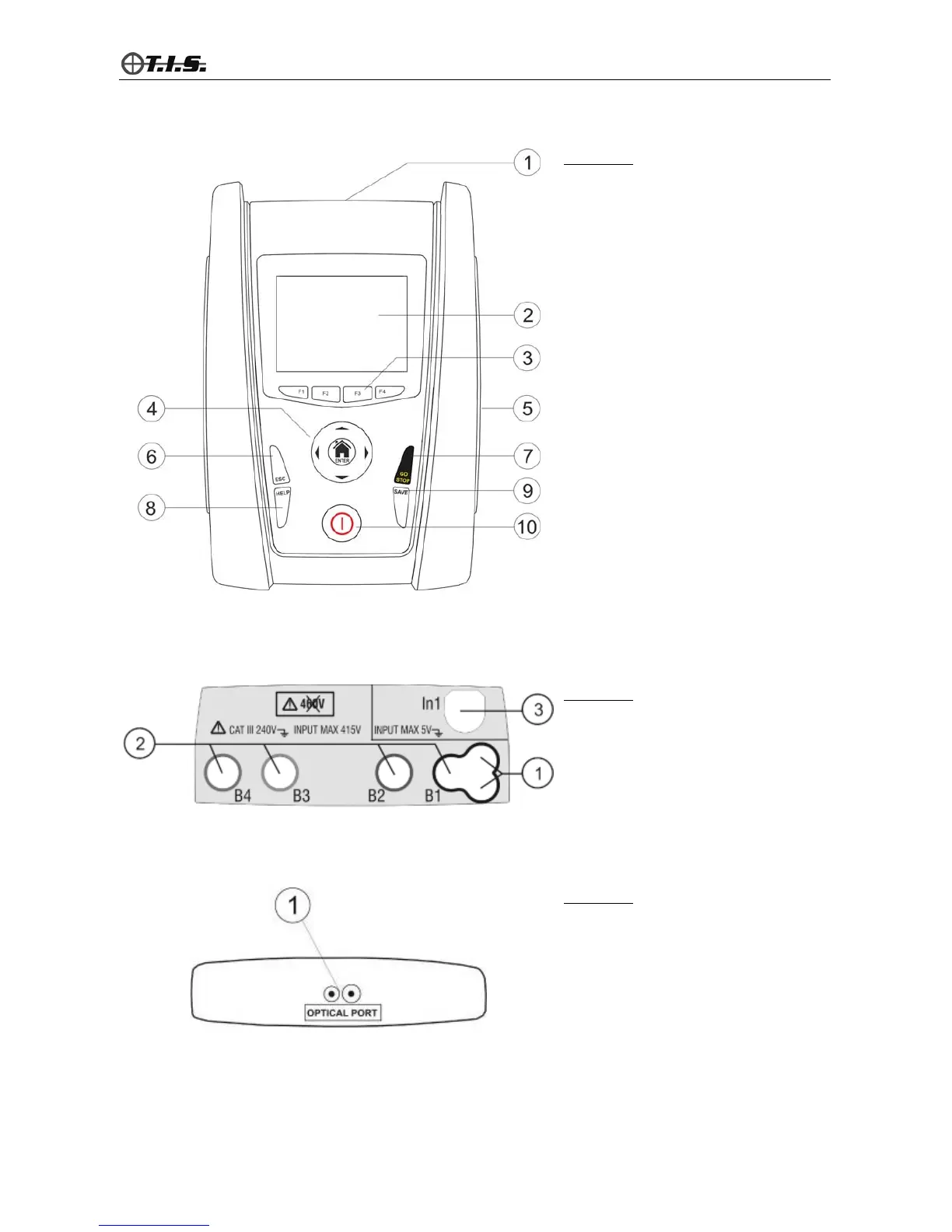
CAPTION:
1. Input leads
2. Touch screen display
3. F1, F2, F3, F4 function keys
4. Arrow
,,, and ENTER key
5. Output for optical/USB connector
6. ESC key
7. GO/STOP key
8. HELP key
9. SAVE key
10. ON/OFF key
Fig. 1: Description of the front part of the instrument
CAPTION:
1. Input for connecting optional
remote lead PR400
2. Inputs B1, B2 (no COMBIG2), B3,
B4 for connecting measuring leads
3. Input In1 for connecting clamp
transducer/probes
Fig. 2: Description of the instrument's input terminals
CAPTION:
1. Serial output for connection with
optical cable/USB C2006 and
adaptor optical/WIFi C2013
Fig. 3: Description of the instrument's output connector


 To Next Page