Discovery DSC™ Getting Started Guide Page 46
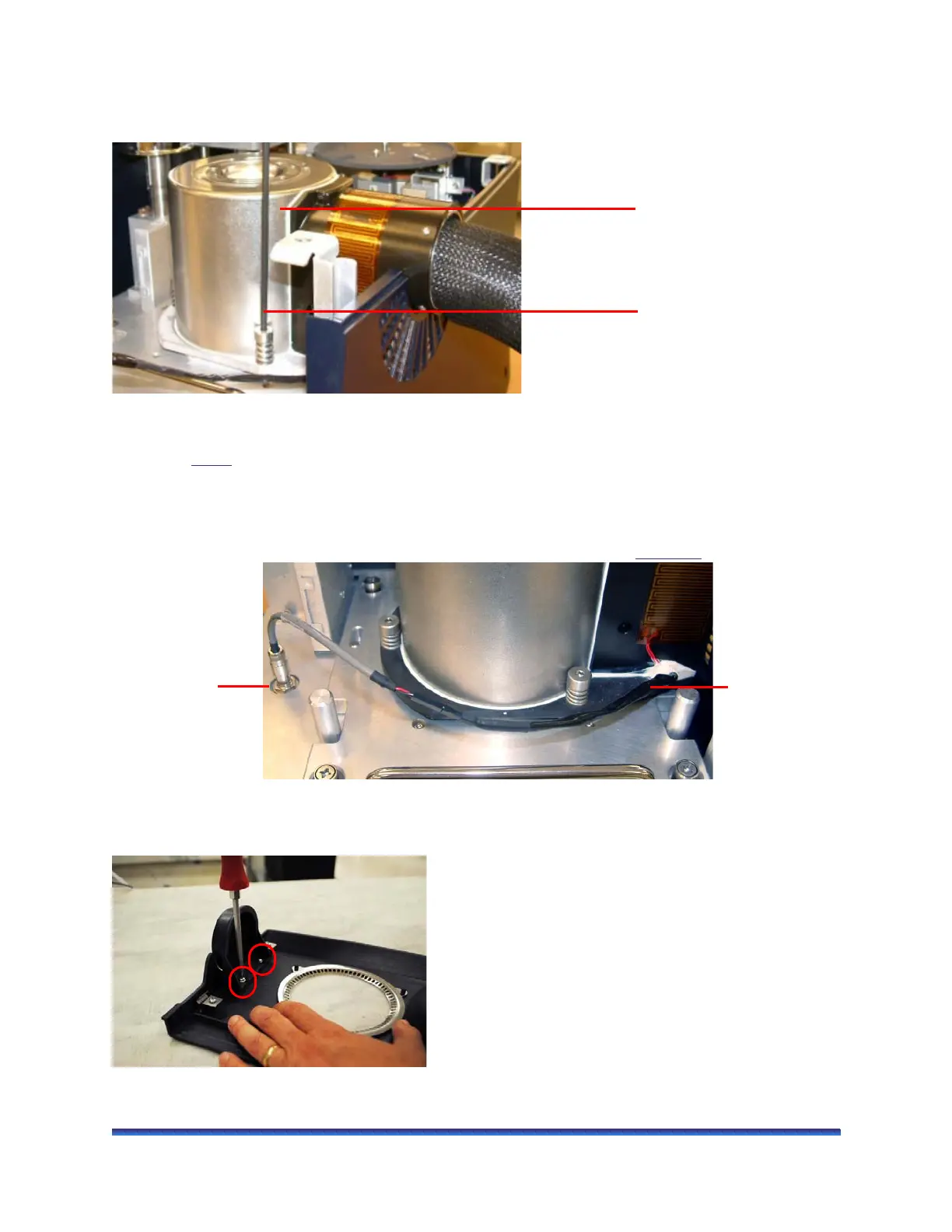
7 Insert the tip of the wrench into any one of the three captive screws in the LN Pump plate while holding
onto the cooling head. You may need to push down while you tighten the screw 3 to 4 turns. DO NOT
fully tighten yet.
Figure 30 Installing the LN Pump cooling head.
8 Repeat step 7
for the two remaining captive screws. After you have started each screw, go back and
tighten down all three screws (one or two turns at a time per screw) until you feel them touch the bottom.
Do not over tighten.
9 Connect the LN Pump anti-condensate heater cable, which is attached to the LN Pump cooling head, to
the +24 VDC port (located behind and to the right of the DSC cell). See Figure 31
.
Figure 31 Installing the heater cable on the DSC.
10 Uninstall the plug from the DSC top cover by removing the two screws holding it in place
Figure 32 Removing the plug from DSC top cover (Discovery DSC 2500 shown).
Long Allen wrench
LN Pump cooling
head
Heater cable in
+24VDC port
LN Pump anti-
condensate
heater cable



 To Next Page