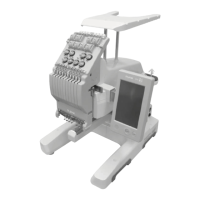
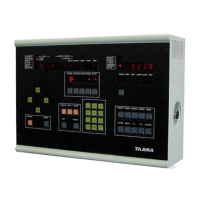
Option buttons (top middle).
COORD
: To rotate the design.
P
and one blinking light is normal. Press
STEP
to change to 45
degree mode (two blinking lights). Press
SET
to make it stop blinking.
A.CHNG
: To switch between automatic and manual color change.
A.STRT
: To turn on automatic start after a color change.
FRAME
: To allow frame to be moved manually during sewing.
D.SET
: Press after you have chosen a new design, and have finished with options.
Edit buttons (bottom right)
NUMERIC KEYPAD 0-9
: Manual color change immediately. Also to insert values.
STEP
: To browse through menu options
C
: Clear button.
MODE
: To change a parameter.
ERASE
: Used in the memory erase function
MRY
: Memory Erase button; used in the erase-all function
Main menu list
N.SELECT
: To show the current automatic color sequence
TAPE CODE
: To show the loaded design
REPEAT
: To show the repeat settings
STITCH
: To show the stitch count. Press
C
to reset the count.
REPEAT
: To show the repeat settings
ERROR
: This menu is shown only when there is an error. Press
RESET
to clear.
ALL LIGHTS
: To show the current resize/scale setting.
Status lights
STOP P.
: Lights up when your main shaft is at the STOP position, marked in RED on the
flywheel.
JUMP, STOP, END
: Lights up when you are at a JUMP code, STOP code, or END code.
Bar switch and button (under table)
BAR SWITCH LEFT
: Pull bar to the left to stop, or to go back one stitch
BAR SWITCH RIGHT
: Pull bar to the right to start; same as the green buttons.
INCH BUTTON
: Inching or Jog button. This is
NOT
an ATH button.
Frame move
ARROW KEYS
: Cause the frame to move manually.


 To Next Page