Load a new design
1. Press
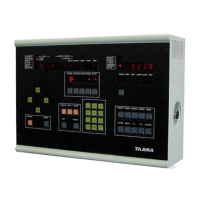
TAPE CODE
.
2. Press the
2
key and then press
SET
.
3. The blinking number is the first empty memory location for your new file.
4. Change this number, or leave it. Press the
SET
key when done.
5. Press the
D.SET
key. This will start the download from tape process.
6. Completion! Be sure to set a new offset for this memory location or it will use the old one.
Select a design in memory
1. Press
TAPE CODE
.
2. Press the
5
key and then press
SET
.
3. Choose a design by typing in the number.
4. Press
SET
when you have the number you want.
5. If you want to rotate the design, you do it now. Press
COORD
to rotate, and press
SET
when done.
STEP
will change between rotating 90 degrees (one blinking light) or 45 degrees (two blinking lights).
6. Press
D.SET
to continue with the process.
7. The screen will ask for a resize value. Accept the standard 100% value by pressing
SET
.
8. Make sure your offset is programmed or cleared, or the frame will move where you don't expect.
9. To clear offsets, Press
MODE
, then
4
, then
SET
.
10. Choose a start point with your manual arrow keys. Do
NOT
press
SET
again, or that will be the
offset.
11. You are ready to start sewing!
Setting color change
1. Press the
SELECT
button.
2. The first color change will be chosen for editing, and the current color selection is blinking.
3. Press the number keys to choose a new color.
4. Press
STEP
to confirm, and move to the next color.
5. If the E is blinking, then no color has been chosen yet. Pick a color and press
STEP
.
6. When you wish to stop, choose a number and press
SET
instead of
STEP
.
7. Finished! Don't forget the automatic color change and auto-start buttons, if you want it to be active.


 To Next Page