Erasing design in memory
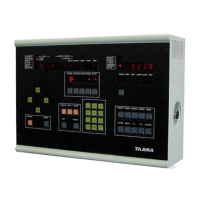
1. Press
MODE
, then press
1
, then press
SET
.
2. Press
ERASE
, then press
SET
.
3. The top right screen will activate, asking which number to delete.
4. Type in the design to erase with the number pad.
5. Press
SET
to erase the chosen design.
6. Press
MODE
when done erasing designs.
Erasing all designs
1. Press
MODE
, then press
1
, then press
SET
.
2. Press
ERASE
, then press
MRY
, then press
SET
.
3. Wait a few seconds. All designs should now be erased.
Error codes
Press the
RESET
button to cancel most errors.
ERROR E-02, E-03, E-04
: Tape data error.
ERROR E-06
: Memory error. Please clear all memory.
ERROR E-08, E-09
: Reader error; try again.
ERROR E-11
: Data set not done correctly. Choose design from beginning.
ERROR E-12
: Cannot stitch backwards that far.
ERROR E-13
: Offset problem. Clear offset.
ERROR E-16
: Memory is empty. Load a design first.
ERROR E-17
: Memory is full. Clear designs.
ERROR E-18
: This design is erased. Choose another.
ERROR E-19
: Memory is full. Clear designs.
ERROR E-30, E-31
: Stop bar chosen at wrong time.
ERROR E-51
: Stop position error. Please set main shaft until
STOP P.
is lit.
ERROR E-52
: Limit switch. X or Y at the limit; adjust sensors if too small.
ERROR E-53
: XY Driver problem.
ERROR E-54
: Limit switch problem.
ERROR E-55
: Color change motor not moving. Inspect.
ERROR E-56
: Half-turn cam troble. Check color change.
ERROR E-57
: Color change needle position error. Check color change.
ERROR E-58
: Main motor not spinning. Check to see if polarity needs to be reversed on the
three phase 220V brake box.


 To Previous Page