Home
Talon
DVR
Digital Video Security System
Page 27 (Installation of Dial-Up Client)
Talon Digital Video Security System - Installation of Dial-Up Client
30 pages
Manual
Save Page as PDF
To Next Page
To Next Page
To Previous Page
To Previous Page
Loading...
26
T
alon
T
alon - NET DVR
5.4.2. Inst
allation
of Dial-Up Client
On T
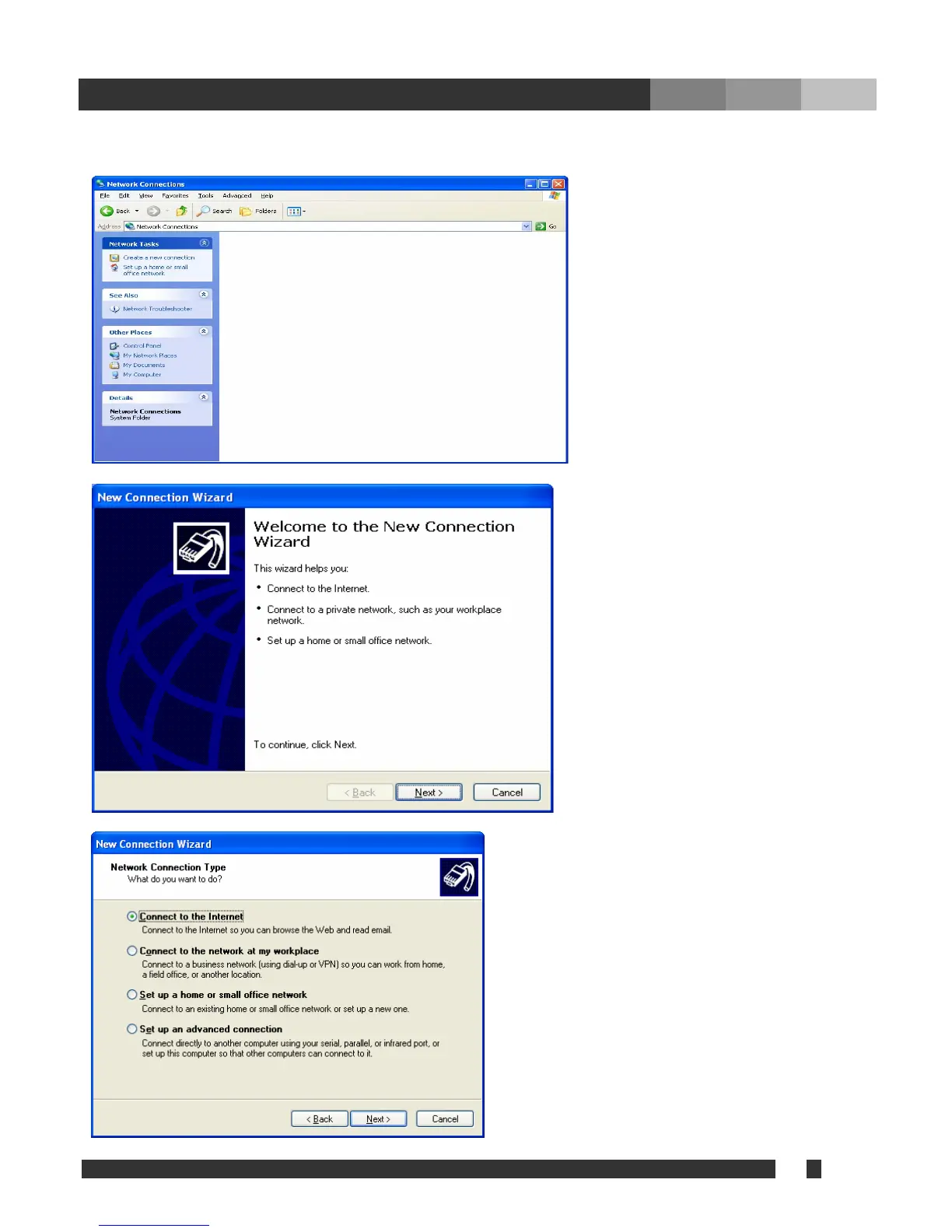
alon Net system, click “S
tart > Setup > Co
Click ‘Next’.
Selec
xt”.
ntrol pad > Network Connection.”
Click “Create a new connection.”
t “Connect to the Internet”, and Click “Ne
26
28
Table of Contents
Main Page
Default Chapter
2
Table of Contents
2
1 Forward
3
2 Introduction
4
3 Installation
5
4 Using Net Software
6
Talon Login Setup
6
Site Setup
7
Setup Connection Mode
9
MISC. Configuration
10
IP Server Setup
10
Change Login Password
11
Accessing Talon Net
12
Remote Search
16
Remote Setup
19
Event Viewer
19
5 Appendix
20
Changing Position
20
Movie Clip & Snapshot
20
Event Notification
21
Dial-Up Connection
22
Installation of Dial-Up Server
22
Installation of Dial-Up Client
27
Using Dial-Up Connection
30


 To Next Page