irlS[alla[iorl irlstrucuorl_5
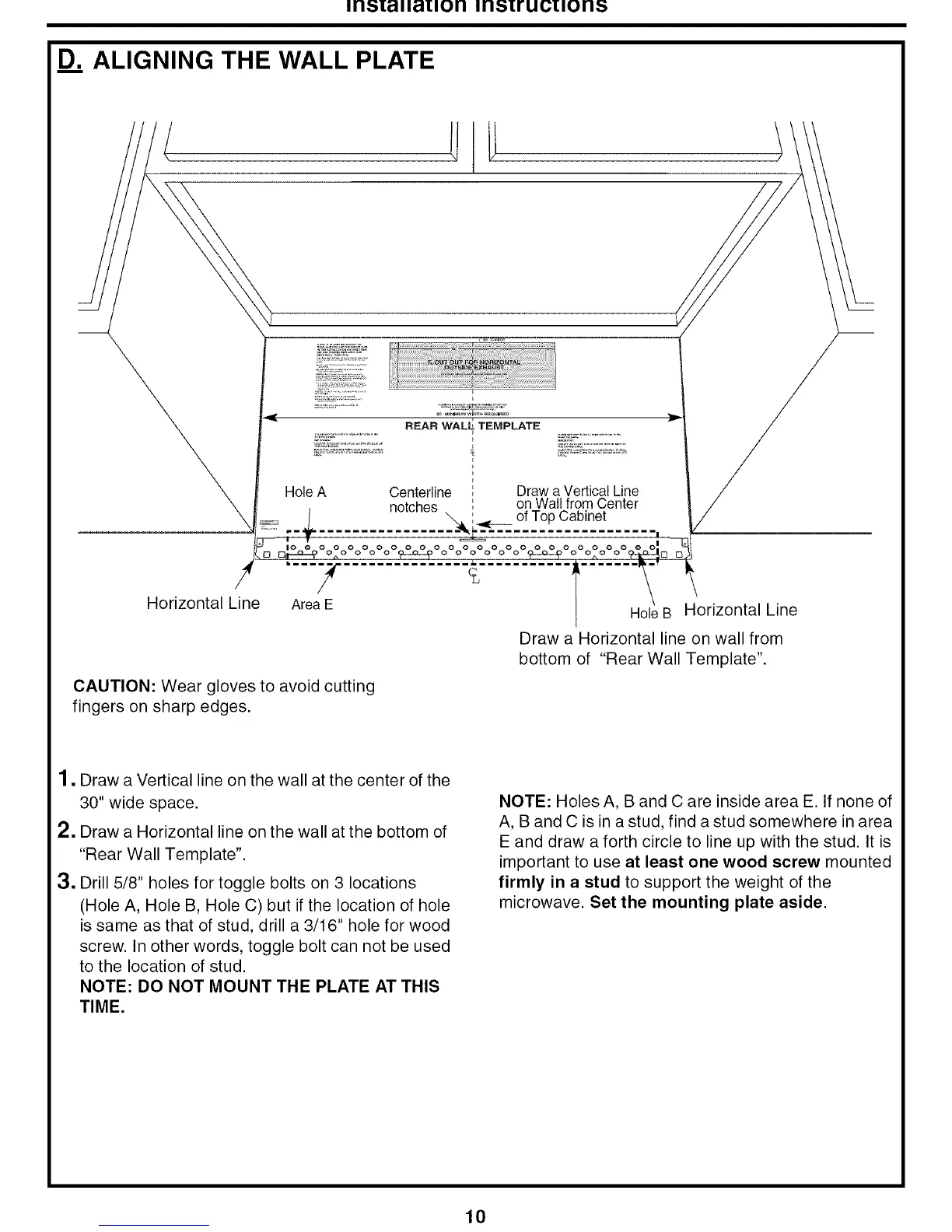
D_ALIGNING THE WALL PLATE
Horizontal Line
HoleA
Area E
REAR WALL TEMPLATE
Centerline Draw a Vertical Line
notches on Wall from Center
_.. ____ of Top Cabinet
o o o o o o o o o o o o
HoleB Horizontal Line
Draw a Horizontal line on wall from
bottom of "Rear Wall Template".
CAUTION: Wear gloves to avoid cutting
fingers on sharp edges.
1, Draw a Vertical line on the wall at the center of the
30" wide space.
2. Draw a Horizontal line on the wall at the bottom of
"Rear Wall Template".
3. Drill 5/8" holes for toggle bolts on 3 locations
(Hole A, Hole B, Hole C) but if the location of hole
is same as that of stud, drill a 3/16" hole for wood
screw. In other words, toggle bolt can not be used
to the location of stud.
NOTE: DO NOT MOUNT THE PLATE AT THIS
TIME.
NOTE: Holes A, B and C are inside area E. If none of
A, B and C is in a stud, find a stud somewhere in area
E and draw a forth circle to line up with the stud. It is
important to use at least one wood screw mounted
firmly in a stud to support the weight of the
microwave. Set the mounting plate aside.
10



 To Next Page