Installation and Setup
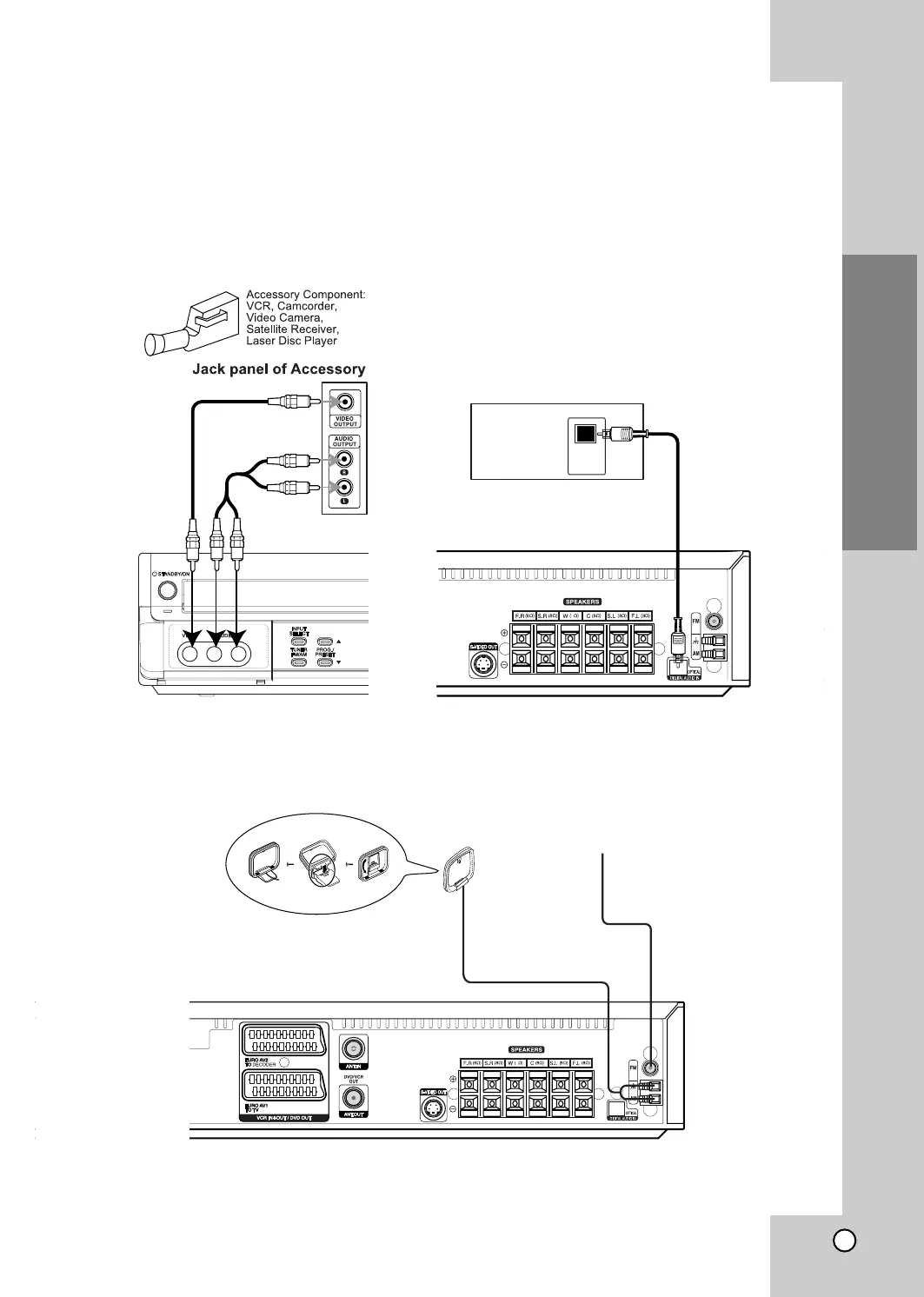
FM Wire aerial (supplied)
AM Loop aerial (supplied)
4
Radio Aerial Connections
Connect the supplied FM/AM aerial for listening to the radio.
• Connect the AM loop aerial to the AM aerial connector.
• Connect he FM wire aerial to the FM aerial connector.
Notes
•
To prevent noise pickup, keep the AM loop aerial away from the DVD/VCR Combi receiver and other components.
• Be sure to fully extend the FM wire aerial.
•
After connecting the FM wire aerial, keep it as horizontal as possible.
DVD Player (or Digital Device, etc)
OPTICAL
OUT
4
Accessory Audio/Video (A/V) Connections to
DVD/VCR Combi
receiver
Connect the AV3 jacks on the DVD/VCR Combi receiver to the audio/video out jacks on your accessory
component, using the optional audio/video cables.
If the auxiliary devices (e.g. DVD) are equipped with OPTICAL OUT jack, connect them to to the corresponding
input jack of the DVD/VCR Combi receive.
13



 To Next Page