6
Targus Wireless Calculator Keypad
Using the Calculator/Keypad
Switching Between Calculator and Keypad
Mode
To switch between the two modes, press the Mode key.
The mode you are in will be displayed on the LCD.
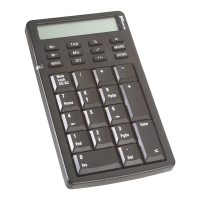
Calculator/Keypad - front view
To turn off the keypad while in calculator mode, press the
NumLock key for 2 seconds.
NOTES: R
EPLACE THE BATTERIES WHEN THE BATTERY LOW
INDICATOR LED STARTS FLASHING.
T
O POWER OFF, USE THE ON/OFF SWITCH LOCATED ON THE
BACK OF THE KEYPAD.
Mode key
Battery low
indicator
NumLock key














 To Next Page