U s e r M a n u a l M D T 8 0 0 0 | 16
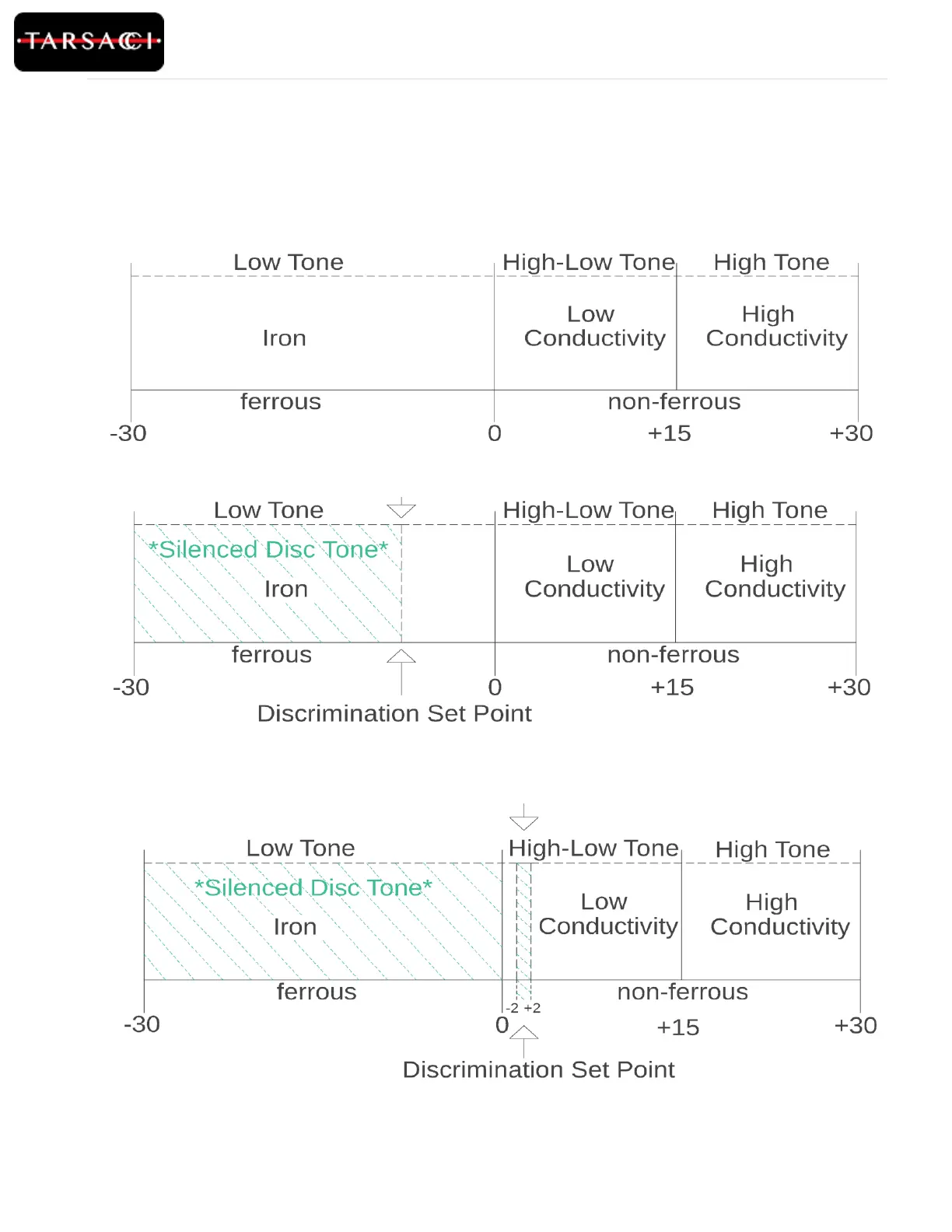
The following figures give a visual breakdown of Discrimination sounds related to the Target ID numbers.
-30 to 0 = Low Tone, ferrous Target
0 to +15 = High-Low Tone, Low Conductivity, non-ferrous Target
+15 to +30 = High Tone, High Conductivity, non-ferrous target
Figure 17: When the Discrimination Set Point is set at a value greater than 0, any Target ID lower than 0 will be silenced;
any Target ID within +- 2 of the Discrimination Set Point will be silenced. The dashed lines indicate the silenced regions.
Discrimination Breakdown Visuals
Figure 15: Displays the tone and conductivity of the metal based on the Target ID being displayed (The Disc is set to -30).
Figure 16: When the Discrimination Set Point is set at a value less than 0, any Target ID lower than the set value will be
silenced. The dashed lines indicate the silenced region.



 To Next Page