28
TASCAM CD-200iL
6 – Message Lists
Operation messages
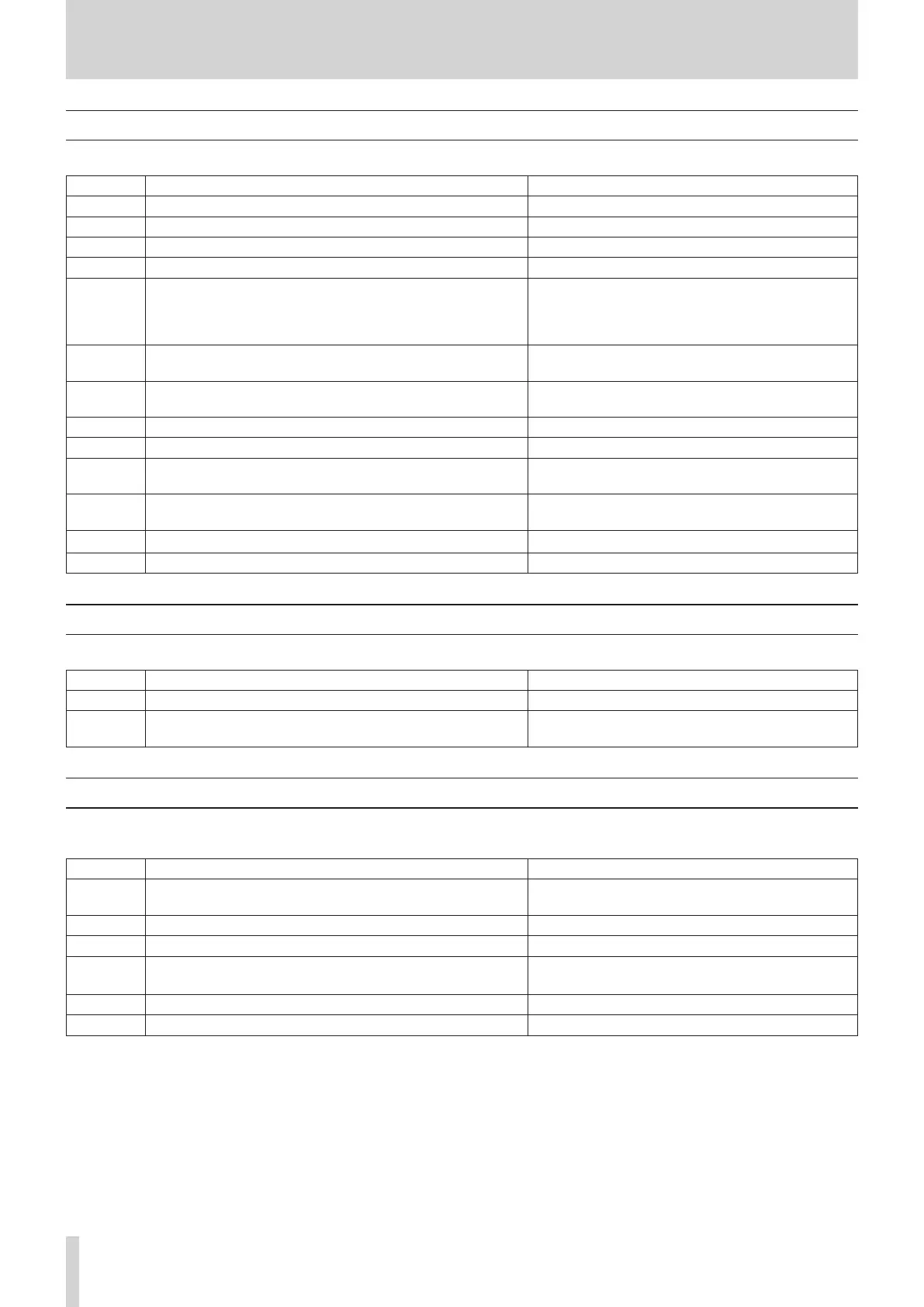
Depending on the operation of the unit, the following messages will appear in the main display area.
Message Meaning Response
-AUX- AUX IN is selected as the current source.
-CLEAR- All programs have been cleared.
CLOSE The disc tray is closing.
-DOCK-
-DOCK-
is selected as the current source.
DOCK---- No iPod or iPhone is connected to the dock.
If this message appears even when an iPod or iPhone
is connected, disconnect that iPod or iPhone from the
iPod dock for a few seconds and then reconnect it to
the dock.
DOCK-30-
An iPod or iPhone with a 30-pin Dock connector is connected to
the dock.
DOCK-LT-
An iPod or iPhone with a Lightning connector is connected to
the dock.
NO DISC There is no disc or the disc cannot be verified.
NO FILES The data CD has no files that can be played back. Load a disc that contains playable files.
NO NAME There is no artist data or no file data that can be displayed.
Only 7-bit ASCII-compatible characters can be
displayed as text information.
NO TITLE There is no title data that can be displayed.
Only 7-bit ASCII-compatible characters can be
displayed as text information.
OPEN The disc tray is open.
TOC READ TOC information is being read.
Warning messages
If an operation cannot be completed, one of the following messages will appear for about two seconds and then disappear.
Message Meaning Response
NO PGM No program has been created. Add tracks to the program.
PGM FULL No more tracks can be added to the program.
A program can contain a maximum of 99 tracks. Clear
tracks from the program and try again.
Error messages
If one of the following error messages is shown, please refer to the Response column and try to resolve it. If you are still unable to correct
the problem, please contact the nearest retailer or TASCAM representative.
Message Meaning Response
COMM ERR
(Blinking)
Cannot communicate with the CD drive. Contact the nearest retailer or TASCAM representative.
COMM ERR An error occurred during communication with the CD drive. Contact the nearest retailer or TASCAM representative.
DEC ERR The file type is not supported or otherwise could not be played. Change the data CD.
DISC ERR
The TOC or file system could not be read, or focus adjustment
was not possible.
Clean or change the disc.
DRV ERR The CD drive hardware is broken. Contact the nearest retailer or TASCAM representative.
READ ERR The song cannot be accessed. Clean or change the disc.



 To Next Page