69
Malfunctions
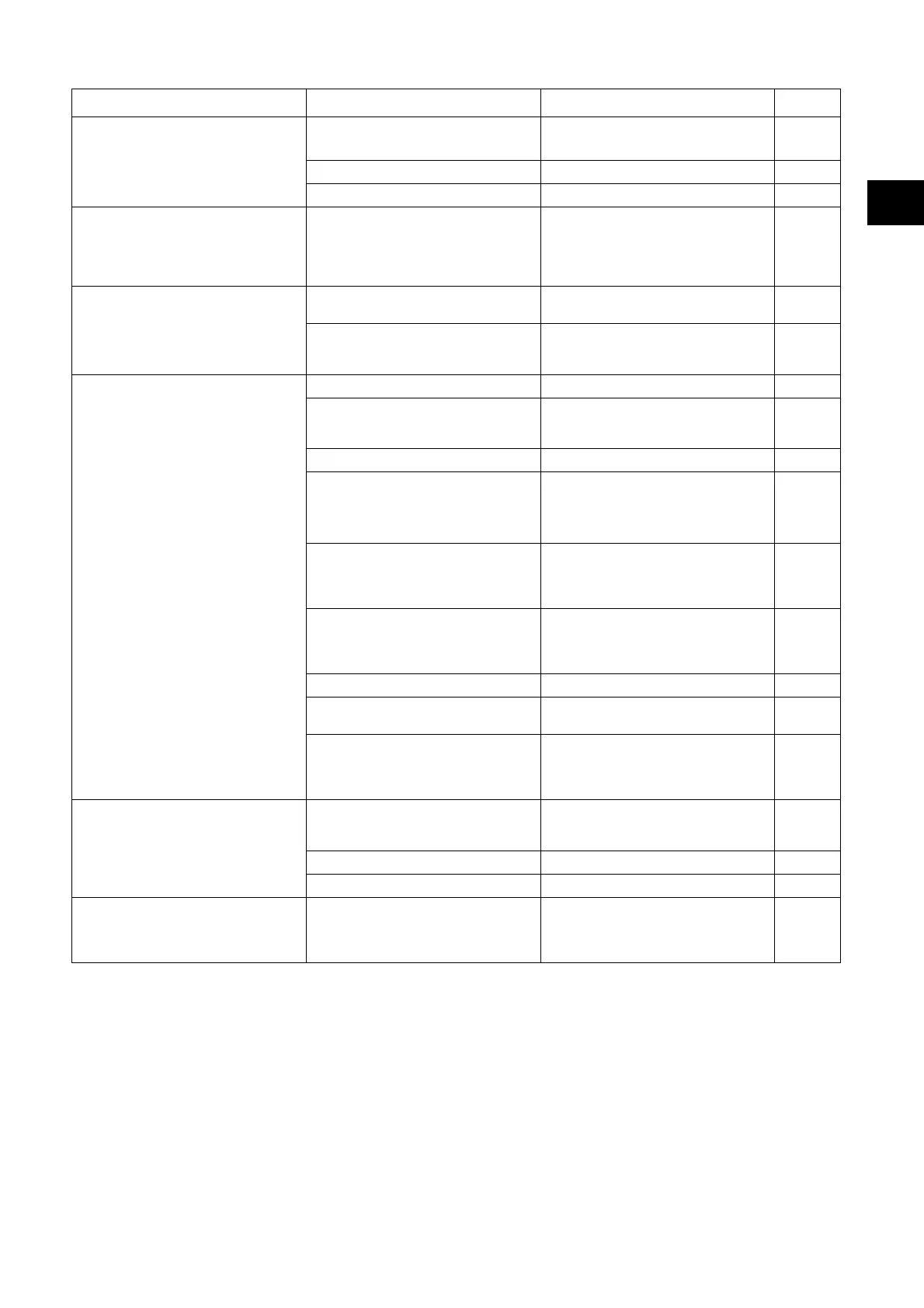
Malfunction Possible causes Troubleshooting Page
Machine without function
No power supply
• Insert the plug into the mains sock-
et.
Machine is switched off • Switch on the main switch 61
Power supply cord defect • Contact your service partner
Brush unit or suction unit cannot be
turned off
Error in the electronic system or in
the control panel
• Switch off the machine (main
switch) and remove the plug from
the mains socket.
• Contact your service partner
61
Brush does not rotate
Machine overload, overload switch
• Release the switch drive and press
again
61
Motor rotates, brush does not
• Drive belt broken
• Contact your service partner
Poor suction performance Floor re-
mains wet Soiled water is not vacu-
umed up
Suction not switched on • Press suction unit button 61
Float closes the inlet opening on the
suction unit (overfill protection recov-
ery tank)
• Recovery tank full, check
• Check float for functionality
61
Suction hose not connected • Connect suction hose 62
Squeegee not on the floor
• Check squeegee suspension for
functionality
62
Blades worn out
• Replace blades
68
Hose or squeegee clogged (e.g.
pieces of wood, remnants)
• Remove any foreign matter
Suction filter clogged • Remove any foreign matter 61
Check the tank cover's gasket for
cracks/dirt
• Clean the gasket and replace if de-
fective
Dirt sieve full
• Remove the dirt sieve.
• Empty the dirt sieve by tapping it
and rinse it under running water
Insufficient cleaning solvent supply
Cleaning solution tank (fresh water
tank) empty
• Check cleaning solution tank
(fresh water tank) and fill with wa-
ter
64
Fresh water tank filter blocked • Cleaning the fresh water tank filter 66
Cleaning solvent button switched off • Press cleaning solvent button 61
Foam or liquid leaking from the ma-
chine
Float malfunction
• Switch the suction unit off
• Check the float to make sure it is
fully functional and repair any fault
EN


 To Next Page
 Loading...