8
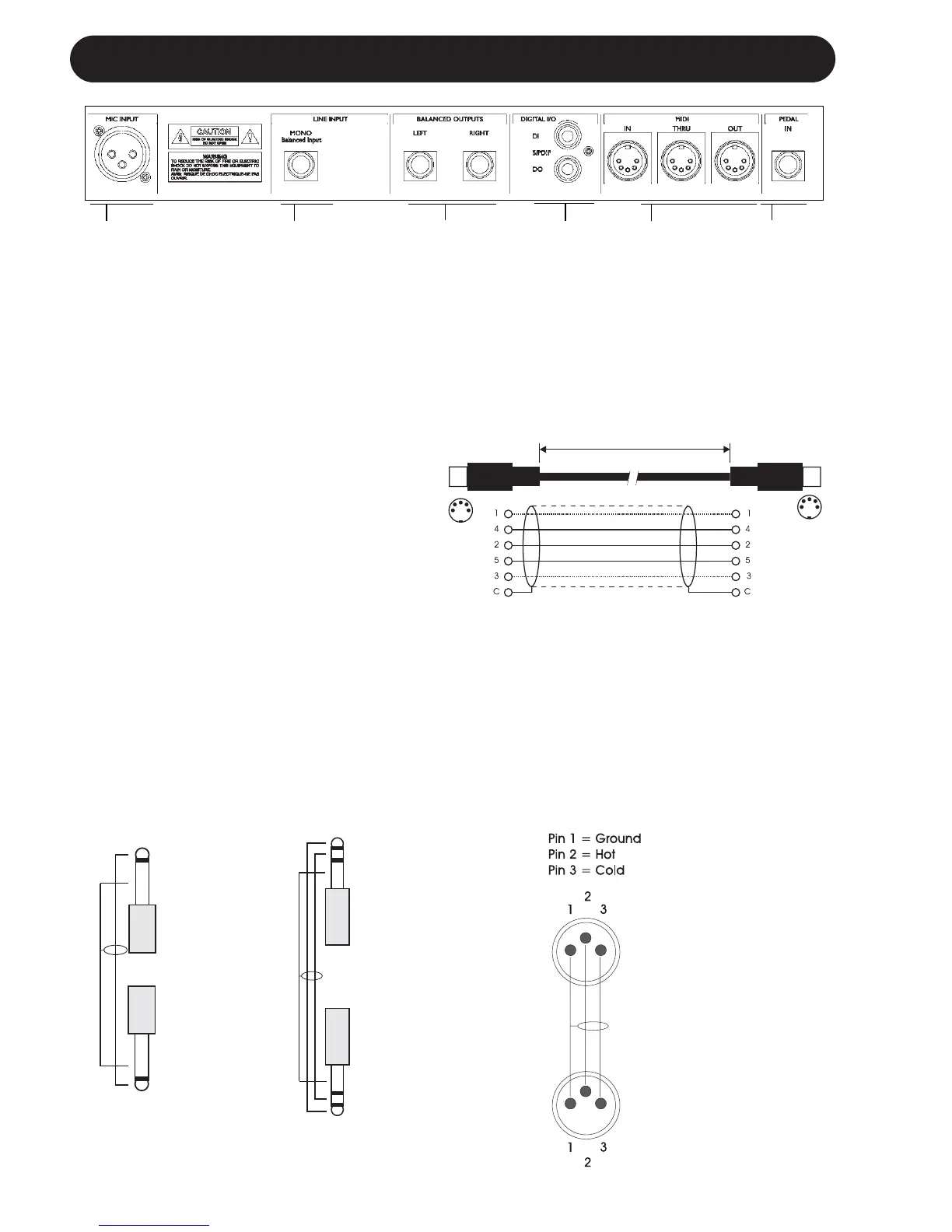
REAR PANEL
Balanced
Jack
Analog
Outputs
External
Control
MIDI
In, Out, Thru
Balanced
Mic Input
with +48V
Phantom
Power
Digital
S/PDIF
Input/
Output
MIDI Cable
DIN CONNECTOR
5POLE - MALE
45 degrees
DIN CONNECTOR
5POLE - MALE
45 degrees
max. 10m
SHIELDED CABLE (3 or 5 wires + screen)
Note!
The microphone input on the VoiceWorks
has +48V phantom power capability.
Never plug single ended (unbalanced)
microphones or instruments or signal
processors (balanced or unbalanced)
into the mic input if +48V phantom
power is on.
The 1/4” analog Input and Output
connectors on the VoiceWorks are balanced
1/4” jacks.
Optimal connection to balanced equipment
is achieved using balanced cables.
However, if your equipment is NOT
balanced you will generally have no
problems using standard mono-to-mono
cables as illustrated below.
Balanced
Jack
Analog
Input
Mono 1/4” Cable
GND
TIP
TIP
GND
TIP
RING
GND
GND
RING
TIP
TRS (Tip Ring
Sleeve) 1/4”
balanced Cable
Balanced XLR Cable
- 3 Pin Type


 To Next Page