EN 7
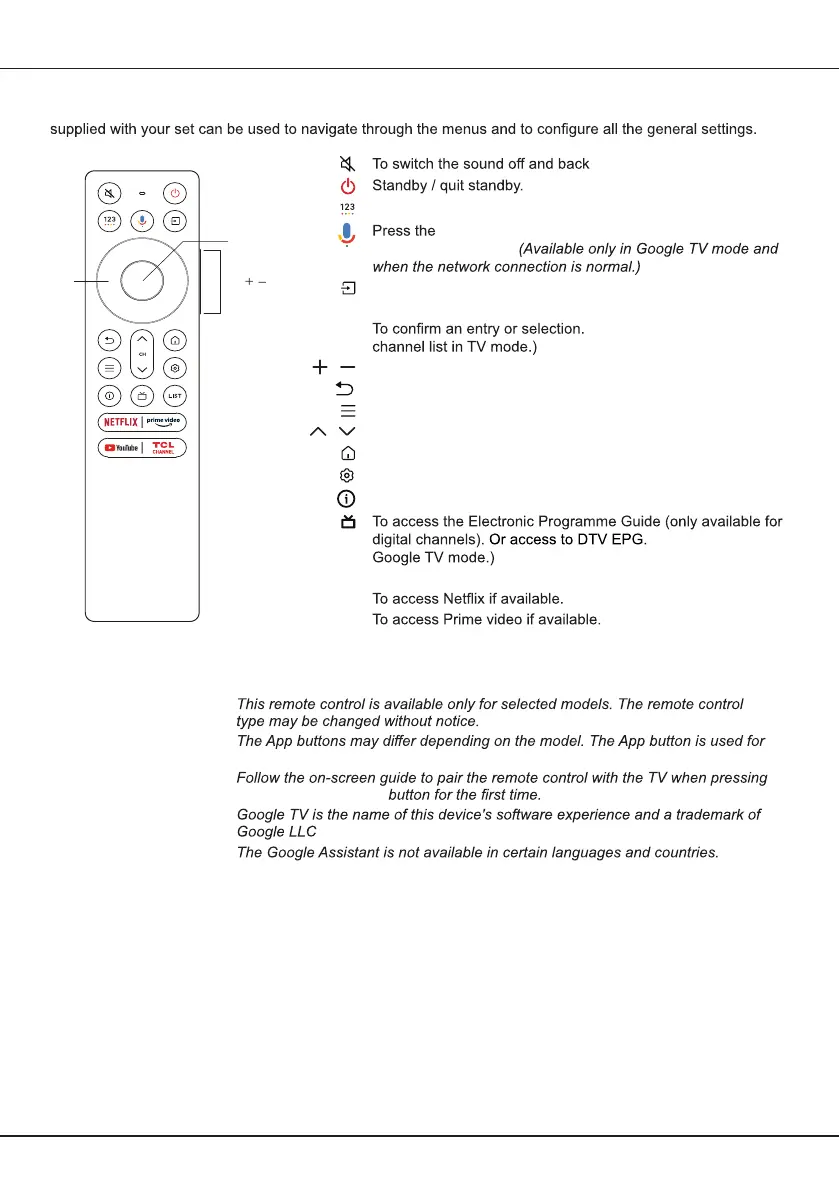
Exclusive Remote control
Most of your television's functions are available via the menus that appear on the screen. The remote control
Chapter 2 - Getting started
on.
To pop up the virtual remote control keyboard when available.
Google Assistant button on your remote to talk to
the Google Assistant.
To select input source.
Navigation direction buttons.
(Available to display the
To control the volume.
To return to the previous menu or quit an App.
To display the Quick Settings panel.
To change channels.
To access the Smart TV homepage.
To display the dashboard menu.
To display programme information, if available.
(Available only in
To access DTV channel list.
To access YouTube if available.
Circular D-Pad
OK
VOL
/
CH /
LIST
NETFLIX
prime video
Youtube
TCL CHANNEL To access TCL Channel.
Notes:
-
-
accessing the corresponding App.
-
the Google Assistant
-
.
-
Circular
D-Pad
OK
VOL /



 To Next Page