Need help?
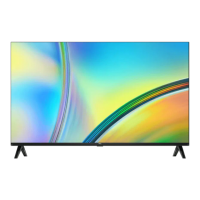
Do you have a question about the TCL L32S6FS and is the answer not in the manual?
Safety guidelines and warnings before operating the TV set.
Instructions for connecting and handling the power cord and plug.
Guidelines for optimal operating conditions and avoiding hazards.
Recommendations for safely cleaning the TV screen and cabinet.
Steps and safety notes for wall-mounting the television.
Description and usage of various input/output connection ports on the TV.
Explanation of buttons and their functions on the TV remote control.
Instructions for inserting batteries into the remote control.
Step-by-step guide on how to turn on the TV and remote control.
Instructions on how to put the TV into standby mode or turn it off.
Overview of connecting the TV to a wired or wireless network.
Detailed steps for establishing a wired network connection.
Detailed steps for establishing a wireless network connection.
Configuration options for wired and wireless network connections.
Explanation of TV set buttons that can be used as alternatives to the remote.
Guide for the first-time setup process upon powering on the TV.
Methods for selecting and navigating through TV channels.
How to select and view content from external devices connected to the TV.
Controls for volume adjustment and sound muting.
Guide to accessing and using the Smart TV interface and applications.
How to navigate and adjust various TV settings.
Procedure for automatically searching and storing TV channels.
Information on using modules for encrypted digital TV channels.
How to enable and manage subtitles for TV programs.
Instructions for accessing and using the Teletext service.
How to remotely turn on the TV via a network connection.
Functionality for CEC device control and auto power features.
How to pause, rewind, and fast-forward live TV programs.
How to record TV programs using a USB drive.
Using the on-screen guide to view and schedule TV programs.
Feature for sharing media from a PC to the TV.
How to mirror your smartphone or tablet screen onto the TV.
Enabling faster TV startup from standby mode.
Managing parental control settings and default passwords.
Troubleshooting guide for problems linking the TV to a network.
Solutions for issues with video playback smoothness and compatibility.
Resolving issues with multiple mobile hard disks or USB device detection.
Addressing problems with video playback having no sound.
A guide to diagnose and fix common TV operational problems and display issues.
Terms and conditions, warranties, and legal disclaimers regarding the TV and its services.
Visual instructions and notes for assembling and installing the TV table stand.
 General
| Screen Size | 32 inches |
|---|---|
| Resolution | 1366 x 768 |
| Display Technology | LED |
| Smart TV | Yes |
| Operating System | Android TV |
| HDR Support | No |
| Wi-Fi | Yes |
| Ethernet | Yes |
| HDMI Ports | 2 |
| USB Ports | 1 |
| Audio Output | 10W |
| Bluetooth | Yes |

 To Next Page