MS82MT-AP/LA Chassis Aliment procedure
PRELIMINARY INFORMATION ----- SUBJECT TO CHANGE
6
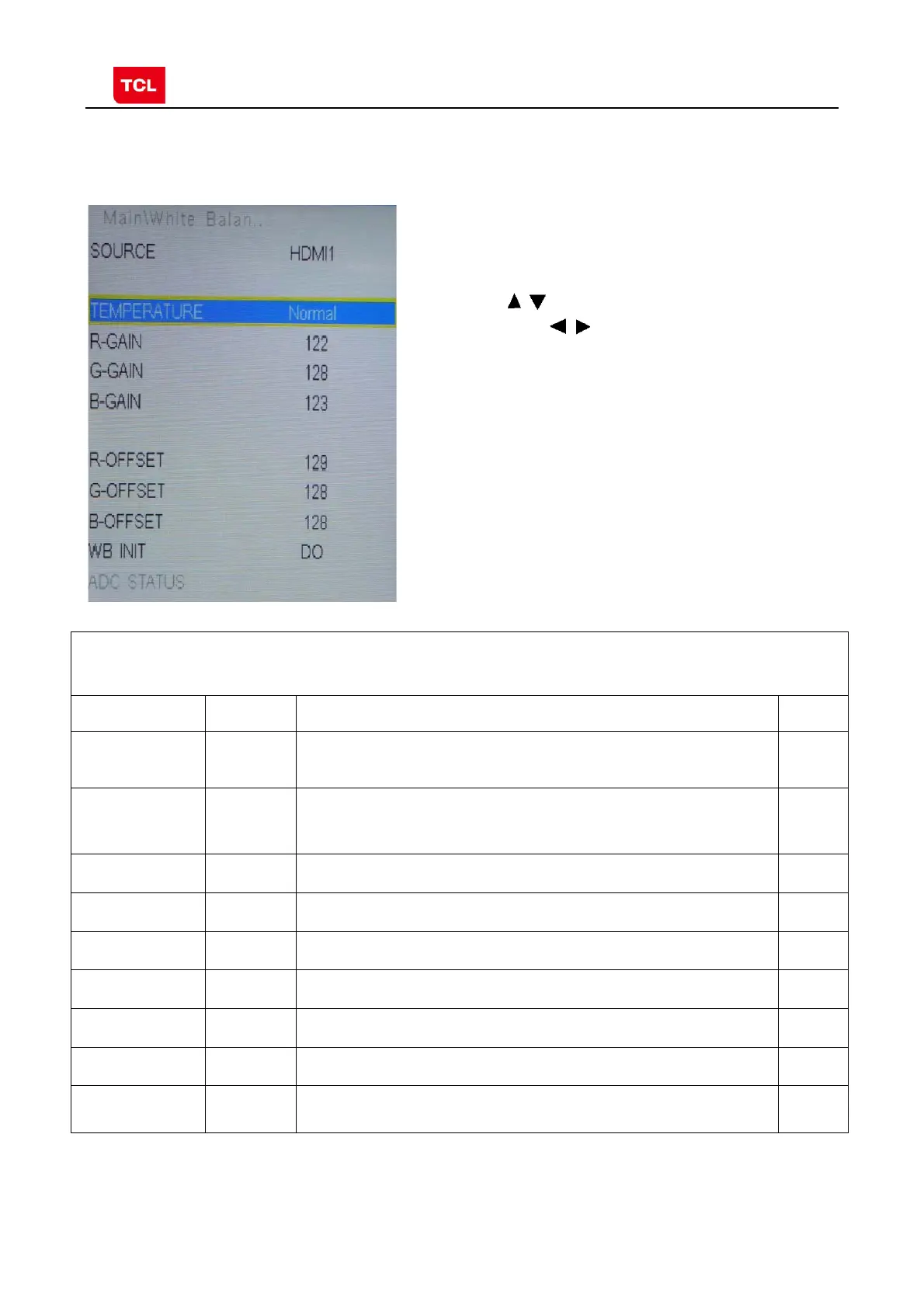
2.4 White Balance Adjustment menu
White Balance menu
Press the button in remote control to select
certain item and to adjust White Balance
White Balance Adjustment menu
Name Default Description Status
Source PC Select the source you intend to apply WB adjustment.
Only HDMI1, AV1, YPBPR, PC and should be adjusted.
OK
COLOR
TEMPERATURE
Cool Select color temperature you intend to adjust Three groups of
color temperature: Normal, Warm, Cool are available for each
source.
OK
R GAIN
-2
Gain of R channel ( cannot be changed after auto calibration) OK
G GAIN
0
Gain of G channel ( cannot be changed after auto calibration) OK
B GAIN
+9
Gain of B channel ( cannot be changed after auto calibration) OK
R OFFSET
+6
Offset of R channel ( cannot be changed after auto calibration) OK
G OFFSET
0
Offset of G channel ( cannot be changed after auto calibration) OK
B OFFSET
-2
Offset of B channel ( cannot be changed after auto calibration) OK
WB INIT
White Balance Initalization. Before WB adjustment, this item should
be executed.
OK



 To Next Page