MS82MT-AP/LA Chassis Aliment procedure
PRELIMINARY INFORMATION ----- SUBJECT TO CHANGE
12
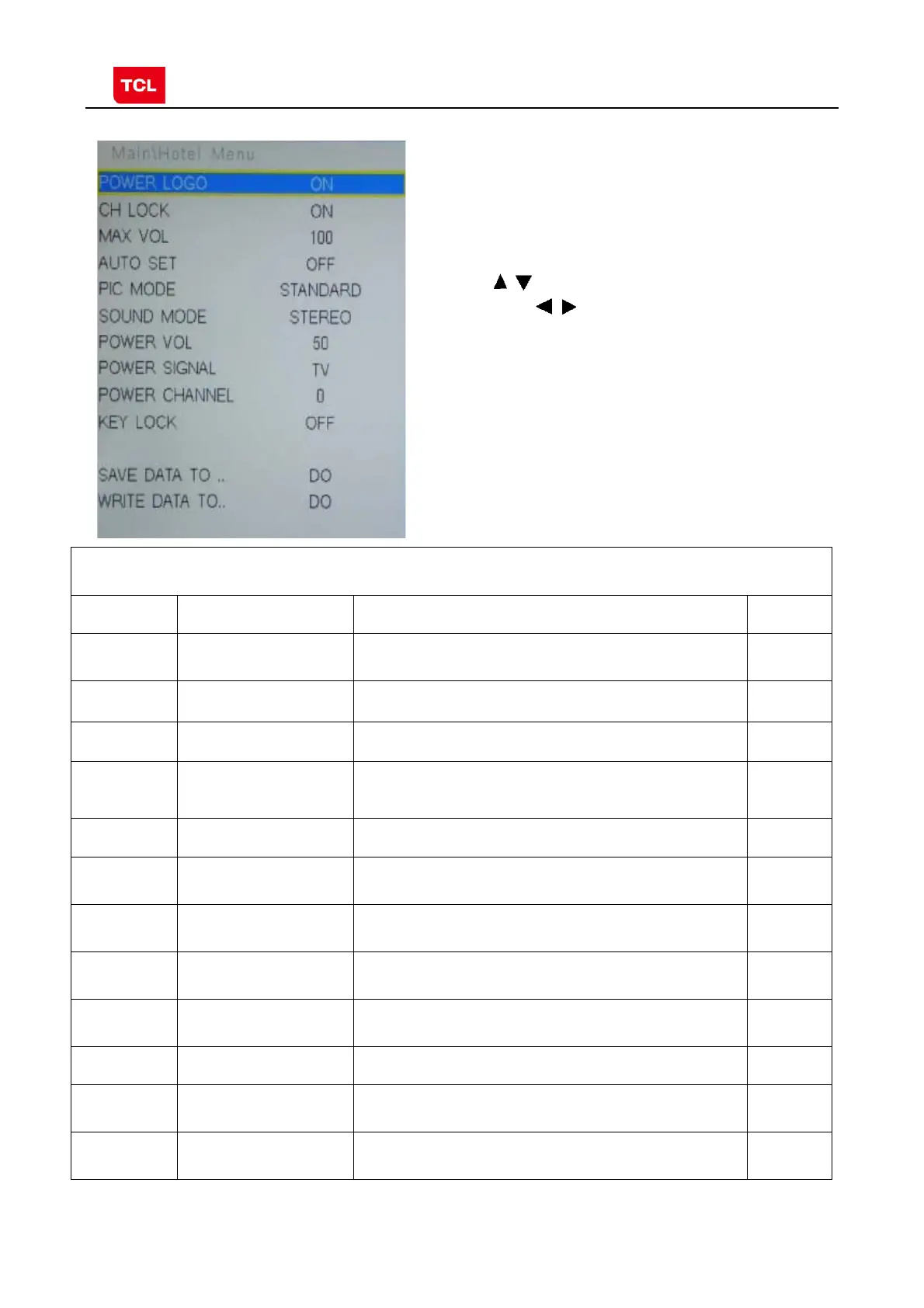
3.6 HOTEL MENU
Press the
button in remote control to select
certain item and
to enter submenu.
HOTEL MENU
Name Default Description Status
POWER
LOGO
ON LOGO select OK
CH LOCK OFF Channel scan lock. OK
MAX VOL 100 Max volume OK
AUTO SET OFF The switch of PIC, SOUND etc.
When it is ON, these items are selectable.
OK
PIC MODE Standard Picture mode. OK
SOUND
MODE
STEREO Sound mode OK
POWER
VOL.
50 Default volume when power on OK
POWER
SIGNAL
ATV Default signal source when power on OK
POWER
CHANNEL
0 Default channel no. when power on OK
KEY LOCK OFF Lock the keys. OK
SAVE DATA
TO
DO Save the settings of Hotel Menu to USB OK
WRITE
DATA TO
DO Copy the settings of Hotel Menu from USB OK



 To Next Page