The TCL-USB (8) is a high-capability network phone designed for use with a computer, featuring a USB port and a lattice LCD display. It functions as a communication device, primarily for making PC-to-PC and PC-to-Phone calls using Voice over IP (VoIP) software like Skype, MSN, and QQ.
Function Description:
The core function of the TCL-USB (8) is to provide a physical handset experience for internet-based calls. It integrates with compatible IM software to allow users to dial contacts, manage calls, and view call information directly on the phone's LCD screen.
Key functionalities include:
- PC-to-PC and PC-to-Phone Dialing: Users can initiate calls to other internet users or to ordinary phone numbers (via SKYPE OUT service) directly from the handset.
- Contact List Management: The phone allows users to browse their contact list, search for friends by ID, and view their online status.
- Call Display Functions: It supports displaying incoming and outgoing calls, as well as redial and call-back functions.
- Multi-language Display: The LCD screen can display information in multiple languages, including Chinese, English, and Spanish.
- Call Holding and Conference: In talk mode, users can place calls on hold and initiate three-way conferences with other contacts.
- Voicemail Access: The phone provides access to voicemail lists and allows users to read new voicemails.
- Mute Function: A dedicated mute key allows users to silence the microphone during a call.
- Volume Control: Volume adjustment keys are available to control the loudspeaker volume.
- Call History: Users can inquire about missed, received, and dialed calls.
- SKYPE Integration: The device is specifically designed to work in conjunction with Skype software, allowing for seamless communication.
Important Technical Specifications:
- Interface: Complies with USB 1.1 and 2.0 interface criteria, supporting plug-and-play functionality.
- Power Source: No external power source is required, as it draws power from the USB connection.
- Display: Features a lattice LCD screen display.
- Audio Technology: Incorporates echo cancellation and noise suppressor technology for improved call quality.
- LCD Standby Picture: Supports 128x64 BMP format for custom standby pictures.
- System Requirements:
- Operating System: Microsoft Windows 2000/XP OS or above (Windows 95/98/Me may require additional driver installation).
- Memory: 64 MB or above.
- Hard Disk Capacity: 100 MB or above.
- Ports: Supports USB ports.
Usage Features:
- Simple Installation: The device is designed for easy installation. For Windows 2000/XP and above, hardware drivers are automatically detected and installed. A specific driver software (TCL_USBDriver.exe) is provided for SKYPE integration.
- Friendly Interface: The phone's interface is designed to be user-friendly, with clearly labeled keys and intuitive menu navigation.
- Plug and Play: The USB connectivity allows for easy connection and disconnection without complex setup procedures.
- Keypad for Dialing: A standard numeric keypad (0-9, *, #) is used for dialing numbers and quick searching of contacts. Each numeric key also corresponds to alphabet characters for text input.
- Navigation Keys: "Up" and "Down" arrow keys are used for scrolling through lists and menus.
- Dedicated Function Keys:
- Phonebook Key: Enters the contact list and, when pressed for seconds, accesses the phone setting menu.
- Talk Key: Initiates calls and facilitates multi-way conferences.
- Delete Key (C key): Deletes the last digit when inputting numbers and inquires about missed calls from the initial interface.
- Call Holding Key (HOLD): Activates/deactivates call holding and, when pressed for seconds, cycles through SKYPE user interfaces (Contacts, Dialing, History Record).
- Hook On Key: Hangs up calls, erases all digits when inputting numbers, and hides the SKYPE user interface when pressed for seconds.
- Mute Key: Mutes the microphone.
- VOL+ / VOL- Keys: Adjusts the loudspeaker volume.
- LCD Screen Icons: Various icons are displayed on the LCD to indicate status such as friends' online status (Online, Offline, Away, Not available, Do not disturb, Skype me, Invisible), call record types (Dialed calls, Received calls, Missed calls, Dial out, Call holding), and phone settings (Switch to friends' list, Switch to dial list mode, Multi-ways conference, Mute the microphone, Volume and contrast levels).
- Phone Setting Menu: Accessible by pressing the "Phonebook" key for seconds, this menu allows users to configure:
- Volume setting (loudspeaker).
- LCD contrast.
- Key tone (on/off).
- Rings (on/off, with eight music ring options).
- MIC silence (on/off).
- Language selection (automatic, Chinese, English).
- USB Driver Console: A dedicated software interface on the PC allows for advanced settings, including:
- Audio Settings: Configuring different audio input/output equipment for Skype and Windows to prevent mixing of phone and music audio.
- Phone Settings: Adjusting LCD contrast, changing the LCD standby picture (128x64 BMP format only), and setting MIC mute on/off.
- Language Settings: Selecting the display language for the LCD.
- Rings Settings: Choosing music and key tones for incoming calls.
- Information and Synchronization: Viewing device information and synchronizing SKYPE software control with the phone's keyboard.
Maintenance Features:
- Troubleshooting Guide: The manual provides a troubleshooting section for common issues:
- One-way audio (others cannot hear you): Suggests checking the phone's transmitter via Windows recorder, ensuring the mute mode is off, and verifying SKYPE's audio input/output settings are correctly configured for the USB phone.
- Keypad not working: Advises checking if the LCD displays "refuse to access SKYPE" and adjusting SKYPE's API access control to "allow to use Skype for this session" for the USB Driver. Also suggests checking for "SKYPE is off line" message, indicating network issues or not being logged into Skype.
- No LCD display (but key tone present): Recommends checking if the USB Driver is running normally, if the LCD contrast has been adjusted properly, and if the LCD itself is faulty (requiring factory maintenance).
- Software Updates: While not explicitly detailed as a maintenance feature, the "USB Driver Version" and "Firmware Version" displayed in the driver console suggest the possibility of software or firmware updates to maintain optimal performance.
- Self-Diagnosis: The device's ability to display connection status (e.g., icon on taskbar, initial interface on LCD) helps users quickly identify if the phone is correctly connected and running.

 Need help?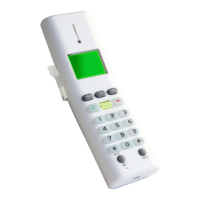

 To Next Page
 General