Service request isamessage generated by the ZUP power supply to interrupt the controller. SRQ
can be generated byapower supply fault condition.
Each of the following conditions can generate SRQ message:
1. Over Voltage Protection (OVP).
2. Over Temperature Protection (OTP).
3. Foldback Protection.
The operator decides which of the conditions are defined as faults. Enabling or disablingacondition
from generating SRQ message does not affect the condition within the power supply.
The service request message consistsof three characters terminated by EOS<CR><LF>.
The first character identifies the SRQ cause: 1-Foldback,2-OVP , 3-OTP.
The 2’nd and 3’rd characters identify the ZUP power supply address.
Example: String generated byaZUP unit :120<CR><LF>,means foldback protection was activated
in power supply address 20.
5.7 SERVICE REQUEST
5.7.1 Service Request (SRQ)
5.7.2 Service Request message
5.7.3. Service request enable/disable commands
49
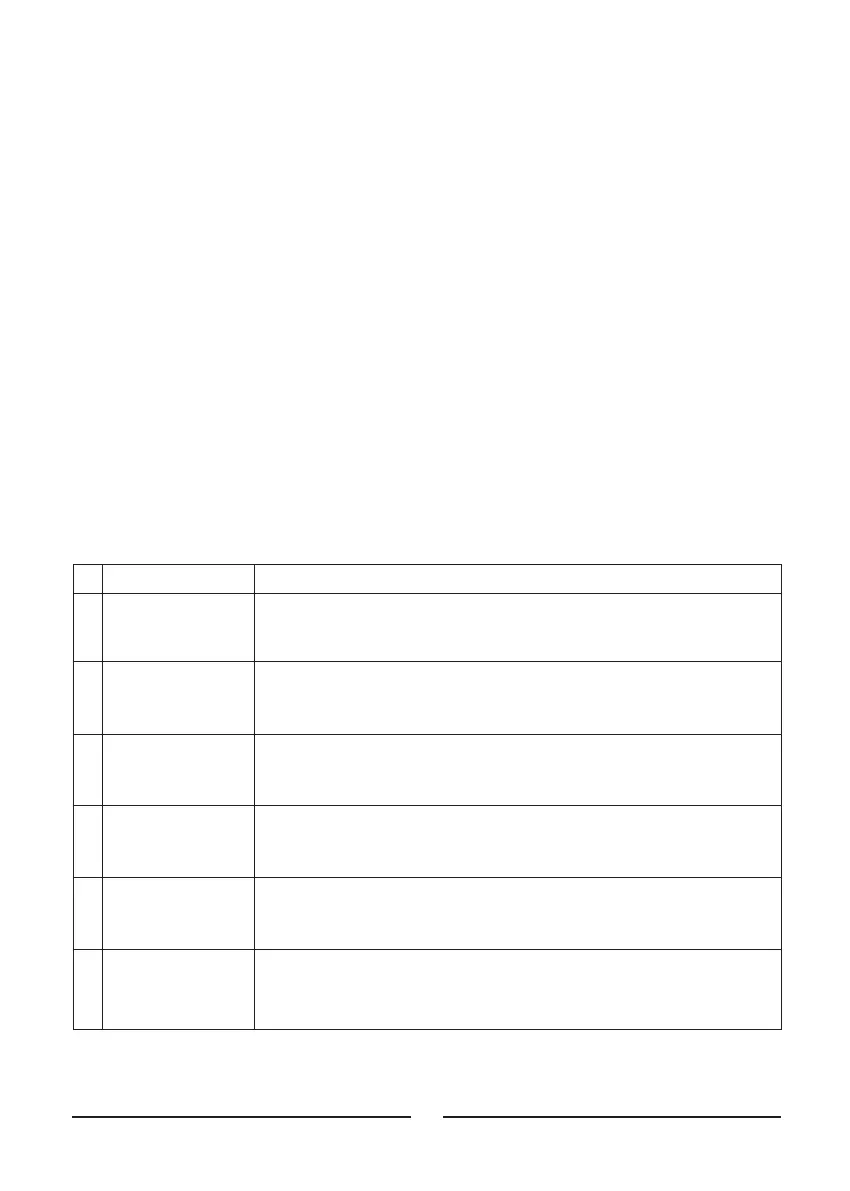
# Command Description
1 :SRVn; Enable or disable OVP service request.
:SRV1; Enable OVP service request.
:SRV0; Disable OVP service request.
2 :SRV?; Returns QV followed by the OVP service request status.
:QV1; OVP service request enabled.
:QV0; OVP service request disabled.
3 :SRTn; Enable or disable OTP service request.
:SRT1; Enable OTP service request.
:SRT0; Disable OTP service request.
4 :SRT?; Returns QT followed by the OTP service request status.
:QT1; OTP service request enabled.
:QT0; OTP service request disabled.
5 :SRFn; Enable or disable Foldback protection service request.
:SRF1; Enable Foldback protection service request.
:SRF0; Disable Foldback protection service request.
6 :SRF?; Returns QF followed by the Foldback protection service request status
:QF1; Foldback protection service request enabled.
:QF0; Foldback protection service request disabled.











 To Next Page