Home
TDK
Speakers
TREK 360
Page 2 (Removing the Old Battery)
TDK TREK 360 - Removing the Old Battery
3 pages
Manual
Save Page as PDF
To Next Page
To Next Page
To Previous Page
To Previous Page
Loading...
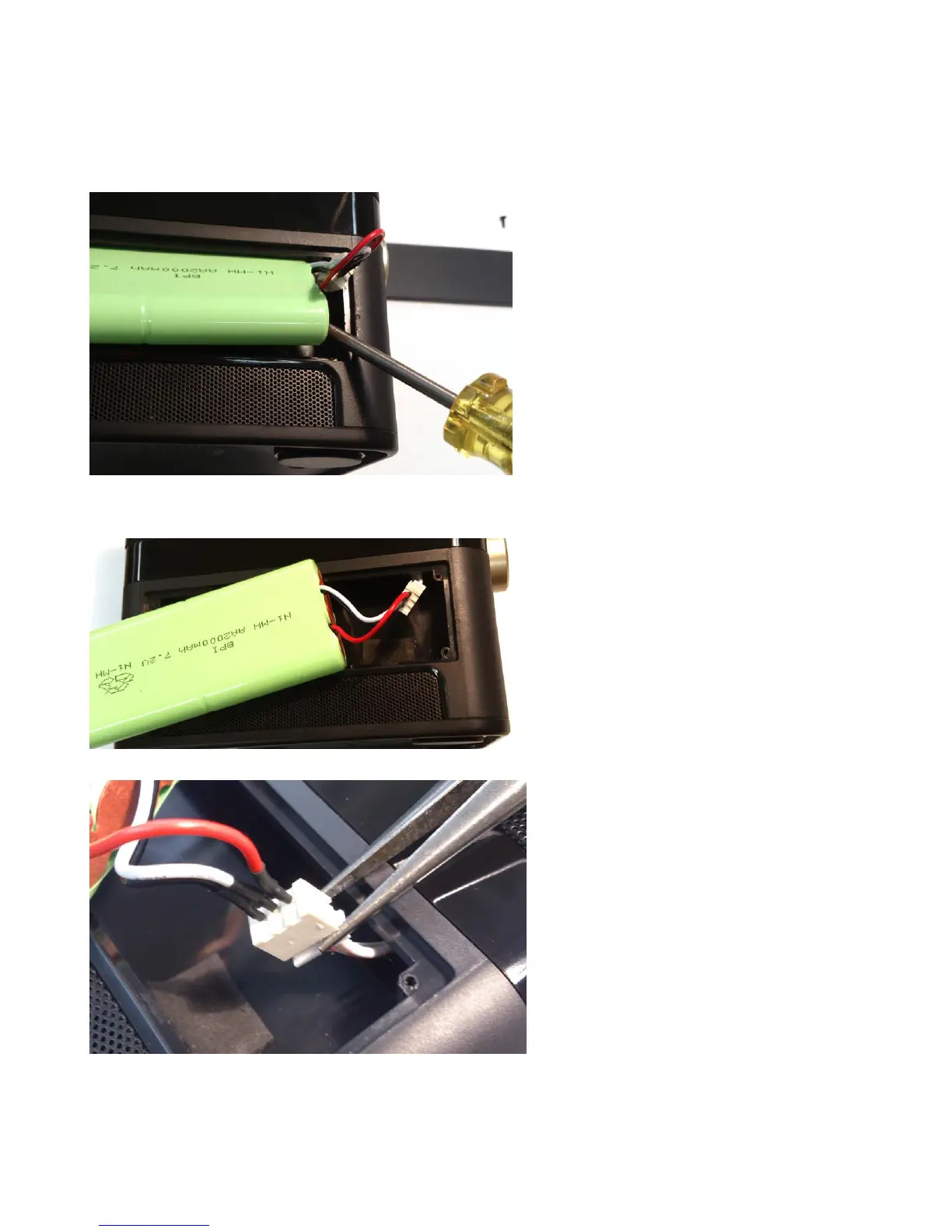
4. Using
a
screw
driver, lift on
the
lower corner
of
the b
attery
assembly and
rotate upwards.
The
battery will not lift
straight u
p.
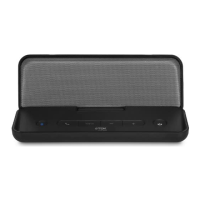
5. Lift the
battery out.
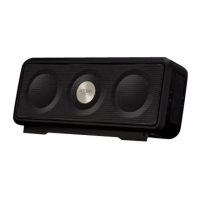
6. Using fingers o
r a need
le nosed
pliers, unp
lug the connec
tor.
1
3
Related product manuals
TDK TREK Max
5 pages
TDK Trek A26
8 pages
TDK TREK Micro
4 pages
TDK TREK Flex A28
7 pages
TDK TREK Micro A12
4 pages
TDK Tremor S60
13 pages
TDK tremor S-80
13 pages
TDK Tremor S-150
13 pages
TDK TW345
6 pages
TDK A33
5 pages
TDK A360
2 pages
TDK V513
2 pages



 To Next Page