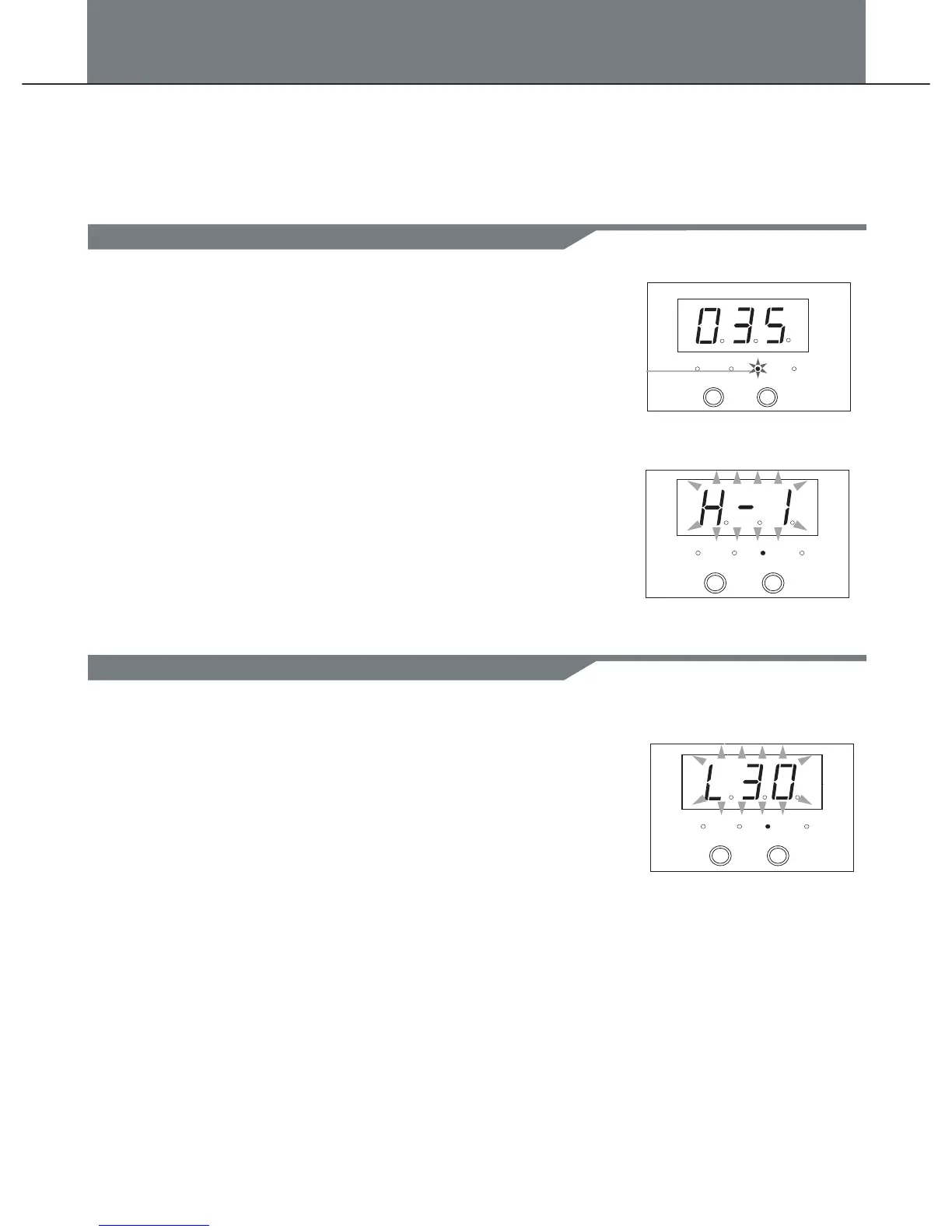
In voice mode, voice number:(1-108).
1. Press [MODE] button to select the voice mode,
the voice LED indicator will be lighted up, strike a drum pad,
the 3-digit-LED will display the voice number.
2. Press [+] or [-] to adjust the value(Automatic save).
Range:(001 to 108).
In voice mode, voice volume:(0-32).
1. Press [MODE] button to select the voice mode, the voice
indicator will be lighted up.LED
2. Press [PAGE] button to select the voice volume page, strike
a drum pad, the 3-digit-LED will display the voice volume(L30).
3. Press [+] or [-] to adjust the value(Automatic save).
Range:(0 to 32).
NOTE:
When you select a voice for hi-hit drum, you only can select
the hi-hat group voices, from group 1-group 4(Automatic save),
the display is:(H-I).
In voice mode, there are 3pages:
1. Voice number:(1-108).
2. Voice volume:(0-32).
3. Midi note:(0-99).
Voice LED indicator
PATTERN
KIT
VOICE CLICK
+
-
PATTERN
KIT
VOICE CLICK
+
-
PAGE 1
PATTERN
KIT
VOICE CLICK
+
-
PAGE 2
Select the voice
Adjust the voice volume
10
Voice


 To Next Page