be
VOLUME knob.
* Adjust the volume to a comfortable level.
convenient
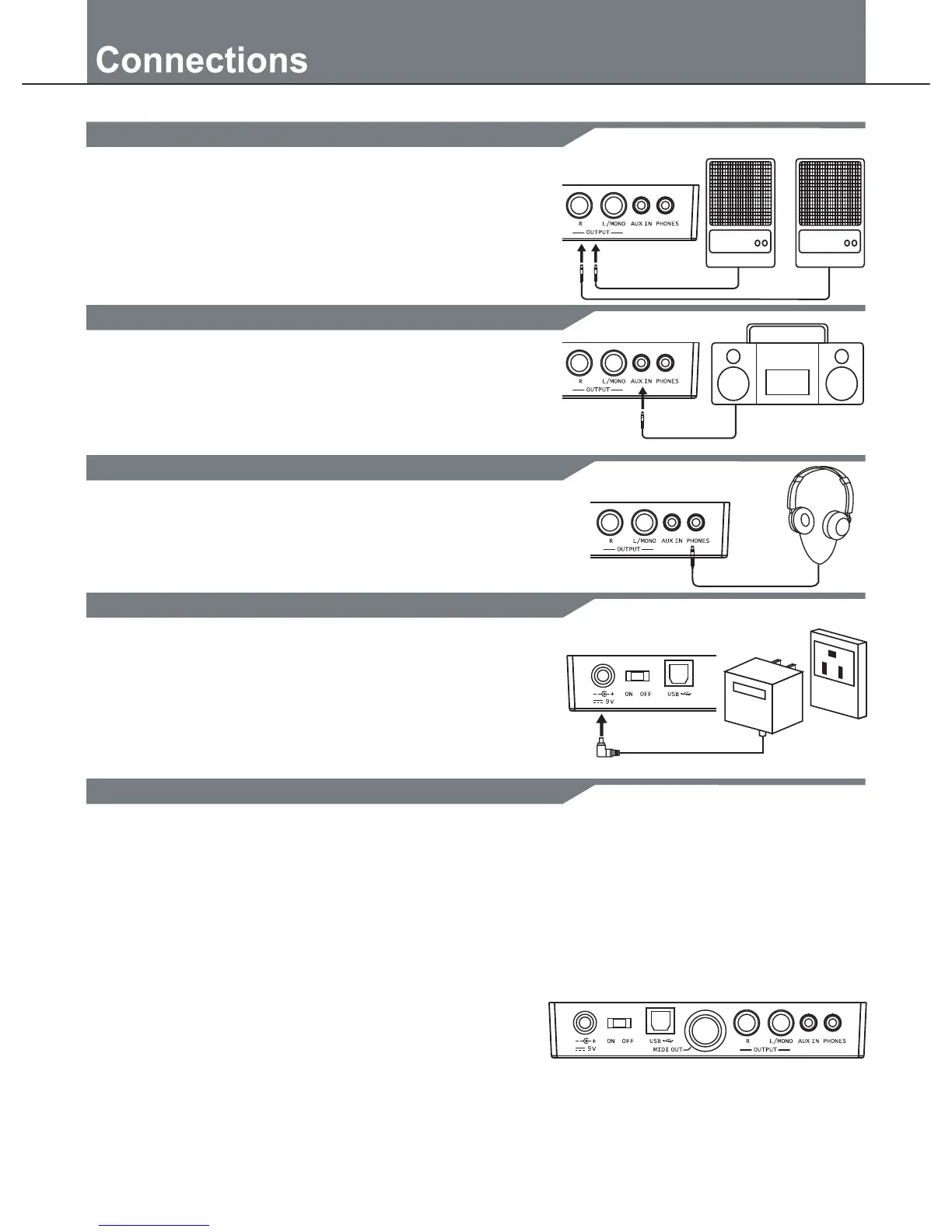
Make sure the power is switched OFF and connect the power
adaptor with the DC IN jack on the rear panel.
Note:
1. To protect the speakers, amplifier and the drum module from
damage, rotate the volume knob to the minimum volume level
before switching the power ON.
2. Make sure the power is switched OFF when connecting drum
module with external devices.
Connect an audio equipment
Connect a CD player, etc.(Aux. In jack)
Connect headphones
Connect the power supply jack
Amplifier Amplifier
MIDI stands for Musical Instrument Digital Interface, this is a
world-wide standard communication interface that enables
electronic musical instruments and computers (of all brands)
to communicate with each other so that MIDI command and
other data can pass between them. This exchange of information
makes it possible to create a system of MIDI instruments and
devices that offer far greater versatility and control than is
available with isolated instruments. Whether you interface with
computers, sequencers, expanders or other controllers, your
musical horizons will be greatly enhanced.
MIDI connection
MIDI OUT: This terminal transmits data from this instrument
to other MIDI devices.
USB connection
The USB connector allows you to connect the module directly to
your computer. It can be connected without driver installation
under the Windows XP\ Vista\Windows 7& MAC OSX environment.
The modulewill be recognized as 'USB Audio device' to receive and
transmit MIDI messages through a single USB cable, USB is used
MIDI and USB
only for MIDI messages(MIDI via USB).
Note: When the USB is connected to a computer, all MIDI messages
will be received and transmitted via USB.
6
the PHONES jack located on the rear panel of the drum module.
An optional set of stereo headphones can be connected with
1. The audio output of a CD player, or other audio source,
to connect with the AUX IN jack on the rear panel can
mixed with the sound of the drum. This function is
that let you play along with a favourite song.
2. The volume of the external signal is adjusted with the
1.When you want to listen to the voices with an amplifier,
connect amplifiers with the Output L/MONO and R jacks
jack; for stereo playback, connect both L/MONO and R
jacks.)
2. The volume is adjusted with the VOLUME knob.
on the rear panel. (For monaural playback, use the L/MONO


 To Next Page