EasyManua.ls Logo

Teac A-2300SD - Partial Disassembly; Removing Wooden Sides and Rear Panel; Head Assembly Removal; Removal of Capstan Motor

Teac A-2300SD
50 pages
Print Icon
To Next Page IconTo Next Page
To Previous Page IconTo Previous Page
Loading...
4.
PARTIAL
DISASSEMBLY
4-1
REMOVING
WOODEN
SIDES
AND
REAR
PANEL--
See
illustration
for
complete
disassembly
instructions.
Most
These
adjustments
should
be
performed
by
experienced
amplifier
checks
and
adjustments
can
be
made
from
the
technicians,
and
then
only
when
going
through
the
corn-
bottom
with
the
(bottom)
panel
removed.
plete
test
and
check
procedures
on
the
unit
which
is
being
tested.
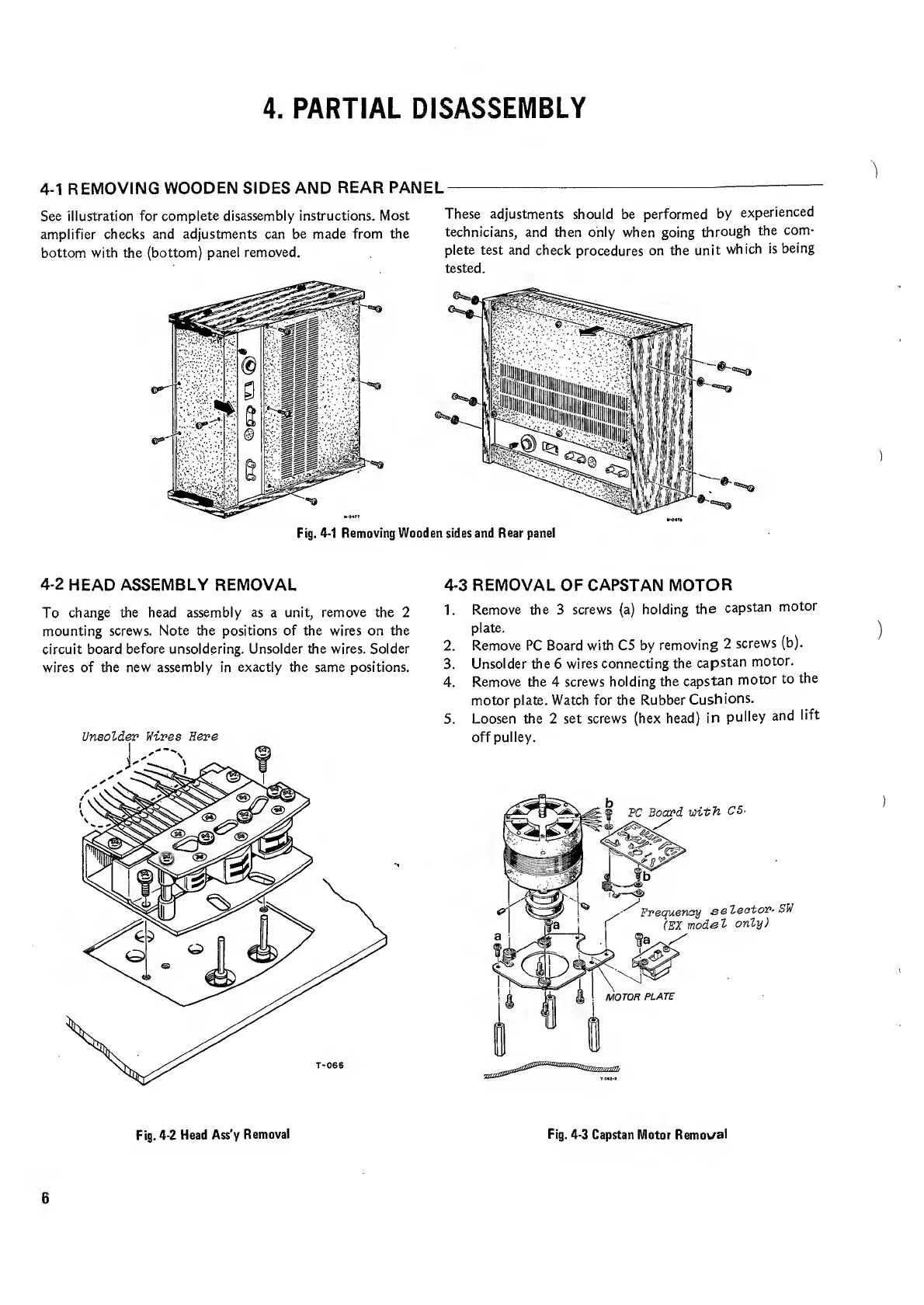
Fig.
4-1
Removing
Wooden
sides
and
Rear
panel
4-2
HEAD
ASSEMBLY
REMOVAL
4-3
REMOVAL
OF
CAPSTAN
MOTOR
To
change
the
head
assembly
as
a
unit,
remove
the
2
1-
Remove
the
3
screws
(a)
holding
the
capstan
motor
mounting
screws.
Note
the
positions
of
the
wires
on
the
plate.
circuit
board
before
unsoldering.
Unsolder
the
wires.
Solder
2.
Remove
PC
Board
with
C5
by
removing
2
screws
(b).
wires
of
the
new
assembly
in
exactly
the
same
positions.
3.
Unsolder
the
6
wires
connecting
the
capstan
motor.
4.
Remove
the
4
screws
holding
the
capstan
motor
to
the
motor
plate.
Watch
for
the
Rubber
Cushions.
5.
Loosen
the
2
set
screws
(hex
head)
in
pulley
and
lift
Unsolder
Vires
Here
off
pulley.
Fig.
4-2
Head
Ass'y
Removal
Fig.
4-3
Capstan
Motor
Removal
6

Related product manuals