EasyManua.ls Logo

Teac AG-V4200 - Audio Operations; Basic Operations

Teac AG-V4200
47 pages
Print Icon
To Next Page IconTo Next Page
To Previous Page IconTo Previous Page
Loading...
AUDIO
OPERATIONS
Basic
Operations
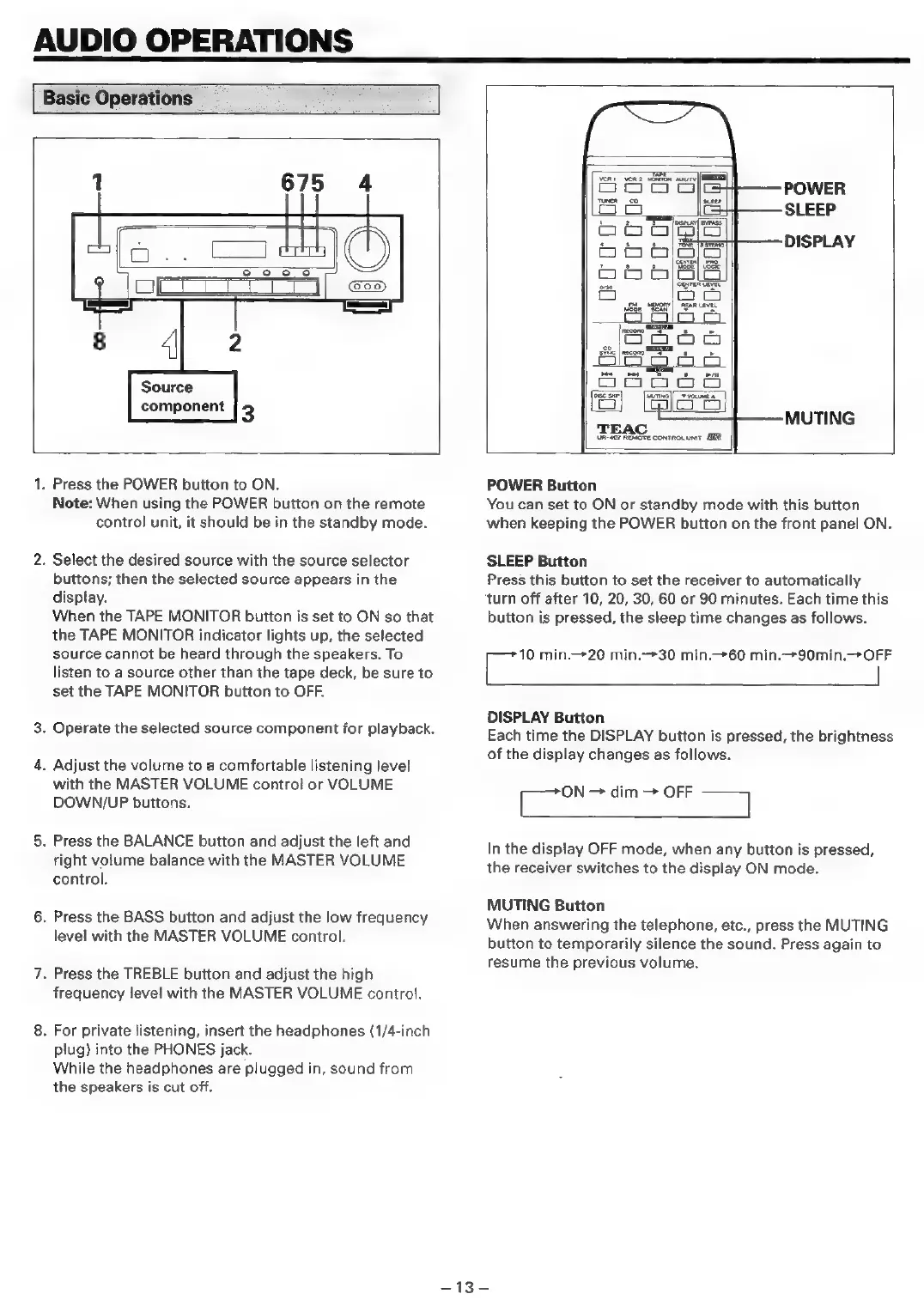
1
675
4
@oo)
s
<4
@
Source
component
3
POWER
SLEEP
DISPLAY
MUTING
UR-S07
REMOTE
CONTROL
UNIT
MIR
1.
Press
the
POWER
button
to
ON.
Note:
When
using
the
POWER
button
on
the
remote
control
unit,
it
should
be
in
the
standby
mode.
2.
Select
the
desired
source
with
the
source
selector
buttons;
then
the
selected
source
appears
in
the
display.
When
the
TAPE
MONITOR
button
is
set
to
ON
so
that
the
TAPE
MONITOR
indicator
lights
up,
the
selected
source
cannot
be
heard
through
the
speakers.
To
listen
to
a
source
other
than
the
tape
deck,
be
sure
to
set
the
TAPE
MONITOR
button
to
OFF.
3.
Operate
the
selected
source
component
for
playback.
4.
Adjust
the
volume
to
a
comfortable
listening
level
with
the
MASTER
VOLUME
control
or
VOLUME
DOWN/UP
buttons.
5.
Press
the
BALANCE
button
and
adjust
the
left
and
right
volume
balance
with
the
MASTER
VOLUME
control.
6.
Press
the
BASS
button
and
adjust
the
low
frequency
level
with
the
MASTER
VOLUME
control.
7.
Press
the
TREBLE
button
and
adjust
the
high
frequency
level
with
the
MASTER
VOLUME
control.
8.
For
private
listening,
insert
the
headphones
(1/4-inch
plug)
into
the
PHONES
jack.
While
the
headphones
are
plugged
in,
sound
from
the
speakers
is
cut
off.
POWER
Button
You
can
set
to
ON
or
standby
mode
with
this
button
when
keeping
the
POWER
button
on
the
front
panel
ON.
SLEEP
Button
Press
this
button
to
set
the
receiver
to
automatically
turn
off
after
10,
20, 30,
60
or
90
minutes.
Each
time
this
button
is
pressed,
the
sleep
time
changes
as
follows.
ee
min.—20 min.—30
min.—60
min.
90min.
OFF
|
DISPLAY
Button
Each
time
the
DISPLAY
button
is
pressed,
the
brightness
of
the
display
changes
as
follows.
ees
dim
>
OFF
=a
In
the
display
OFF
mode,
when
any
button
is
pressed,
the
receiver
switches
to
the
display
ON
mode.
MUTING
Button
When
answering
the
telephone,
etc.,
press
the
MUTING
button
to
temporarily
silence
the
sound.
Press
again
to
resume
the
previous
volume.
=
13

Related product manuals