EasyManua.ls Logo

Teac AG-V4200 - Speaker Installation; Selecting the Surround Effect

Teac AG-V4200
47 pages
Print Icon
To Next Page IconTo Next Page
To Previous Page IconTo Previous Page
Loading...
Speaker
Installation
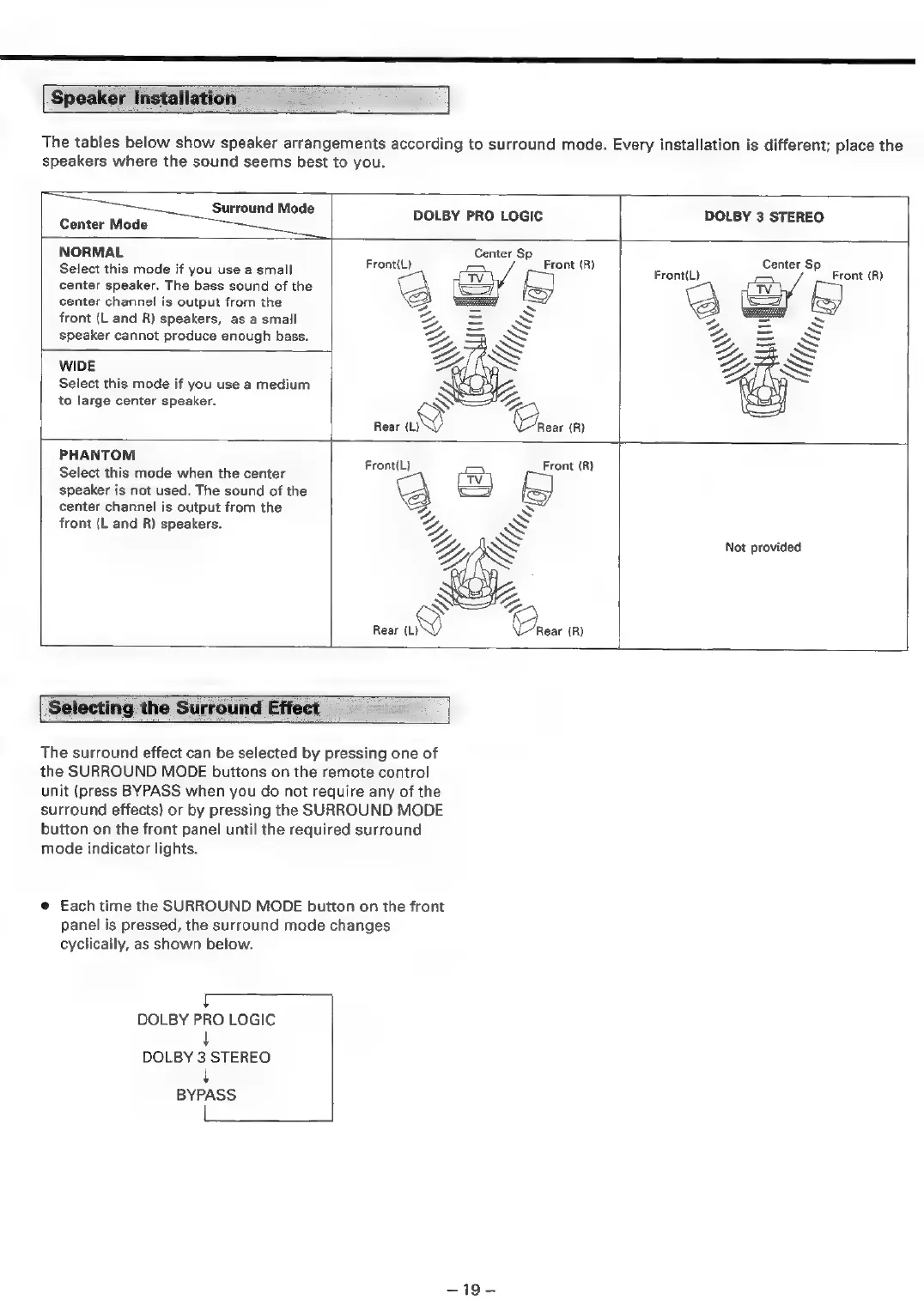
The
tables
below
show
speaker
arrangements
according
to
surround
mode.
Every
installation
is
different;
place
the
speakers
where
the
sound
seems
best
to
you.
k
ae
Surround
Mode
DOLBY
PRO
LOGIC
DOLBY
3
STEREO
|
Center
Mode
NORMAL
Center
Sp
Select
this
mode
if
you
use
a
small
Erontil)
Front
(A)
Front(L)
Center
SP
Front
(R)
center
speaker.
The
bass
sound
of
the
center
channel
is
output
from
the
KB)
front
(L
and
R)
speakers,
as
a
small
speaker
cannot
produce
enough
bass.
WIDE
Select
this
mode
if
you
use
a
medium
to
large
center
speaker.
PHANTOM
Select
this
mode
when
the
center
speaker
is
not
used.
The
sound
of
the
center
channel
is
output
from
the
front
(L
and
R)
speakers.
Not
provided
.)
Rear
(L)
Rear
(R)
Selecting
the
Surround
Effect
=
The
surround
effect
can
be
selected
by
pressing
one
of
the
SURROUND
MODE
buttons
on
the
remote
control
unit
(press
BYPASS
when
you
do
not
require
any
of
the
surround
effects)
or
by
pressing
the
SURROUND
MODE
button
on the
front
panel
until
the
required
surround
mode
indicator
lights.
@
Each
time
the
SURROUND
MODE
button
on
the
front
panel
is
pressed,
the
surround
mode
changes
cyclically,
as
shown
below.
~-
DOLBY
PRO
LOGIC
+
DOLBY
3
STEREO
t
BYPASS
erasers
==

Related product manuals