EasyManua.ls Logo

Teac AG-V4200 - Playing Surround Sound

Teac AG-V4200
47 pages
Print Icon
To Next Page IconTo Next Page
To Previous Page IconTo Previous Page
Loading...
Playing
Surround
Sound
DOLBY
3
STEREO
DOLBY
PRO
LOGIC
Surround
UR-407
REMOTE
CONTROL
UNtT
IR
Un-407
REMOTE
CONTROL
UNT
AIR
.
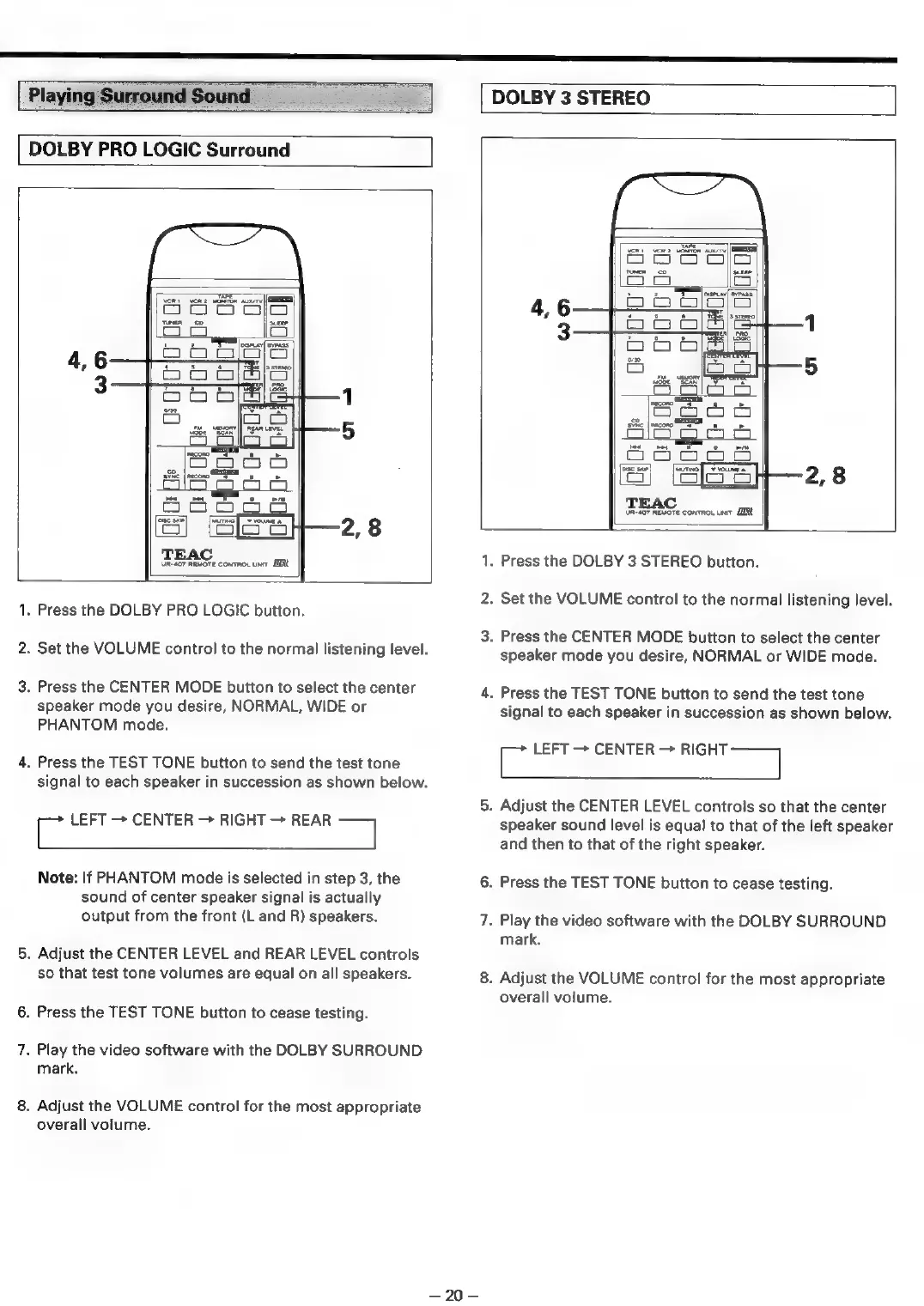
Press
the
DOLBY
PRO
LOGIC
button.
.
Set
the
VOLUME
control
to
the
normal
listening
level.
.
Press
the
CENTER
MODE
button
to
select
the
center
speaker
mode
you
desire,
NORMAL,
WIDE
or
PHANTOM
mode.
.
Press
the
TEST
TONE
button
to
send
the
test
tone
signal
to
each
speaker
in
succession
as
shown
below.
i
LEFT
CENTER
RIGHT
REAR
“al
Note:
If
PHANTOM
mode
is
selected
in
step
3,
the
sound
of
center
speaker
signal
is
actually
output
from
the
front
(L
and
R)
speakers.
.
Adjust
the
CENTER
LEVEL
and
REAR
LEVEL
controls
so
that
test
tone
volumes
are
equal
on
all
speakers.
.
Press
the
TEST
TONE
button
to
cease
testing.
.
Play
the
video
software
with
the
DOLBY
SURROUND
mark.
.
Adjust
the
VOLUME
control
for
the
most
appropriate
overall
volume.
=320=
.
Press
the
DOLBY
3
STEREO
button.
.
Set
the
VOLUME
control
to
the
normal
listening
level.
.
Press
the
CENTER
MODE
button
to
select
the
center
speaker
mode
you
desire,
NORMAL
or
WIDE
mode.
.
Press
the
TEST
TONE
button
to
send
the
test
tone
signal
to
each
speaker
in
succession
as
shown
below.
oe
CENTER
>
wines
.
Adjust
the
CENTER
LEVEL
controls
so
that
the
center
speaker
sound
level
is
equal
to
that
of
the
left
speaker
and
then
to
that
of
the
right
speaker.
.
Press
the
TEST
TONE
button
to
cease
testing.
.
Play
the
video
software
with
the
DOLBY
SURROUND
mark.
.
Adjust
the
VOLUME
control
for
the
most
appropriate
overall
volume.

Related product manuals