10
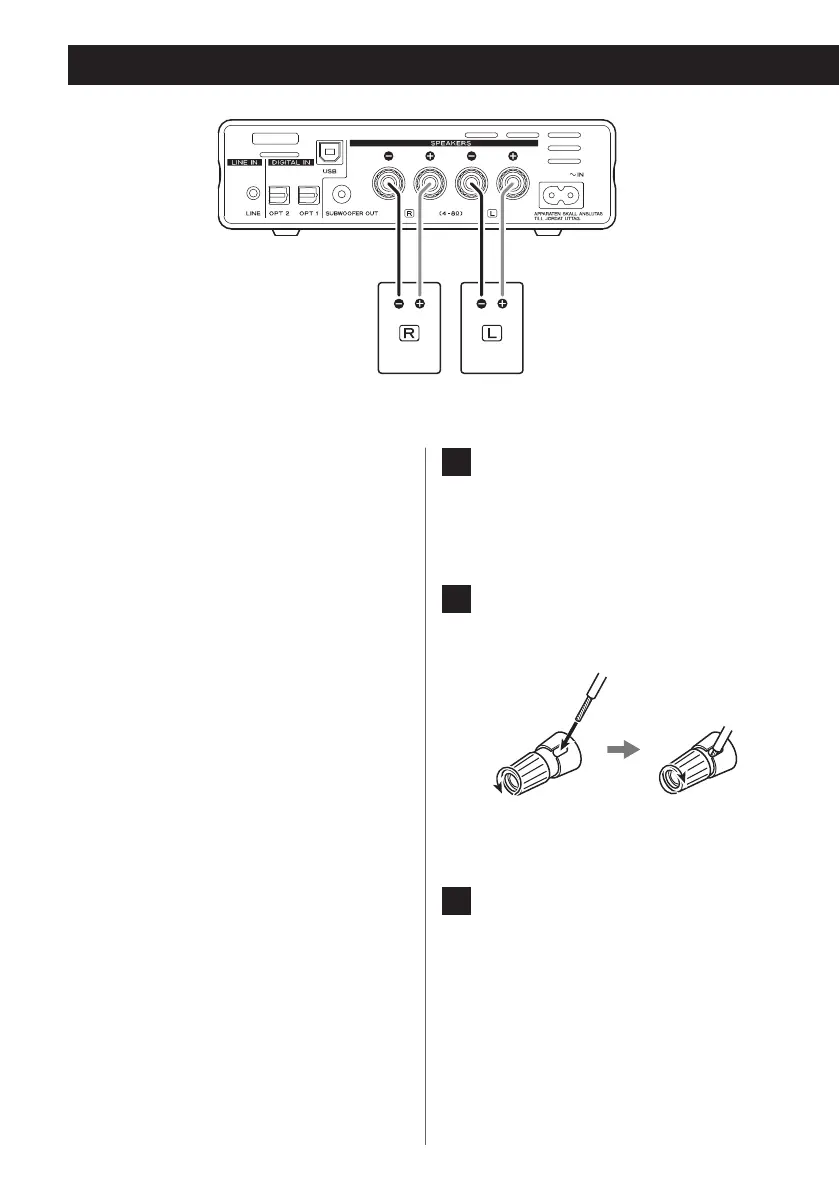
Connecting speakers
V
Precautions when making
connections
o After all connections are complete, connect
the power cord’s plug to the AC wall outlet.
o Read the instructions of each device that
you intend to use with this unit.
NOTE
o When connecting speakers other than
the LS-101, use speakers with 4–8Ω nom-
inal impedance. If speakers with different
impedance ratings are used, the protection
circuit could operate, causing sound output
to stop.
o The red speaker terminals are positive (+)
and the black speaker terminals are nega-
tive (–). Generally, the + wire of the speaker
cable is marked to distinguish it from the –
wire of the cable. Connect the marked wire
to the red + terminal and the unmarked
wire to the black – terminal.
o If the exposed core wires at the tips of the
speaker cables should touch other cables
or terminals, an electrical short might occur.
Never allow speaker cables to cause a short.
o Be sure to insert each plug securely. To pre-
vent hum and noise, avoid bundling the
cables together with the AC power cord or
other cables.
1 Turn the terminal cap counter-
clockwise to loosen it. The speaker
terminal caps cannot be fully
removed from the unit.
2 Insert the wire into the terminal
and turn the terminal cap clockwise
to securely connect it.
o Make sure none of the wire insulation
is under the terminal and only the bare,
stripped wire is touching the terminal.
3 Conrm that the cable is fastened
securely by gently pulling the
cable.
LS-101 speakers or speak-
ers with 4–8Ω nominal
impedance


 To Next Page