7
o Do not put cloth on top of the unit or place
the unit on top of bedding or thick carpets.
Doing so could cause the unit to overheat
and damage it.
o Do not move the unit during use. The volt-
age supplied to the unit should match the
voltage printed on the rear panel. If you are
in any doubt regarding this matter, consult
an electrician.
o Do not open the body of the unit as this
might result in damage to the circuitry or
cause electric shock. If a foreign object
should get into the unit, contact your dealer.
o When removing the power plug from the
wall outlet, always pull directly on the plug;
never yank on the cord.
o If a TV is turned on while the unit is on, static
might appear on the TV screen depending
on the characteristics of the TV broadcast
signal. This is not a malfunction of the unit
nor of the TV. If this occurs, put the unit into
standby.
Note about installation
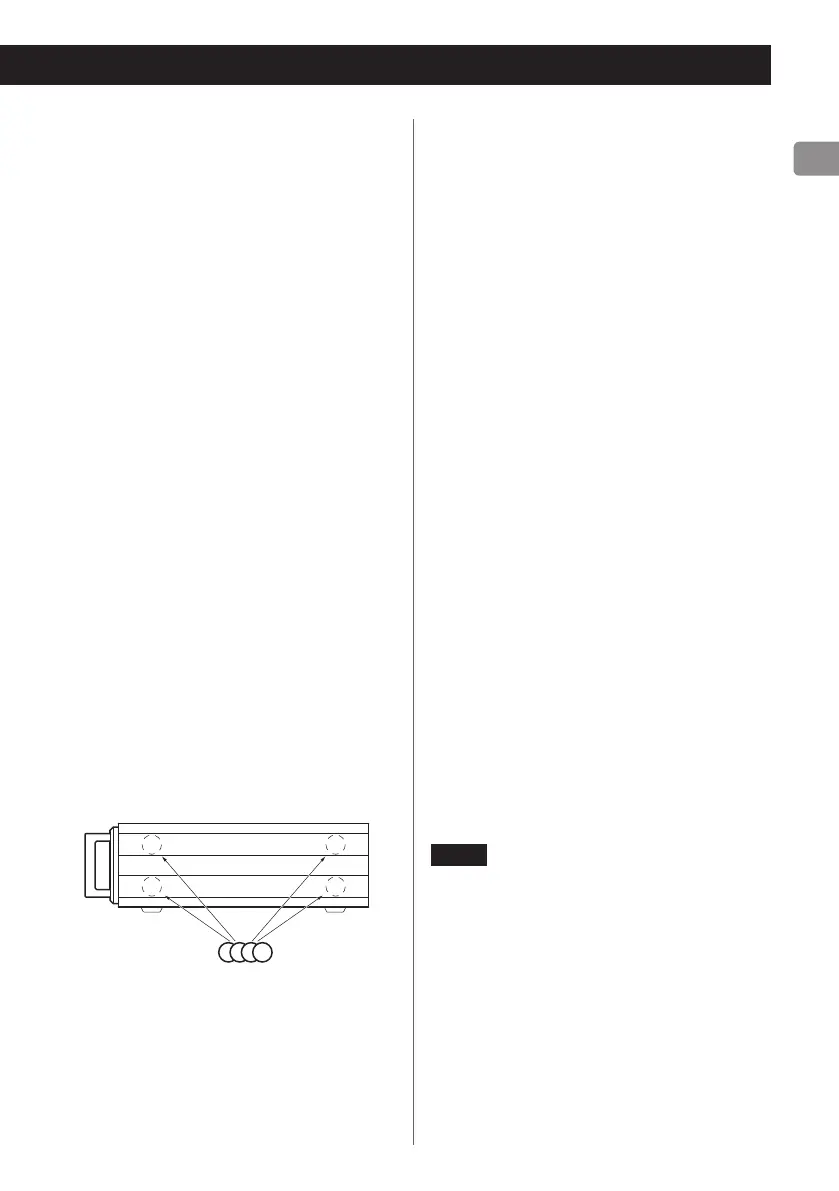
This unit can be used both horizontally and
vertically (on its side). When using it in a verti-
cal position, attach the included rubber feet to
the four places on the bottom.
Bottom when placed vertically
Rubber feet
Maintenance
Wipe dirt from the top cover and other panel
surfaces using a soft cloth that has been slightly
dampened with a diluted neutral cleanser.
Do not wipe with chemical cleaning cloths, thin-
ner or other chemical agents. Doing so could
damage the surface.
V
For your safety, disconnect the power
cord from the socket before cleaning.
Product registration
Customers in the USA, please visit the follow-
ing TEAC website to register your TEAC product
online.
http://audio.teac.com/support/registration/
Using the TEAC Global Site
You can download the dedicated drivers nec-
essary for this unit from the TEAC Global Site:
http://teac-global.com/
1) Open the TEAC Global Site.
2) In the TEAC Downloads section, click the
desired language to open the Downloads
website page for that language.
NOTE
If the desired language does not appear, click
Other Languages.
3) Click the product name in the “Search by
Model Name” section to open the Downloads
page for that product.
4) Select and download the dedicated drivers
that are needed.


 To Next Page