EasyManua.ls Logo

Teac BX-550 - Idling Current Adjustment; Power Output Meter Adjustment (BX-550); LED Meter Adjustment (BX-330)

Teac BX-550
44 pages
Print Icon
To Next Page IconTo Next Page
To Previous Page IconTo Previous Page
Loading...
BX-550/BX-330
4-3
IDLING
CURRENT
ADJUSTMENT
.
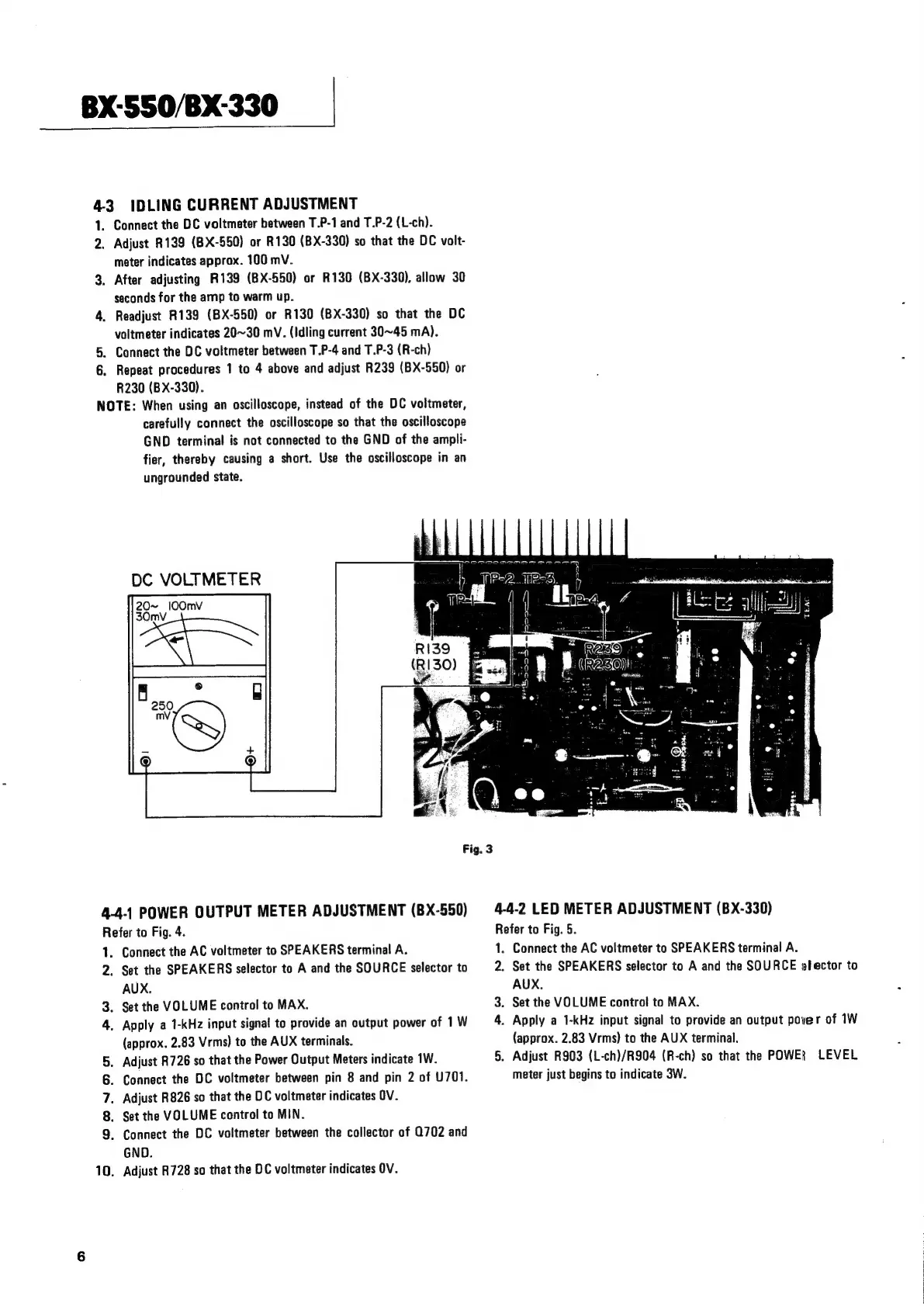
Connect
the
DC
voltmeter
between
T.P-1
and
T.P-2
(L-ch).
.
Adjust
R139
(BX-550)
or
R130
(BX-330)
so
that
the
DC
volt-
meter
indicates
approx.
100
mV.
.
After
adjusting
R139
(BX-550)
or
R130
(BX-330),
allow
30
seconds
for
the
amp
to
warm
up.
.
Readjust
R139
(BX-550)
or
R130
(BX-330)
so
that
the
DC
voltmeter
indicates
20~30
mV.
(Idling
current
30~45
mA).
.
Connect
the
DC
voltmeter
between
T.P-4
and
T.P-3
(R-ch)
.
Repeat
procedures
1
to
4
above
and
adjust
R239
(BX-550)
or
R230
(BX-330).
NOTE:
When
using
an
oscilloscope,
instead
of
the
DC
voltmeter,
carefully
connect
the
oscilloscope
so
that
the
oscilloscope
GND
terminal
is
not
connected
to
the
GND
of
the
ampli-
fier,
thereby
causing
a
short.
Use
the
oscilloscope
in
an
ungrounded
state.
Oem
me
meme
ene
=
PEAS.
DC
VOLTMETER
20~
l0Omv
30mvV
Fig.
3
4-4-1
POWER
OUTPUT
METER
ADJUSTMENT
(BX-550)
Refer
to
Fig.
4.
1.
2.
Pw
oan
n
uo
Connect
the
AC
voltmeter
to
SPEAKERS
terminal
A.
Set
the
SPEAKERS
selector
to
A
and
the
SOURCE
selector
to
AUX.
.
Set
the
VOLUME
control
to
MAX.
.
Apply
a
1-kHz
input
signal
to
provide
an
output
power
of
1
W
(approx.
2.83
Vrms)
to
the
AUX
terminals.
.
Adjust
R726
so
that
the
Power
Output
Meters
indicate
1W.
.
Connect
the
DC
voltmeter
between
pin
8
and
pin
2
of
U701.
.
Adjust
R826
so
that
the
DC
voltmeter
indicates
OV.
.
Set
the
VOLUME
control
to
MIN.
.
Connect
the
DC
voltmeter
between
the
collector
of
0702
and
GND.
.
Adjust
R728
so
that
the
DC
voltmeter
indicates
OV.
ie
Faaion)
of
ns
e
4-4-2
LED
METER
ADJUSTMENT
(BX-330)
Refer
to
Fig.
5.
1.
2.
3.
4.
Connect
the
AC
voltmeter
to
SPEAKERS
terminal
A.
Set
the
SPEAKERS
selector
to
A
and
the
SOURCE
efector
to
AUX.
Set
the
VOLUME
control
to
MAX.
Apply
a
1-kHz
input
signal
to
provide
an
output
pover
of
1W
(approx.
2.83
Vrms)
to
the
AUX
terminal.
.
Adjust
R903
(L-ch)/R904
(R-ch)
so
that
the
POWER
LEVEL
meter
just
begins
to
indicate
3W.

Related product manuals