Preset select
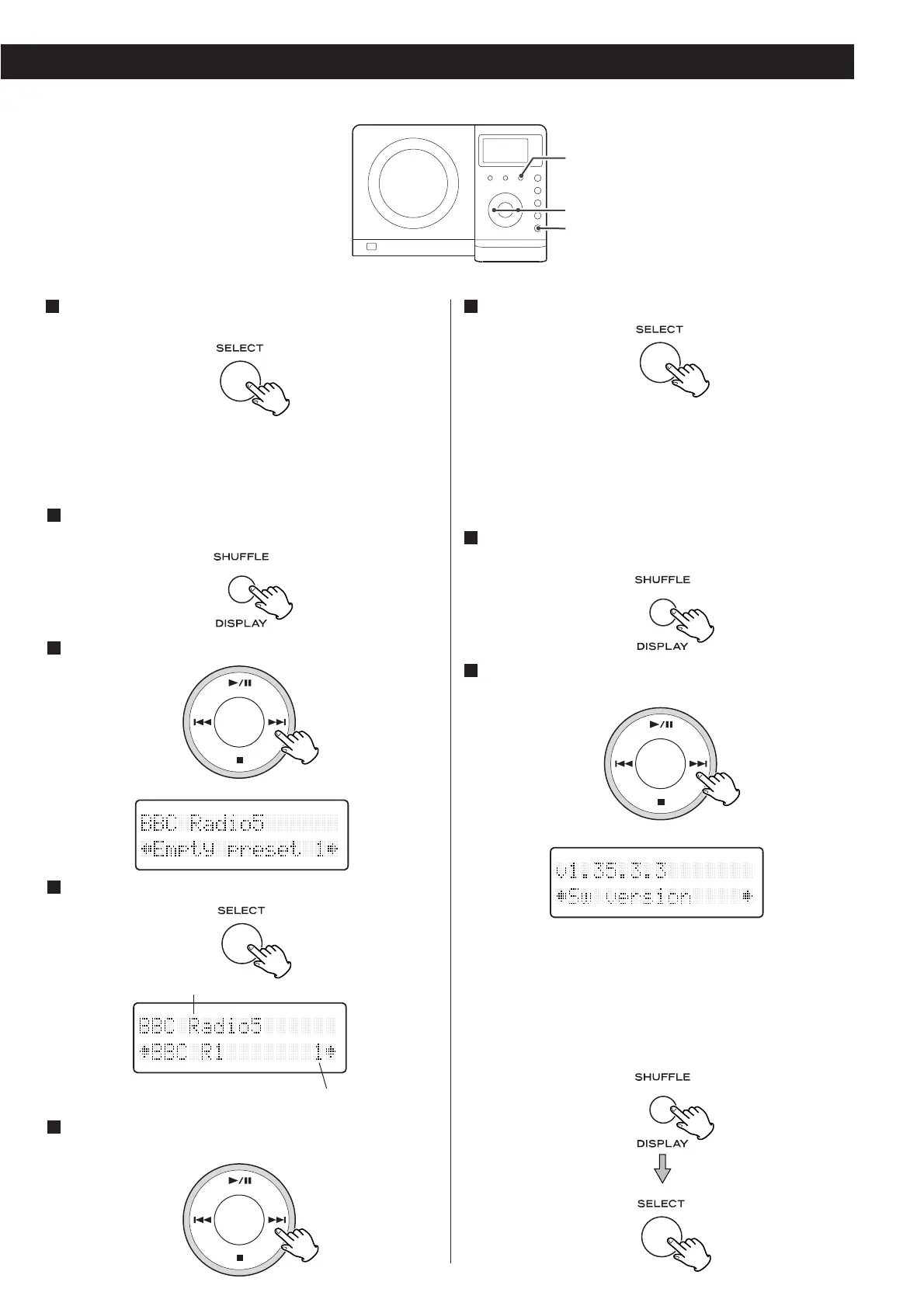
Use this option to select the DAB preset station.
While listening to a DAB broadcast press the DISPLAY
button.
Select ‘Preset select’ using the SKIP burron (.or /).
Press the SELECT button.
Select the desired preset station in the second line of
the display using the SKIP button (.or /).
4
3
2
1
Sw version (Software version)
This option shows the version number of the installed
software. This is for information only and no adjustment is
available.
While listening to a DAB broadcast press the DISPLAY
button.
Select ‘Sw version’ using the SKIP button (.or /).
The version number of the installed software is displayed.
If you want to initialize the DAB settings:
Press and hold the DISPLAY button for longer than 2 seconds
to display ‘Press SELECT to confirm reset’. Press the SELECT
button.
< All settings are cleared and the auto tuning process will start
automatically.
2
1
27
currently tuned station.
preset No.



 To Next Page