- -
5
View of Unit
Rear Panel and Right Side Panel
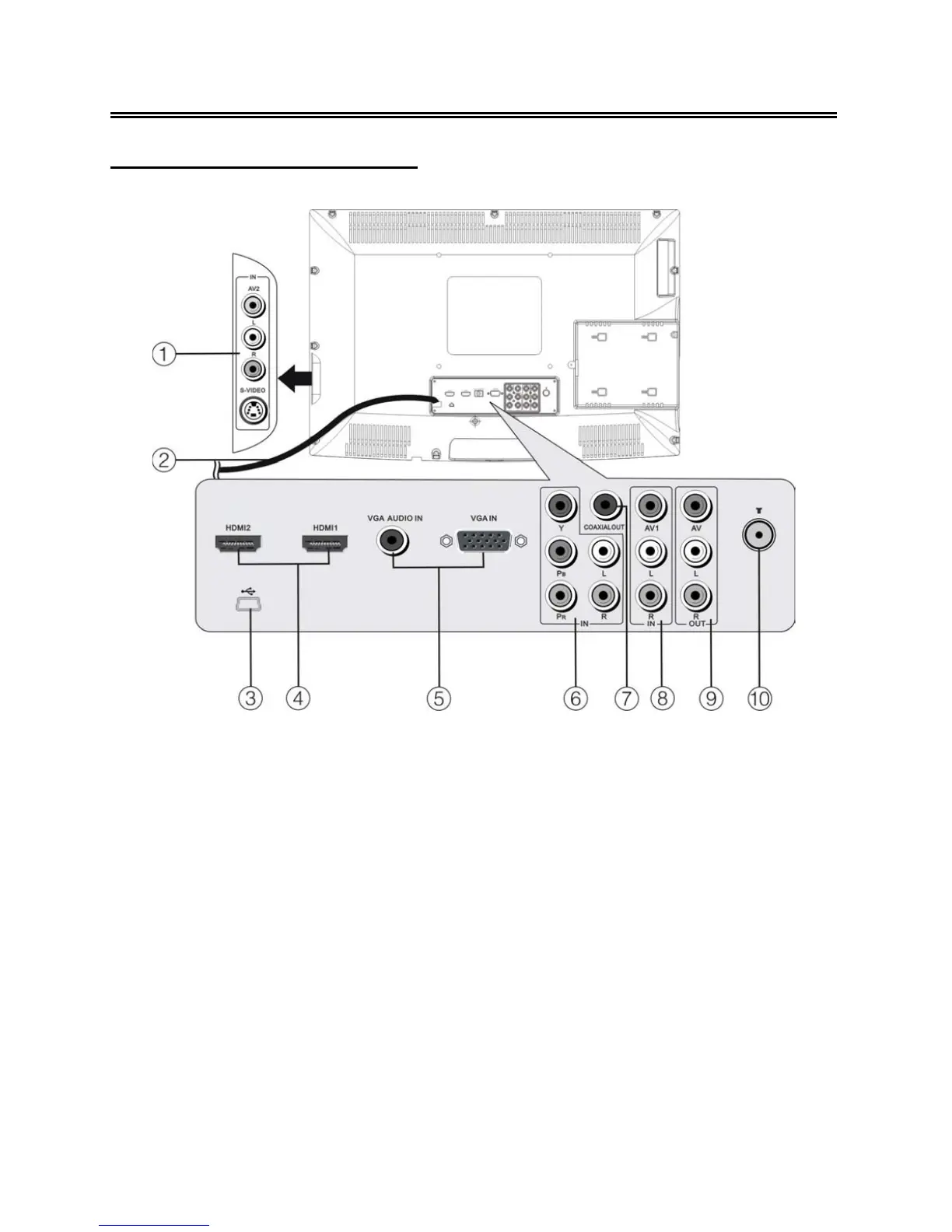
1. AV2/S-VIDEO Input Jacks
Connect Composite/S-Video signal source
in Composite 2 or S-Video mode. AV2 and
S-Video share L/R audio jacks.
2. Power Supply Cord
3. upgrade port
Connect the USB device only for
upgrading the TV software.
4. HDMI 1 and HDMI 2 Input Jacks
Connect the HDMI signal source.
5. VGA Input Jack
Connect the VGA signal source in VGA
mode.
6. Y/Pb/Pr (Component) and L/R audio
Input Jacks
Connect the Y/Pb/Pr (Component) signal
source in Component mode.
7. COAXIAL Output Jack
Output the coaxial digital audio signal.
8. AV1 and L/R Audio Input Jacks
Connect AV1 signal source in Composite 1
mode.
9. AV Output Jacks
Connect to output the audio/video signals.
10. TV antenna Input Jack
Connect the external TV antenna signal
source.



 To Next Page