ENGLISH FRANÇAIS
28
Basic Setup (6) Réglage de base (6)
Height
< The best height for the front speakers is
when the high frequency speakers
(tweeters) are at ear height (while
seated). They are best placed at the same
height as your TV screen.
<
The best height for the center speaker is
at the height of your ears (while seated)
<
The height of the rear speakers should be
equal to or higher than the height of your
ears (while seated).
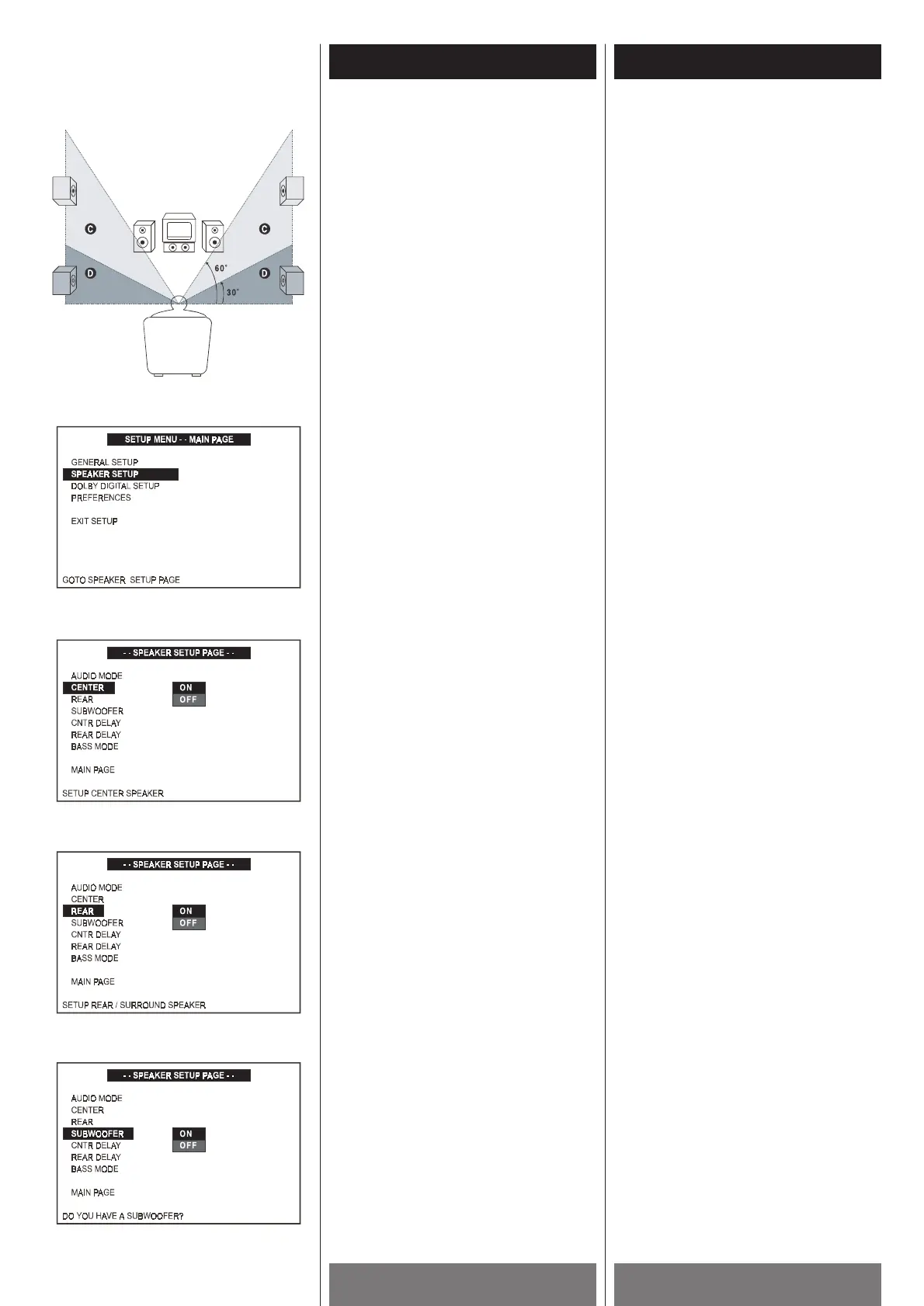
See the following diagram. It’s best to
place the rear speakers in the
D area;
however, you can place them in the
C
area, too.
Size
When you do not connect center, rear
speakers or subwoofer, change the
SPEAKER SETUP parameters for them in the
SETUP MENU. Since the front speakers
setting are fixed, you cannot change them.
ON: Normally select this when you
connect all 6 speakers supplied
with your PL-D2000.
OFF: If you are only connecting the left
and right front speakers, select
this.
Note
< When BASS MODE in the SETUP MENU is
set to CONFIG 1, you cannot select the
SUBWOOFER. (see page 50)
1 Press the SETUP button to enter SETUP
MENU. Use the 5
/b buttons to select
SPEAKER SETUP, and then press the
ENTER button.
2 Highlight CENTER using the 5 /b
buttons, then press the tbutton to go to
the right option list. Select ON or OFF
using the 5
/b buttons, then press
ENTER to confirm your selection.
3 Highlight REAR using the 5/b buttons,
then press the t
button to go to the right
option list. Select ON or OFF using the
5
/b buttons, then press the ENTER
button to confirm your selection.
4 Highlight SUBWOOFER using the 5/b
buttons, then press the t button to go to
the right option list. Select ON or OFF
using the 5
/b buttons, then press the
ENTER button to confirm your selection.
5 Press SETUP again to exit menu.
Hauteur
< La hauteur idéale pour les haut-parleurs
avants est quand les tweeters sont au
niveau de l’oreille (quand assi).
L’emplacement idéal est quand ils sont à
la même hauteur que votre écran.
<
La meilleur hauteur de haut-parleur centre
est au niveau de l’oreille (quand assi).
<
La hauteur des haut-parleurs arrières
n’est pas moin que la hauteur de vos
oreilles (quand assi).
Voir le diagramme suivant. Il est
préférable de placer les haut-parleurs
arrières dans la section
D. Vous pouvez
aussi les placer dans la section
C.
Dimension
Si vous ne branchez pas le haut-parleur du
centre, les haut-parleurs arrières ou le
subwoofer, changer les données du
SPEAKER SETUP dans le menu SETUP. Vu
que les haut-parleurs avant sont fixes, vous
ne pouvez pas les changer.
ON: Normalement choisir ce réglage
quand vous utilisez tous les 6 haut-
parleurs fournis avec votre PL-
D2000.
OFF: Si vous utilisez seulement les haut-
parleurs avants gauches et droits,
choisir ce réglage.
Remarque
Si BASS MODE dans le menu SETUP est en
position CONFIG 1, vous ne pouvez pas
choisir l'option SUBWOOFER. (voir page 50)
1 Appuyer sur la touche SETUP pour
engendrer le menu SETUP. Utiliser les
touches 5
/b pour choisir SPEAKER
SETUP et ensuite appuyer sur la touche
ENTER.
2 Rehausser CENTER utilisant les touches
5
/b, ensuite appuyer la touche t pour
aller vers la liste d’option de droite.
Choisir ON ou OFF utilisant les touches
5
/b , ensuite appuyer sur la touche
ENTER pour confirmer votre choix.
3 Rehausser REAR utilisant les touches
5
/b , ensuite appuyer sur la touche
t
pour aller vers la liste d’option de
droite. Choisir ON ou OFF utilisant les
touches 5
/b, ensuite appuyer ENTER
pour confirmer votre choix.
4 Rehausser SUBWOOFER utilisant les
touches 5
/b, ensuite appuyer sur la
touche t
pour aller vers la liste d’option
de droite. Choisir ON ou OFF utilisant les
touches 5 /b ensuite appuyer sur
ENTER pour confirmer votre choix.
5 Appuyer sur la touche SETUP de nouveau
pour quitter le menu.
1
2
3
4



 To Next Page